July 20, 2026
Audit. Just hearing that word probably makes you feel one of two things: Anxiety (if you've never been through one) or Exhaustion (if you have).
For many organizations, an IT security audit sounds like a stressful process filled with endless documentation requests, technical reviews, and the fear of uncovering critical vulnerabilities. It's easy to view an audit as nothing more than an IT compliance requirement or a box that needs to be checked.
Yet much of that uncertainty disappears once you understand what auditors are looking for and how to prepare. The process becomes far more manageable, and far more valuable.
If you are at the point of deciding whether to commission an IT security audit, choosing between internal and external options, or trying to figure out what the process will actually demand from your team, this guide covers all of it.
TABLE OF CONTENTS
- What an IT Security Audit Actually Involves
- 6 Best IT Security Audit Types for Your Business
- Internal vs External Security Audit: Which One Do You Need?
- The IT Security Audit Process, Phase by Phase
- How to Prepare Your Business Before the Audit Starts
- What an IT Security Audit Checklist Should Cover
- Common IT Security Audit Frameworks and Which One Fits
- How Much Does an IT Security Audit Cost?
- Turning Audit Findings into a Stronger Security Program
- Frequently Asked Questions
Main Highlights
- A typical IT security audit evaluates five core areas: access control, network security, data protection, vulnerability management, and incident response, and moves through eight structured phases from scope definition to remediation and follow-up.
- Audits come in several types, including compliance-based, risk-based, technical, process and policy, penetration testing, and vulnerability assessment audits, and most mature organizations use a mix of internal audits for ongoing readiness and external audits for unbiased, third-party validation.
- Audit costs range from a few thousand dollars for small businesses to tens or hundreds of thousands for large enterprises, and simple preparation steps like reviewing admin access, testing backup restorations, and removing terminated employees' access can reduce both audit findings and cost.
What an IT Security Audit Actually Involves
An IT security audit is a structured evaluation of an organization's information systems, security controls, policies, and processes. The goal is to determine whether existing cybersecurity measures effectively protect sensitive data, reduce risk, and comply with applicable regulatory requirements.
Contrary to what many people expect, an IT security audit is not simply a vulnerability scan, penetration test or a checklist exercise. It is a comprehensive review of how your organization manages information security across people, processes, and technology.
While the exact scope varies depending on the business, industry, and audit objectives, most IT security audits examine several key areas:
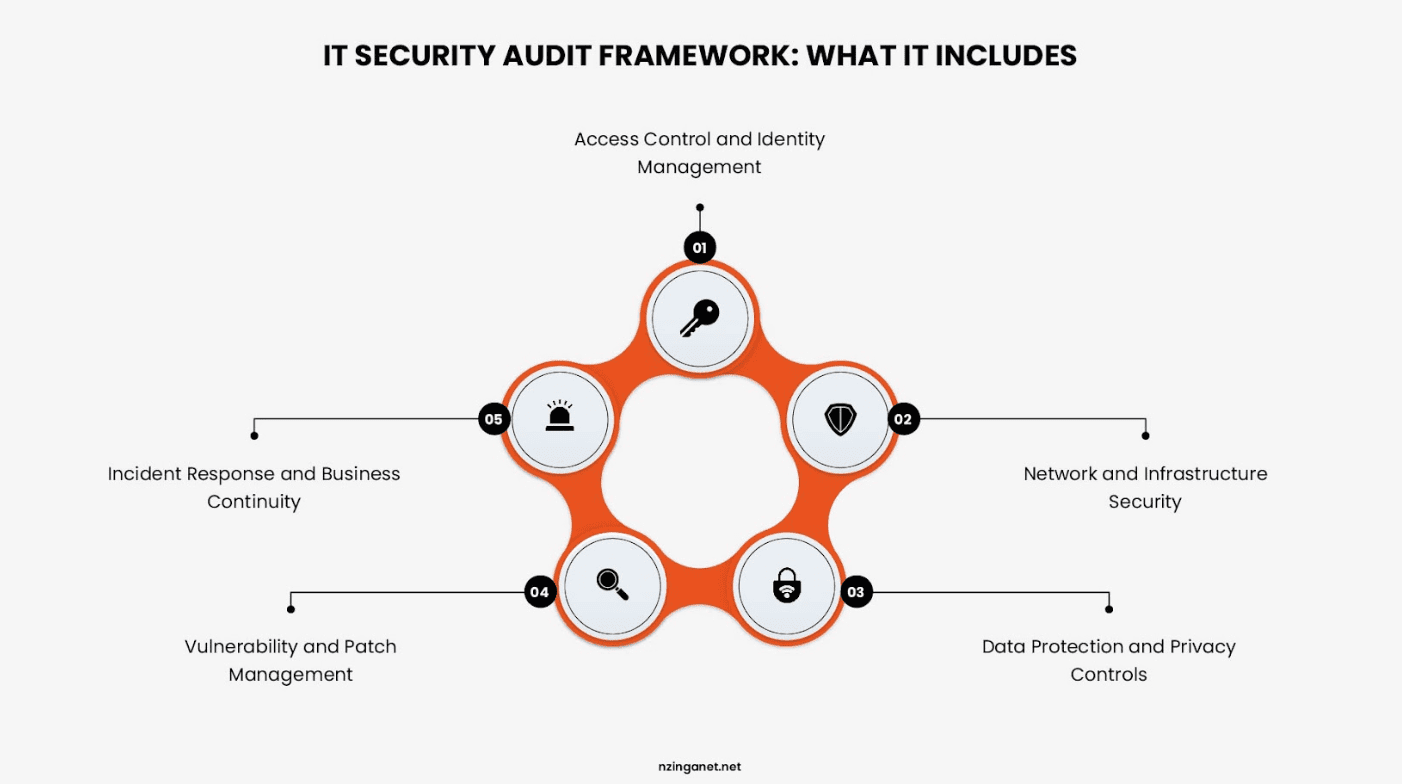
- Access Control and Identity Management: Auditors review how user access is managed across systems and applications. This includes evaluating authentication methods, user permissions, and privileged account controls to ensure only authorized individuals can access sensitive resources.
- Network and Infrastructure Security: The audit examines the security of the organization's network and IT infrastructure. Auditors review firewalls, network segmentation, monitoring tools, and other controls designed to protect systems from unauthorized access and cyber threats.
- Data Protection and Privacy Controls: Auditors assess how sensitive data is collected, stored, transmitted, and protected throughout its lifecycle. The review typically includes encryption practices, access restrictions, backup procedures, and data privacy controls.
- Vulnerability and Patch Management: This review focuses on how the organization identifies, prioritizes, and remediates security vulnerabilities. Auditors evaluate vulnerability scanning processes, patch deployment timelines, and remediation effectiveness.
- Incident Response and Business Continuity: Auditors examine the organization's ability to detect, respond to, and recover from security incidents. This includes reviewing incident response procedures, disaster recovery plans, and business continuity strategies.
6 Best IT Security Audit Types for Your Business
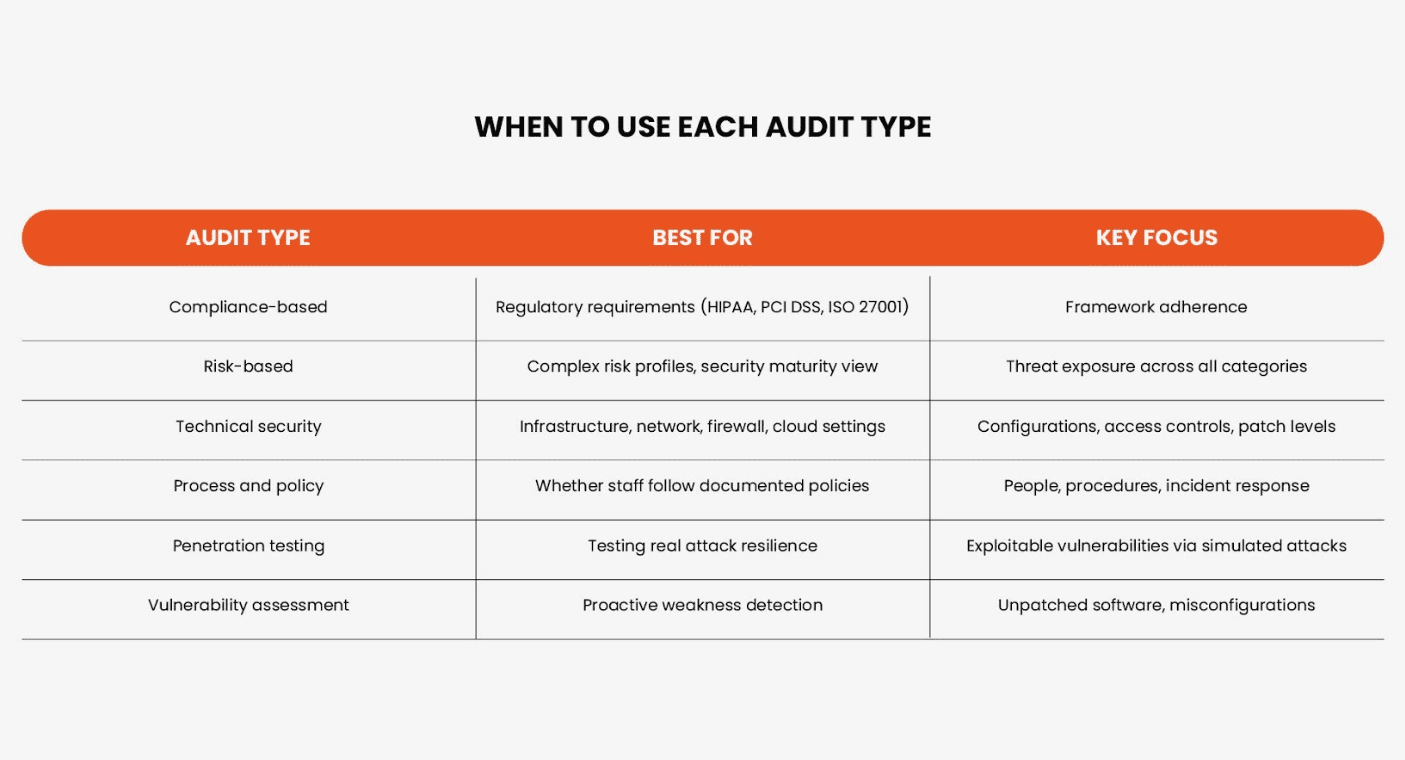
The type of IT security audit your organization needs depends on factors such as industry regulations, customer requirements, business objectives, and overall cybersecurity maturity. While many businesses think of security audits as a single process, there are actually several audit types, each designed to evaluate different aspects of your security program.
Understanding these differences can help you choose the right audit and avoid investing time and resources in an assessment that doesn't align with your goals.
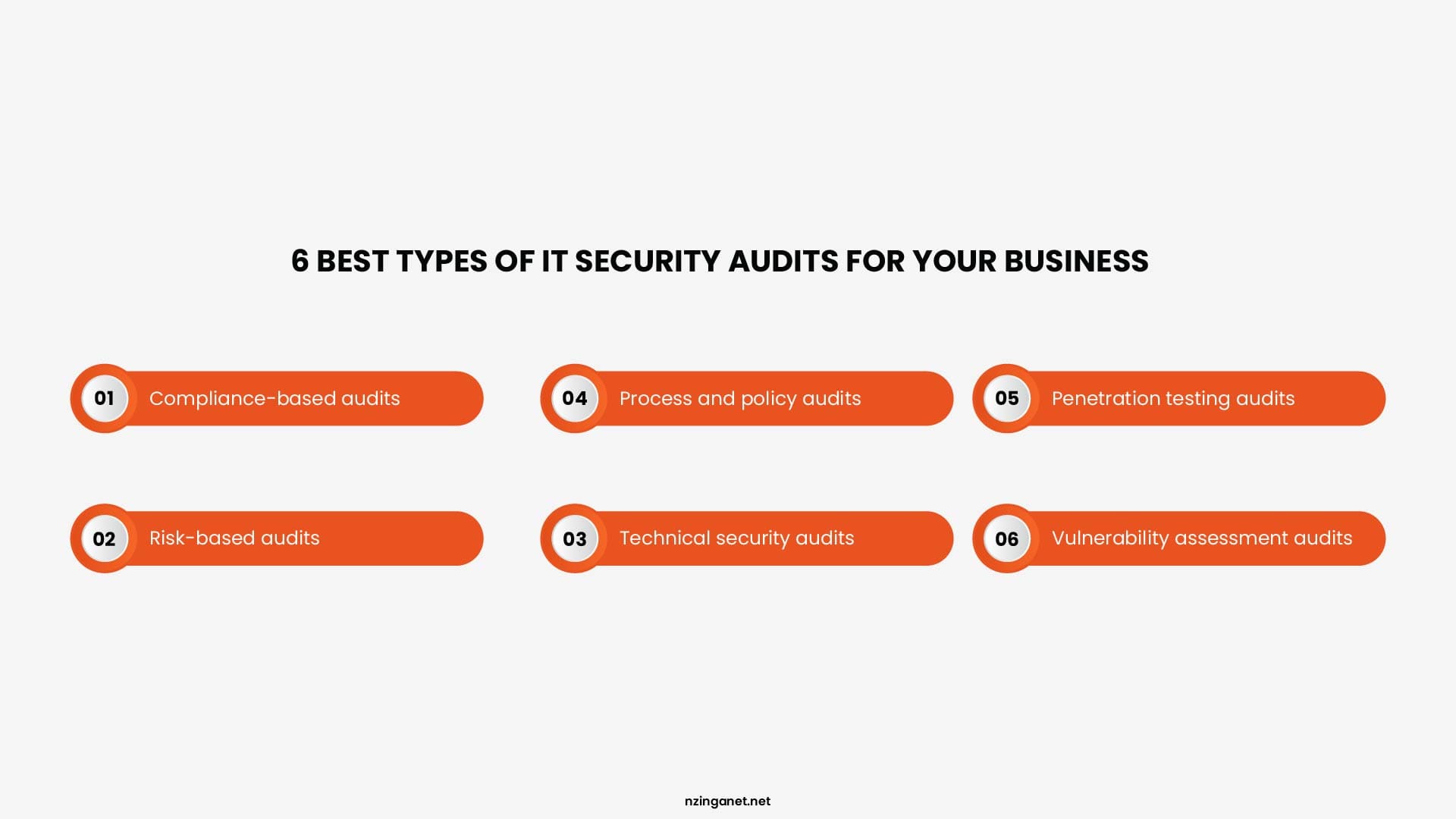
- Compliance-based audits: Verify that your controls satisfy a specific regulatory or contractual framework. Common frameworks include ISO 27001, NIST Cybersecurity Framework, PCI DSS, HIPAA, and SOC 2. These audits follow defined criteria and produce findings measured against the standard's requirements.
- Risk-based audits: Assesses your exposure across all relevant threat categories without being anchored to a single standard. They are useful when your risk profile is complex or when you want a broader view of your security maturity rather than just compliance status.
- Technical security audits: Focuses specifically on infrastructure: network configurations, firewall rules, access controls, patch levels, endpoint security, and cloud environment settings. These are heavily evidence-driven and often involve automated scanning tools alongside manual review.
- Process and policy audits: Examines whether your documented security policies reflect best practice and whether your people actually follow them. A technically sound environment can still be fundamentally insecure if staff bypass controls or if incident response procedures exist only on paper.
- Penetration testing audits: Simulates real-world attack surfaces against your systems, networks, and applications to uncover exploitable vulnerabilities. These active tests determine whether attackers can actually breach your defenses and measure the effectiveness of your security controls under attack conditions.
- Vulnerability assessment audits: Systematically scans your IT infrastructure to identify unpatched software, weak encryption, misconfigurations, and other weaknesses before attackers exploit them. These assessments prioritize identified issues based on potential business impact and ease of exploitation by malicious actors.
Internal vs External Security Audit: Which One Do You Need?
When planning a security audit, one of the first decisions you'll face is whether to conduct an internal audit or bring in an external auditor. While both serve the same ultimate goal (improving your organization's security posture) they do so in different ways:
Internal Security Audit
An internal security audit is conducted by your own IT, security, or compliance team. Because internal auditors understand the organization's systems, processes, and business objectives, they can efficiently identify security gaps and monitor ongoing compliance efforts. Internal audits are often used as a proactive measure to uncover issues before they become larger problems.
External Security Audit
Whereas, an external security audit, on the other hand, is performed by an independent third party. These audits provide an objective assessment of your security controls and are often required for regulatory compliance, certifications, cyber insurance requirements, or customer contracts. The outside perspective can also reveal risks that internal teams may overlook.
| Feature | Internal Security Audit | External Security Audit |
|---|---|---|
| Who performs it? | In-house team, internal audit department, or hired consultants acting as an internal extension. | Independent third-party specialists with zero connection to your company. |
| Primary Goal | Operational readiness, risk mitigation, policy adherence, and continuous improvement. | Unbiased validation, regulatory compliance, and stakeholder/customer assurance. |
| Cost & Speed | Highly cost-effective and can be done continuously throughout the year. | Higher cost due to specialized expertise; takes longer to scope and execute. |
| Bias Potential | High (employees may overlook familiar flaws or internal politics). | None (provides an objective, unvarnished look at your defenses). |
| Audience | Executive management, board members, and internal IT teams. | Customers, auditors, partners, regulators, and insurance providers. |
- You need an Internal Audit if: Your goal is to prepare for a formal certification, check if recent system updates comply with internal policies, or keep a tight budget. It functions as a diagnostic check-up.
- You need an External Audit if: A client demands proof of security, your cyber insurance policy requires it, or you need to achieve frameworks like SOC 2, HIPAA, or ISO 27001. Most mature organizations use both in a rotating cadence, using internal reviews to stay stable and external assessments to remain credible.
STEP BY STEP
The IT Security Audit Process, Phase by Phase
One reason organizations feel intimidated by security audits is that they often don't know what to expect. In reality, most IT security audits follow a structured process designed to evaluate your security controls, identify risks, and recommend improvements.
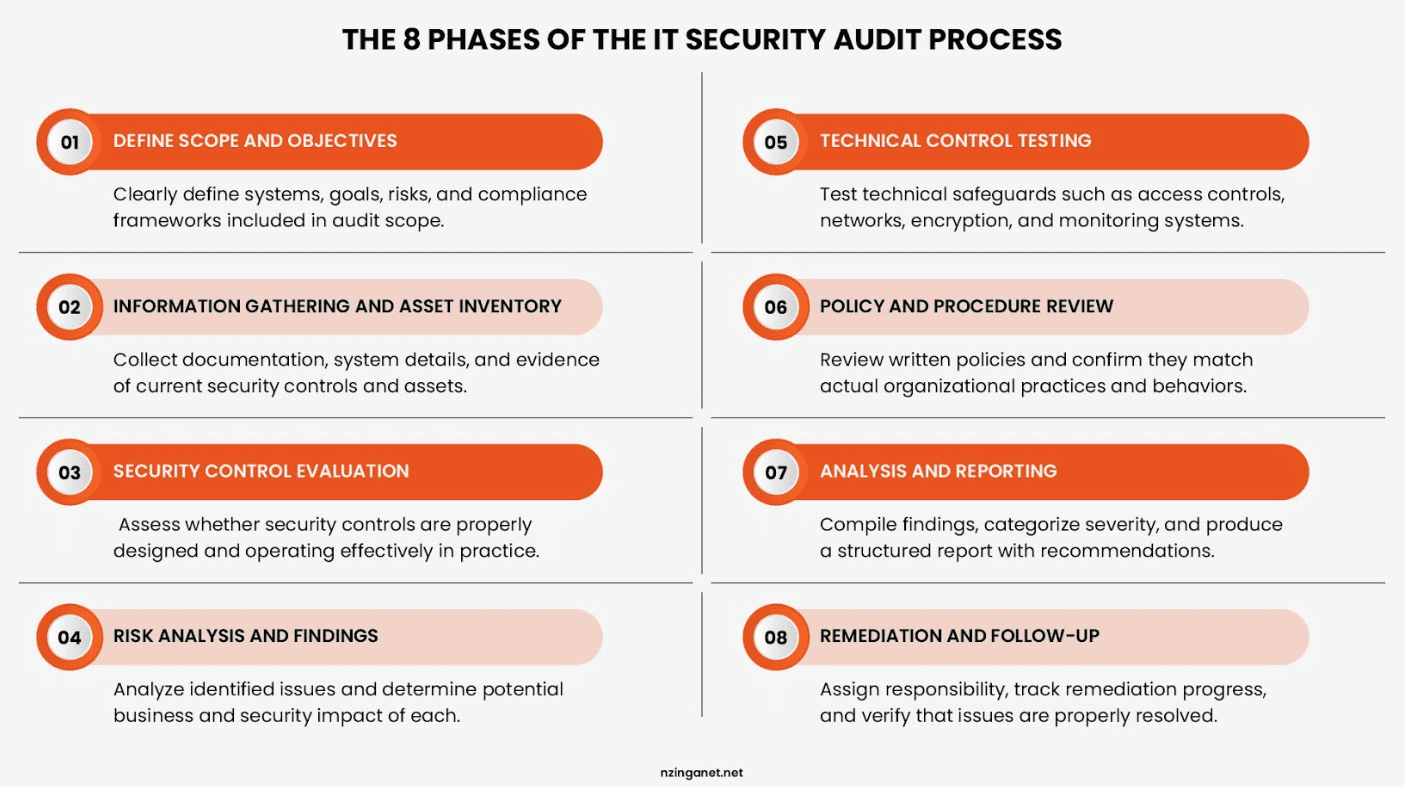
While the exact methodology may vary depending on the audit scope, most audits progress through the following phases:
Phase 1: Define Scope and Objectives
Every audit starts with a clear definition of what is in scope. This includes identifying the systems, applications, networks, and data sets to be reviewed; the compliance frameworks that apply; and the specific risks or concerns that prompted the audit. The more precisely you define what needs to be audited and why, the more actionable the results will be.
Phase 2: Information Gathering and Asset Inventory
Next, auditors collect documentation and evidence related to your security program. This may include security policies, network diagrams, access control procedures, incident response plans, risk assessments, and system configurations. The goal is to understand how security is managed across the organization before testing begins.
Phase 3: Security Control Evaluation
Auditors then assess whether existing security controls are properly designed and operating as intended. This often involves reviewing access management practices, network security measures, vulnerability management processes, data protection controls, and monitoring capabilities. Any gaps, inconsistencies, or areas of non-compliance are documented for further analysis.
Phase 4: Risk Analysis and Findings
Once the evaluation is complete, auditors analyze their findings and determine the potential impact of identified weaknesses. Issues are typically categorized by risk level, helping organizations prioritize remediation efforts based on business impact and threat exposure.
Phase 5: Technical Control Testing
This is where auditors actively test the controls in place. Typical activities include reviewing firewall and network configuration, testing access control and identity management settings, evaluating encryption standards, reviewing patch management and vulnerability management procedures, examining backup and recovery processes, and assessing physical security where relevant. Both automated scanning tools and manual verification are used. Evidence is documented throughout.
Phase 6: Policy and Procedure Review
Alongside technical testing, auditors review your documented security policies to assess completeness, accuracy, and real-world adherence. This covers acceptable use policies, incident response plans, change management procedures, third-party vendor management, and employee security training records.
Phase 7: Analysis and Reporting
Findings are compiled, categorized by severity, and assessed against the defined scope and applicable frameworks. A well-structured audit report includes an executive summary for non-technical stakeholders, a detailed technical findings section, evidence supporting each finding, and a prioritized remediation plan with clear ownership and timelines.
Phase 8: Remediation and Follow-Up
The audit report is the beginning of the work. Effective organizations assign ownership to each finding, track remediation progress, and schedule a follow-up review to verify that gaps have been closed. Some organizations build a formal remediation cycle into their governance calendar so that audit findings feed directly into their risk register and improvement roadmap.
How to Prepare Your Business Before the Audit Starts
- Open your password manager or your IT admin console: Write down every person who has administrator access to anything. If that list has more than five names, you already know what the auditor will ask. Why does each of these people need admin rights? Go through the list and remove anyone who cannot answer that question out loud.
- Pull your most recent backup log: Look for the last time you actually restored a file from backup, not just ran a backup job. If you cannot find a restoration test in the last three months, schedule one for this Friday. Do not wait. Auditors ask for proof of restoration, not proof of backup.
- Find your terminated employees list from the last six months: Check each name against your active directory or Google Workspace. If even one former employee still has access, fix it before the auditor walks in. That is the most common finding in small to midsize U.S. companies. And it is an easy fix. You just missed it.
- Print out your cyber insurance application from last year: Go through each question you answered yes to. Now find the evidence. For example if you said you have multi factor authentication everywhere, prove it to yourself first. Pick five random accounts including your own and try to log in from a new device. If MFA does not ask for a code, you have a problem.
- Ask your receptionist or your office manager one question: If the auditor shows up at the front desk, who do they ask for? That person should have a one page folder ready. It needs three things. Your last audit report if you have one. Your incident response plan. And a list of who handles what in IT. Nothing worse than an auditor standing in a lobby for twenty minutes while someone tries to figure out who to call.
THE CHECKLIST
What an IT Security Audit Checklist Should Cover
An effective IT security audit checklist provides a structured way to evaluate your organization's security posture, identify vulnerabilities, and ensure compliance with industry standards. It should cover all critical layers of your IT environment. Below are the core domains every checklist must include:
1. Identity and Access Management (IAM)
Control over who has access to your data is the first line of defense. This section ensures the principle of least privilege is actively enforced.
- User Provisioning: Procedures for granting, modifying, and revoking access tokens (especially during employee offboarding).
- Authentication Controls: Enforceability and strength of Multi-Factor Authentication (MFA) and password complexity policies.
- Privileged Access Management (PAM): Monitoring and auditing of admin and super-user accounts.
2. Network and Infrastructure Security
This pillar evaluates the perimeter and internal architecture defending your organization from external threats.
- Perimeter Defenses: Configuration and logs of firewalls, Intrusion Detection/Prevention Systems (IDS/IPS), and secure web gateways.
- Wi-Fi and Remote Access: Security of corporate Wi-Fi networks and virtual private networks (VPNs) used by remote staff.
- Network Segmentation: Verification that critical asset environments (like payment processing or HR data) are isolated from general networks.
3. Endpoint and Asset Management
Every device connected to your network is a potential entry point for attackers.
- Inventory Control: An up-to-date registry of all hardware (servers, laptops, IoT devices) and software assets.
- Endpoint Protection: Deployment and update status of Antivirus, Endpoint Detection and Response (EDR), and mobile device management (MDM) software.
- Patch Management: A systematic schedule for deploying OS and application security patches.
4. Data Security and Privacy
This focuses on protecting your most valuable asset, data, both at rest and in transit.
- Encryption Protocols: Verification that sensitive data is encrypted using modern standards (e.g., AES-256) on laptops, servers, and during transmission.
- Data Classification: Clear labeling of data based on sensitivity (Public, Internal, Confidential, Restricted).
- Data Loss Prevention (DLP): Tools and policies to prevent unauthorized data exfiltration.
5. Backup and Disaster Recovery (BCDR)
Security audits must account for worst-case scenarios, ensuring the business can survive a ransomware attack or catastrophic failure.
- Backup Integrity: Verification that backups are performed regularly, encrypted, and stored immutably or offsite (air-gapped).
- Testing Schedules: Documented proof of recent, successful restoration tests.
- RTO and RPO: Assessment of whether Recovery Time Objectives and Recovery Point Objectives align with business needs.
6. Threat and Vulnerability Management
Proactive defense requires identifying weaknesses before malicious actors do.
- Vulnerability Scanning: Routine internal and external scans to catch software flaws.
- Penetration Testing: Annual or bi-annual ethical hacking simulations to test defense depth.
- Log Management & SIEM: Centralized collection and analysis of security logs to spot anomalous behavior.
7. Physical and Environmental Security
Digital security is useless if an unauthorized person can walk into a server room and pull a hard drive.
- Access Controls: Use of biometric scanners, keycards, and visitor logs for secure areas.
- Surveillance & Alarms: Functional CCTV coverage at entry/exit points and continuous alarm monitoring.
- Environmental Controls: Adequate fire suppression systems, Uninterruptible Power Supplies (UPS), and climate control.
8. Employee Awareness and Governance
Technology is only as strong as the people operating it. This section reviews the "human firewall."
- Security Training: Frequency and completion rates of continuous security awareness and phishing simulation training.
- Policy Acknowledgement: Evidence that employees have read and signed Acceptable Use and Information Security policies.
9. Regulatory and Compliance Alignment
Finally, the checklist must map all technical controls back to the specific legal frameworks governing your industry.
- Framework Verification: Checking alignment with standard frameworks relevant to the business (e.g., ISO 27001, SOC 2, NIST, CIS Controls).
- Industry Standards: Ensuring compliance with legally mandated requirements like GDPR (privacy), HIPAA (healthcare), or PCI-DSS (payment cards).
Common IT Security Audit Frameworks and Which One Fits
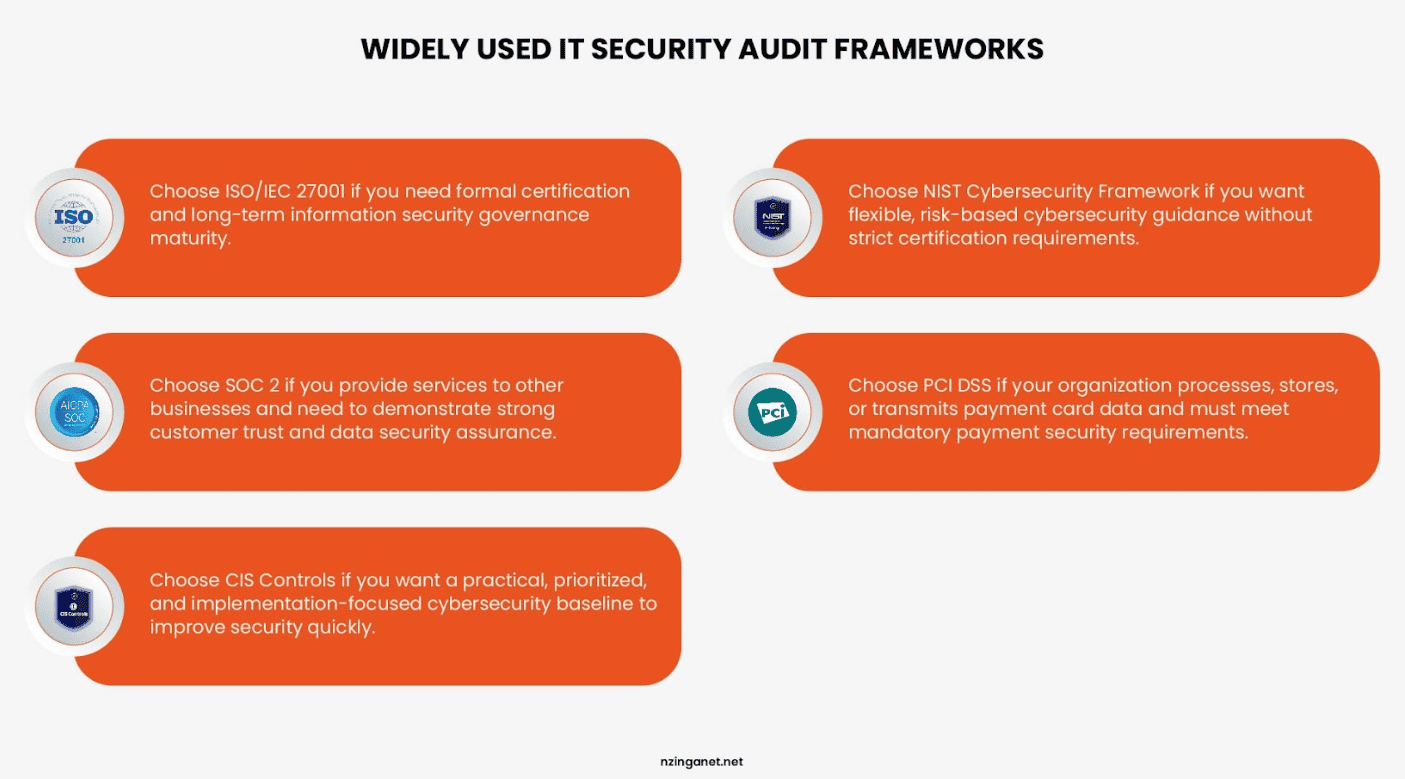
Choosing a security framework provides structure to your audit process and ensures that findings can be measured, compared, and improved over time. Different frameworks serve different regulatory, industry, and operational needs. Here are listed a few:
ISO/IEC 27001
ISO/IEC 27001 is an internationally recognized standard for establishing and maintaining an information security management system (ISMS). It takes a risk-based approach and defines a comprehensive set of security controls across people, processes, and technology.
It is particularly valuable for organizations that operate globally or need to demonstrate a strong, formal security posture to clients, partners, or regulators. Certification requires an external audit and follows a three-year cycle, including surveillance audits in the interim years.
NIST Cybersecurity Framework
NIST Cybersecurity Framework is widely used across the United States and beyond, especially in sectors such as healthcare, government, and critical infrastructure. It is built around five core functions: Identify, Protect, Detect, Respond, and Recover. It does not prescribe specific tools or technologies, making it flexible and suitable for organizations at different levels of security maturity.
SOC 2
SOC 2 is designed for service providers, particularly SaaS and cloud-based businesses that handle customer data. It evaluates controls based on five trust service criteria: security, availability, processing integrity, confidentiality, and privacy. SOC 2 reports are commonly required during enterprise vendor assessments and are often a key requirement for gaining customer trust in B2B environments.
PCI DSS
PCI DSS applies to any organization that processes, stores, or transmits payment card data. It is mandatory for businesses handling card payments and is enforced by payment card brands and acquiring banks. The standard focuses heavily on securing cardholder data through strict access controls, encryption, monitoring, and regular security testing.
How Much Does an IT Security Audit Cost?
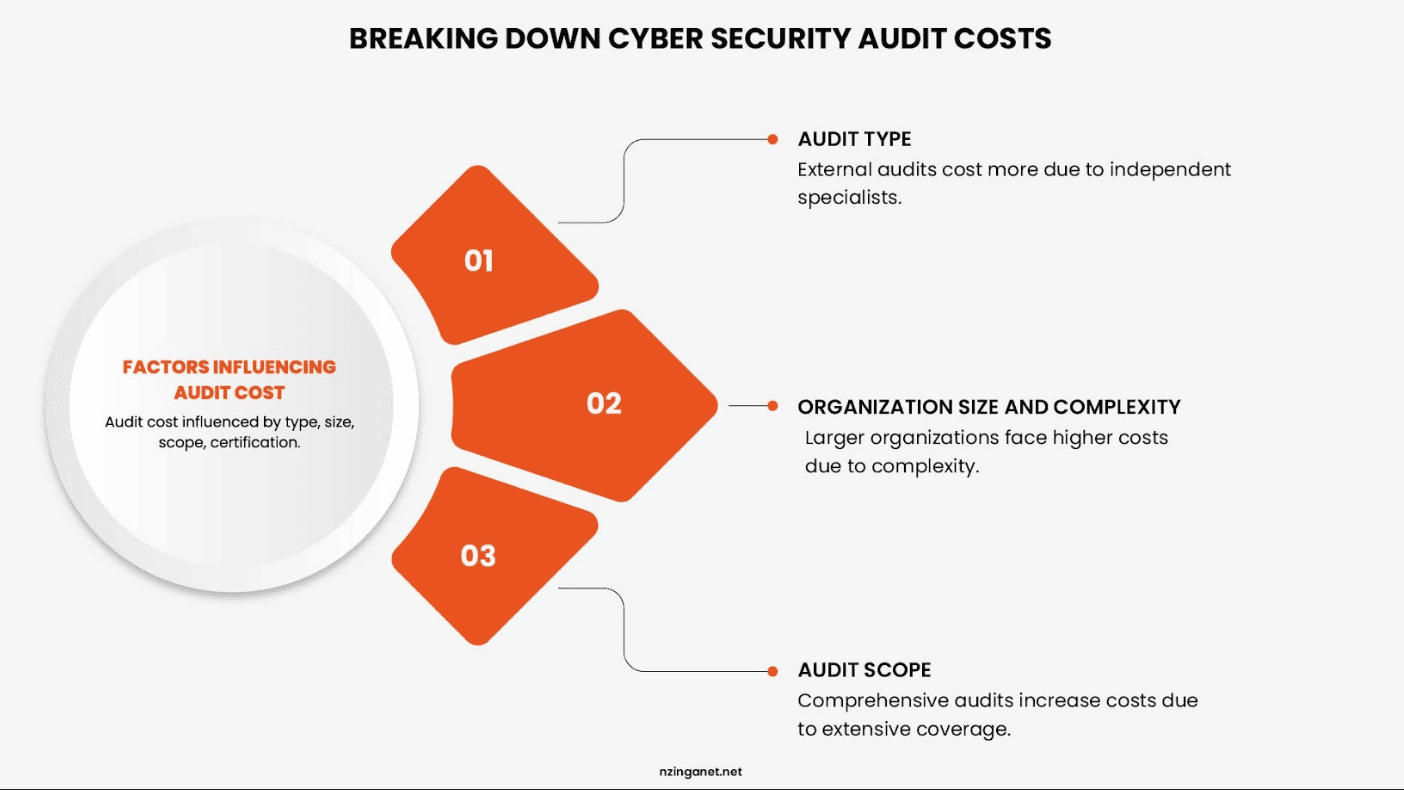
The cost of an IT security audit can vary widely depending on the size of your organization, the complexity of your IT environment, and the type of audit being performed. There is no fixed price because no two security audits cover the same scope or level of risk.
For small businesses with limited infrastructure, a basic security audit may cost a few thousand dollars. These audits typically focus on essential areas such as access controls, network security, and basic compliance checks.
For mid-sized organizations, costs are usually higher because the audit scope expands to include multiple systems, cloud infrastructures, and more detailed compliance requirements. In these cases, pricing often ranges from several thousand to tens of thousands of dollars.
For large enterprises or highly regulated industries such as finance, healthcare, or SaaS platforms, security audits can be significantly more expensive. These audits often involve multiple phases, deep technical assessments, third-party compliance requirements, and ongoing reporting obligations, which can bring costs into the tens or even hundreds of thousands of dollars.
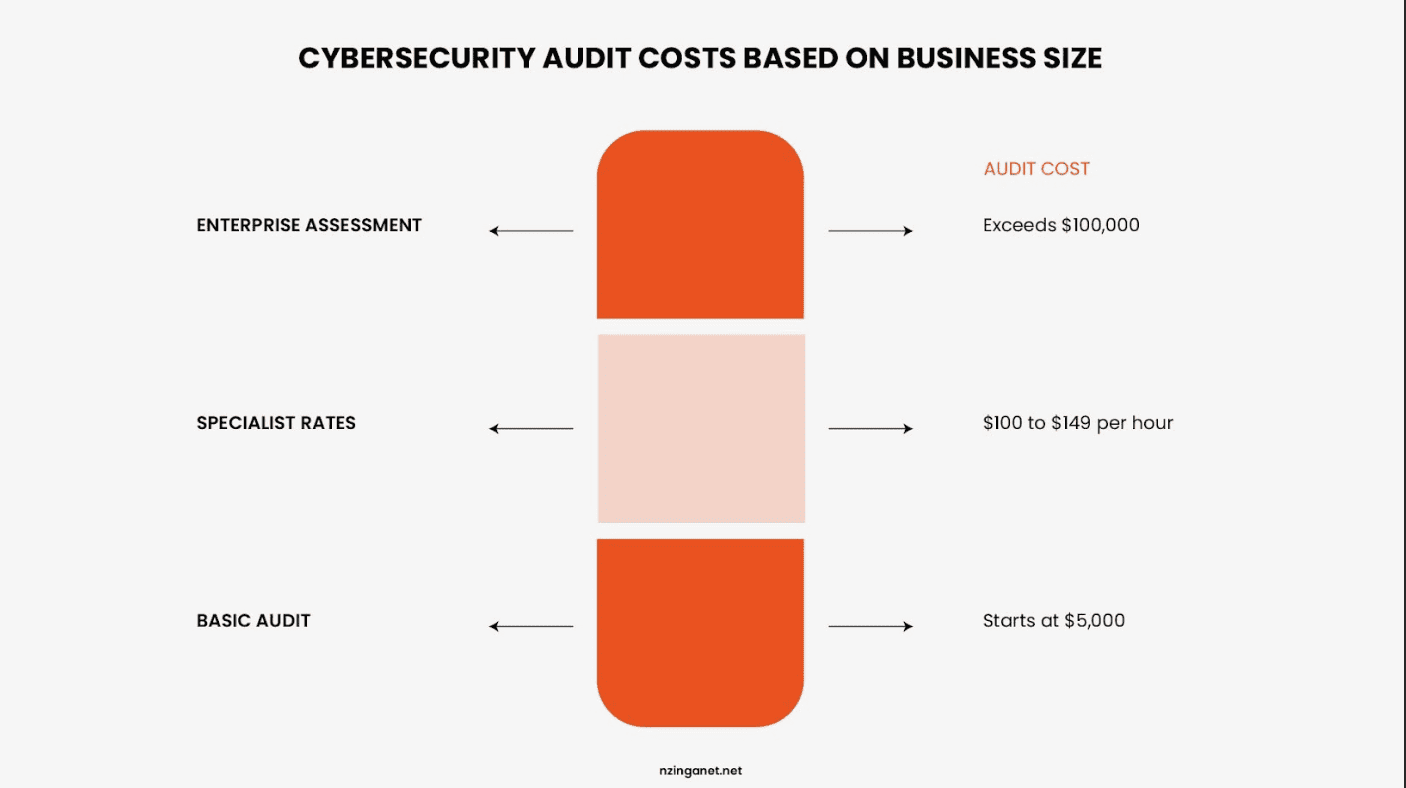
Several key factors influence the overall cost of an IT security audit:
- Scope of the audit (number of systems, applications, and locations included)
- Type of audit (internal review, external audit, compliance audit, or certification audit)
- Complexity of IT infrastructure (on-premises, cloud, hybrid environments)
- Regulatory requirements (such as ISO 27001, SOC 2, or PCI DSS compliance)
- Level of detail required in reporting and testing
- Readiness of the organization (well-prepared environments reduce audit time and cost)
In general, the more mature and organized your security practices are, the lower your audit costs tend to be, since auditors spend less time gathering basic information and resolving avoidable gaps.
While cost is an important consideration, it should not be the only factor. A well-executed IT security audit is an investment in reducing risk, preventing breaches, and strengthening long-term business resilience.
Turning Audit Findings into a Stronger Security Program
If you have read this far, you already understand that an audit report is only useful when it leads to action. The findings themselves are not the end goal. The real value comes from how they are addressed.
The next step is to turn each finding into something clear and workable. That means understanding what the issue is, deciding who is responsible for fixing it, and setting a realistic timeframe for completion. Without those three elements, even important findings tend to remain open longer than they should.
It also helps to start with the areas that create the most meaningful risk, particularly anything related to access, exposure of sensitive data, or missing core protections. Once those are addressed, the remaining items can be handled in a more steady and structured way.
When this approach is followed, the audit report becomes less of a static document and more of a practical guide for improving security over time.
Next step
If you are at the stage where audit findings have been identified but you need help turning them into a clear and realistic plan, NzingaNet supports organizations in organizing and prioritizing that work so it can be completed effectively. You can schedule a free consultation to review your results and outline a sensible starting point for remediation.
COMMON QUESTIONS
Frequently Asked Questions
1. What is an IT security audit?
An IT security audit is a structured review of your systems, controls, policies, and processes. Auditors check whether your security measures actually protect sensitive data, reduce risk, and meet regulatory requirements. It covers access management, network security, data protection, patch management, and how your team responds to incidents. It is not a vulnerability scan. It is a full picture of how your organization manages security across people, processes, and technology.
2. How often should a company do an IT security audit?
At minimum, once a year for an internal review. External audits typically happen every one to three years, or when a compliance framework requires it. If you move to the cloud, acquire another company, or experience a breach, do not wait for the annual cycle. Run an audit. High-risk industries like healthcare and finance often audit more frequently, and for good reason.
3. What is the difference between an IT security audit and a penetration test?
A penetration test simulates an attack to find vulnerabilities an attacker could exploit. An IT security audit is broader. It looks at your whole security program, including policies, access controls, vendor management, and whether your people actually follow documented procedures. A pen test tells you where an attacker could get in. An audit tells you whether your security program is built to stop them in the first place.
4. What does an IT security auditor look for?
Overprivileged accounts. Missing MFA. Unpatched systems. Terminated employees who still have active access. Backup jobs that run but have never been tested with an actual restoration. Incident response plans that exist on paper but nobody has practiced. Auditors follow the evidence, and the most common findings are usually the ones organizations already suspected but never got around to fixing.
5. How much does an IT security audit cost?
Small businesses typically pay a few thousand dollars for a basic review. Mid-sized organizations usually land somewhere between ten and fifty thousand dollars depending on scope and complexity. Large enterprises or those pursuing certifications like SOC 2 or ISO 27001 can spend significantly more. The more prepared you are going in, the less time auditors spend chasing basic documentation, and the lower your bill tends to be.
6. What happens after an IT security audit?
You get a report. Then the real work starts. Assign a specific owner to each finding, set a deadline, and track remediation the same way you would any other project. Critical findings go first. Everything else gets prioritized by risk and business impact. Feed the results into your risk register so they do not disappear between audit cycles. The organizations that get the most value from audits are the ones that treat the report as a starting point, not a finish line.
PENNSYLVANIA & BEYOND
Ready to Pass Your Next IT Security Audit with Confidence?
NzingaNet helps small and mid-sized businesses across Pennsylvania and the surrounding region prepare for IT security audits, close compliance gaps, and strengthen their overall security posture. From internal readiness reviews to full audit support, our team helps you walk in prepared.