May 7, 2026
A cyberattack hits every 39 seconds somewhere in the world.
And contrary to popular belief, small businesses aren't too small to target. They're actually easier to target, often because of common cybersecurity mistakes.
Here's why:
Modern attacks don't start at the perimeter. They start at the endpoint. A laptop opened on home Wi-Fi. A phishing email clicked by an employee. A remote desktop connection with a recycled password. By the time you find out, the damage is already done.
This is why endpoint detection and response, or EDR, has become one of the most important security investments any business can make in 2026.
This guide covers everything you need to know: what EDR is, how it works, what it costs, and how to choose the right EDR solution for your business.
- Key Takeaways
- EDR Meaning & Market Growth
- What Is an Endpoint in Cybersecurity?
- EDR vs Antivirus: Main Differences
- How Does EDR Work?
- Types of EDR: Which Model Fits Your Business
- Benefits of EDR for Small and Medium Businesses
- How Much Does EDR Cost?
- EDR Implementation: Securing Every Device in Your Business
- Best EDR Solutions for Small and Medium Businesses in 2026
- How to Choose an EDR Solution: A Practical Framework
- Frequently Asked Questions
QUICK SUMMARY
Key Takeaways
- EDR (Endpoint Detection and Response) is a cybersecurity tool that continuously monitors all devices on your network, detects threats in real time, and responds to them automatically or with analyst guidance.
- Traditional antivirus only catches known threats. EDR catches known and unknown threats by watching how programs behave, not just what they look like.
- Ransomware appears in 88% of SMB breaches. EDR is the most effective technical control for detecting and containing ransomware before it spreads.
- EDR costs between $3 and $15 per endpoint per month, depending on the tier. Managed EDR (MDR) ranges from $11 to $50 per endpoint per month with 24/7 expert monitoring included.
- EDR adoption grew from 49% of organizations in 2024 to 65% in 2025, and is now a baseline requirement for most cyber insurance policies.
DEFINITION
EDR Meaning
Endpoint Detection and Response is a category of cybersecurity software that installs a lightweight agent on every device in your network, continuously collects data about what is happening on those devices, uses behavioral analysis and machine learning to detect suspicious activity, and provides tools to investigate and respond to threats in real time.
The term Endpoint Detection and Response or (ETDR) was coined by Gartner analyst Anton Chuvakin in 2013 to describe a new class of tools that went beyond prevention into active detection and investigation.
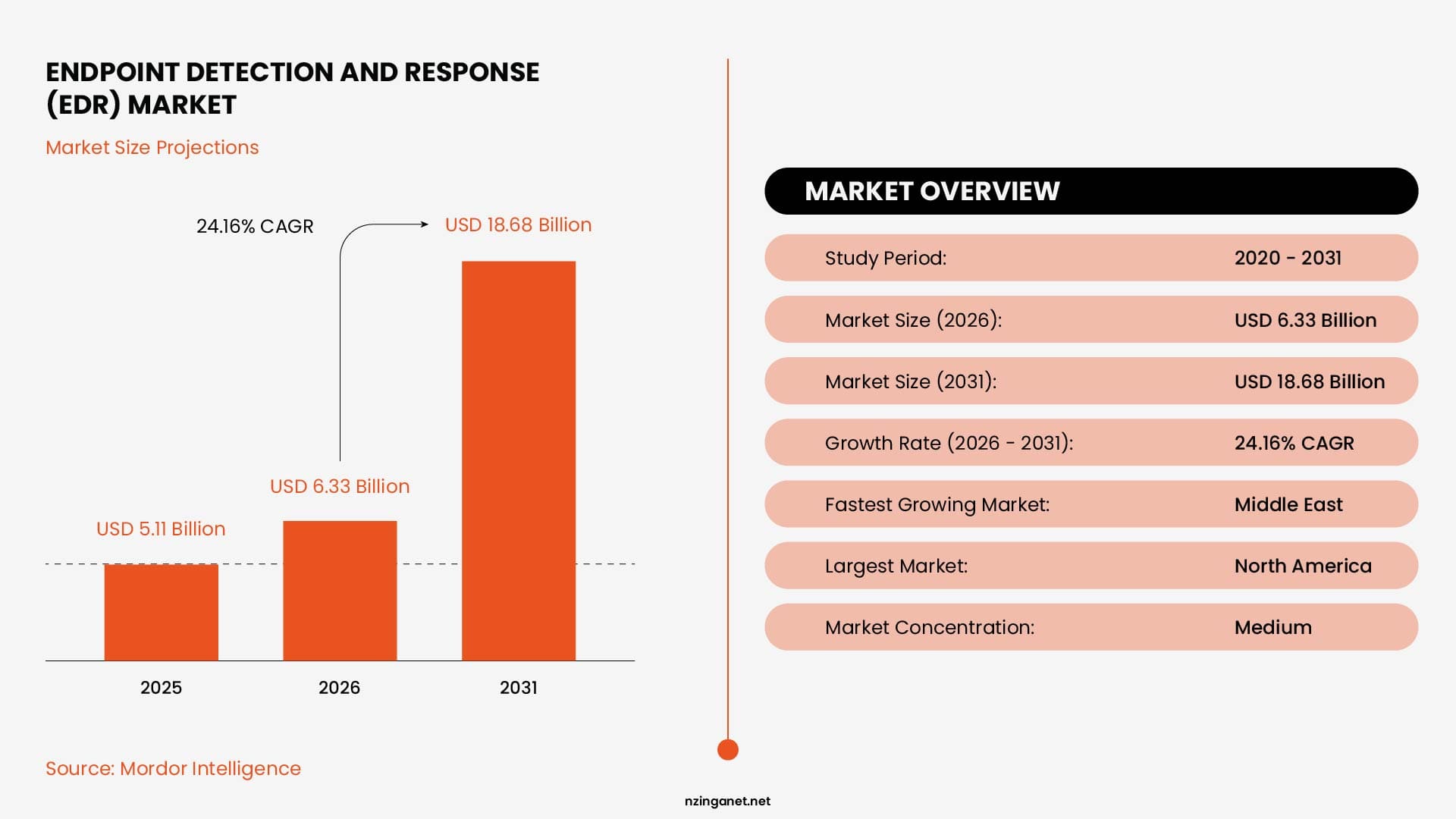
In 2026, EDR has become a core layer of security infrastructure for organizations of all sizes, with the global market reaching $6.33 billion in 2026 and projected to grow to $18.68 billion by 2031 at a 24 percent annual growth rate.
THE BASICS
What is an endpoint in cybersecurity?
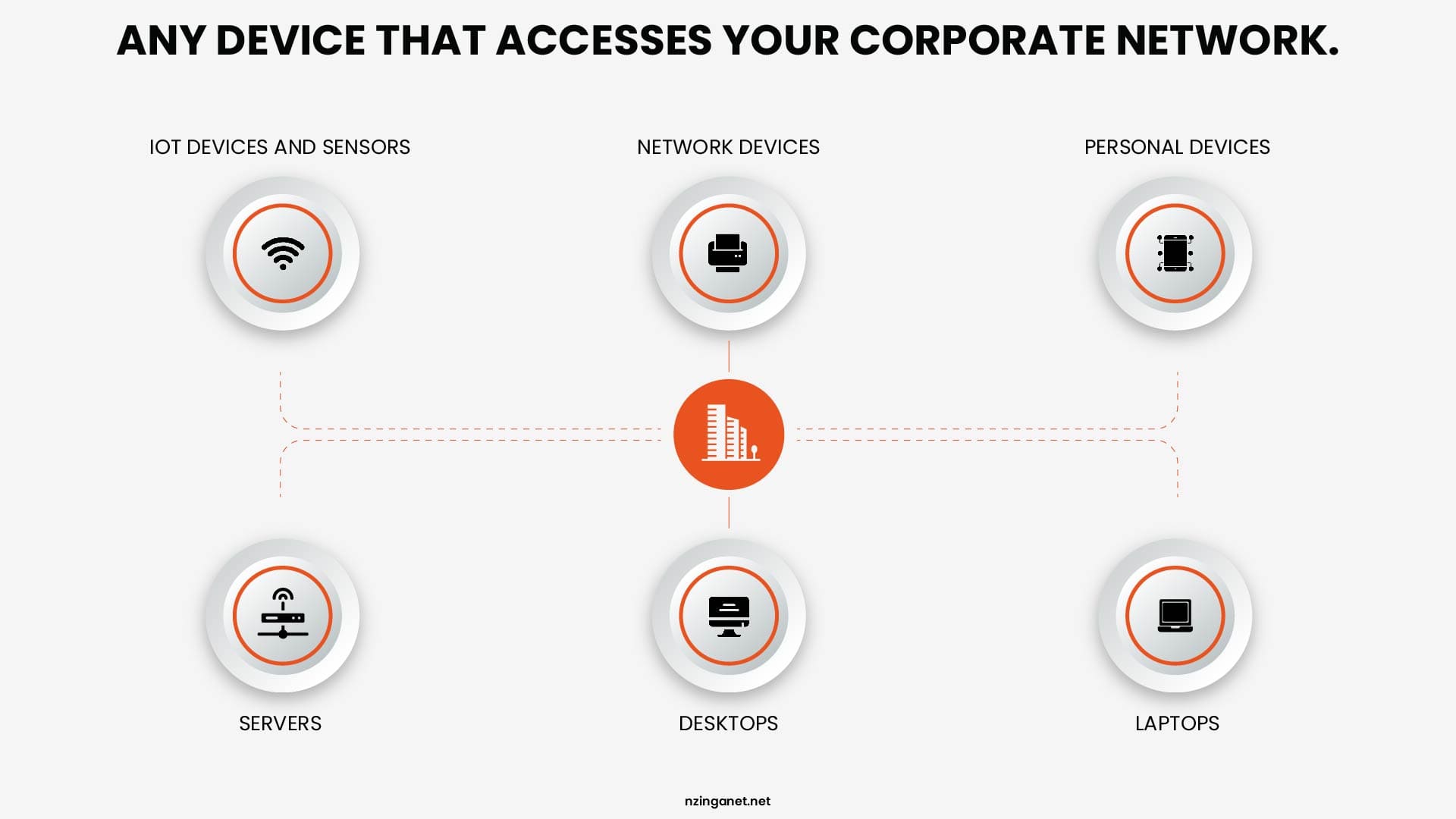
An endpoint is any device that connects to your network: laptops, desktops, servers, mobile phones, tablets, and in many cases printers and IoT devices. Each one is a potential entry point for an attacker. The more endpoints a business has, the larger its attack surface, and the more a unified, centralized monitoring system matters.
Remote and hybrid work have made endpoint risk more significant than it was when everyone sat in the same office on the same managed network. Employees connecting from coffee shops, home networks, and shared spaces introduce new variables that a perimeter-based security model cannot account for. EDR was designed for exactly this reality.
COMPARISON
What is the main difference between EDR and Antivirus?
Antivirus software compares files against a database of known malicious signatures. If the file matches a known threat, it blocks it. If the file is new, disguised, or behaves differently from anything in the database, antivirus typically allows it to run.
On the other hand, EDR watches behavior. It monitors how processes start and what they do. It tracks which files they access, which network connections they open, which other processes they spawn. When a process behaves in a way that looks like malware, even if the file itself has never been seen before, EDR flags it, records the full timeline, and takes action.
| Capability | Traditional Antivirus | EDR |
|---|---|---|
| Detection method | Signature-based (known threats only) | Behavioral analysis + AI (known and unknown) |
| Fileless attack detection | No | Yes (watches process behavior in memory) |
| Zero-day protection | Minimal | Strong (flags suspicious behavior patterns) |
| Real-time monitoring | Limited to file scans | Continuous across all endpoint activity |
| Threat investigation | None | Full attack timeline and root cause analysis |
| Automated response | None | Isolate devices, kill processes, roll back changes |
| Ransomware rollback | No | Yes (many platforms offer file restoration) |
| Visibility across devices | Per-device only | Correlated view across all endpoints |
| Forensic data retention | None | 30 to 365+ days of telemetry logs |
| Suitable for modern threats | No | Yes |
For a deeper look at how these solutions differ in real-world scenarios, features, and use cases, check out our full guide on EDR vs antivirus.
📌 Verdict: Antivirus is still useful as basic protection against common known threats. But in 2026, with rising ransomware and sophisticated attacks, EDR is far better at catching unknown threats and stopping them before they spread.
TECHNICAL DEEP DIVE
How Does EDR Work?
EDR, or Endpoint Detection and Response, protects your devices by watching what they do and reacting quickly when something looks wrong. Here's how it works:
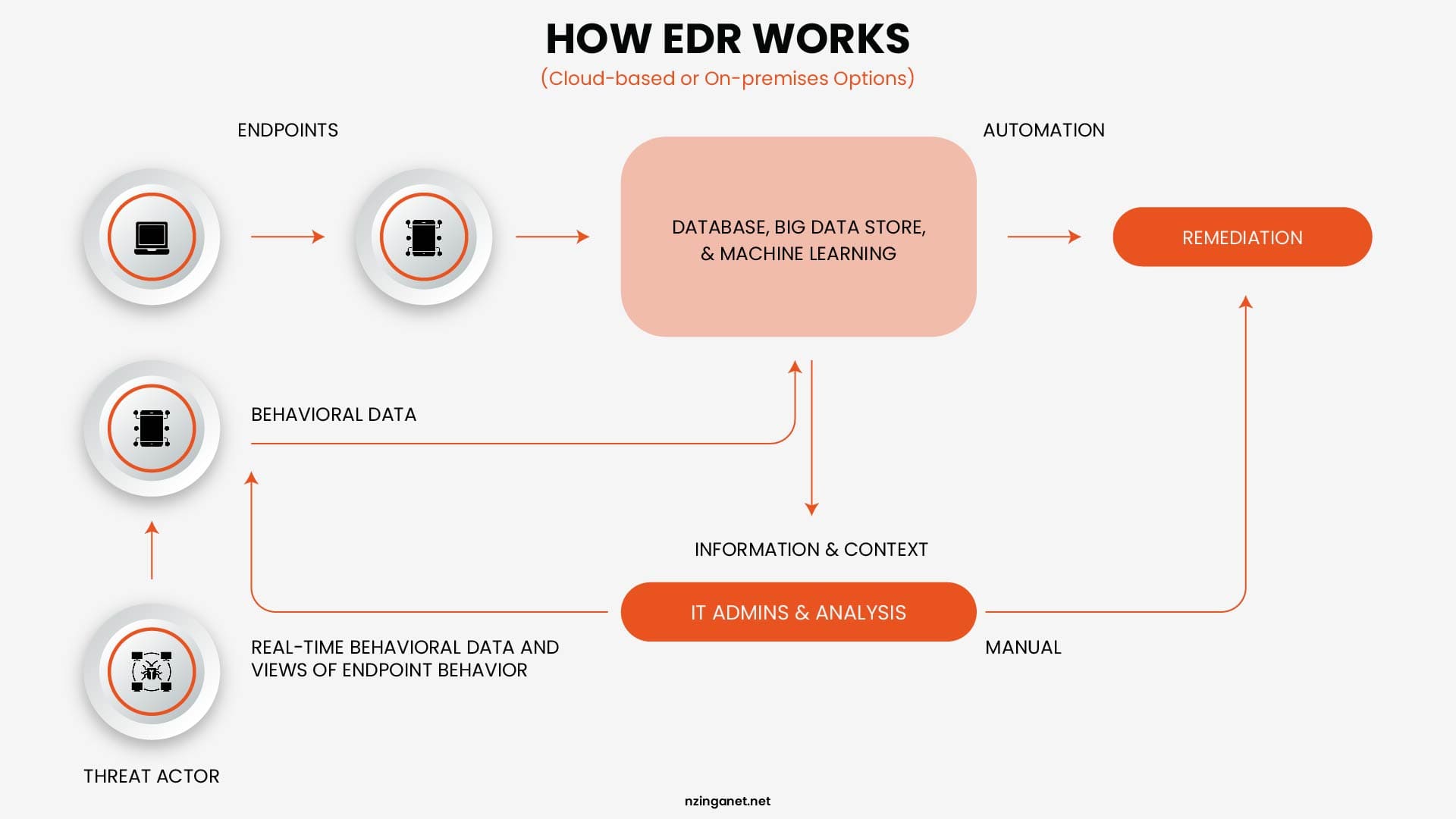
Step 1: The Agent
EDR begins with a software agent installed on every endpoint you want to protect. This agent runs silently in the background, consuming minimal system resources, and sends a continuous stream of telemetry data back to a central platform. That data includes every process that starts and stops, every file that is created or modified, every network connection that is opened, and every user action that occurs on the device.
Step 2: Behavioral Analysis and Threat Detection
Once that data starts coming in, the system builds a sense of what normal activity looks like. From there, it watches for anything that does not fit. This is where EDR stands apart from traditional antivirus tools. Instead of looking for known threats, it focuses on behavior. So even if a threat leaves no file behind or uses a program that looks safe on the surface, the way it behaves can still give it away. The same idea applies to new attacks that have not been seen before. If the activity looks suspicious, it gets flagged.
Step 3: Investigation and Alert Triage
When the platform detects something suspicious, it generates an alert and constructs a full attack timeline. The security team, or the managed service provider monitoring the platform, can see exactly what happened: which device was affected first, which processes ran, which files were accessed or encrypted, whether any lateral movement occurred to other devices on the network, and what data may have been accessed or exfiltrated.
This investigation capability is one of the things that most meaningfully separates EDR from legacy tools. It answers not just whether an attack happened, but how it happened, how far it got, and what needs to be remediated. Without that context, responding to an incident is largely guesswork.
Step 4: Automated and Guided Response
Once a threat is confirmed, EDR platforms can take action immediately. Automated responses include isolating the affected device from the network while keeping the agent active for continued investigation, terminating the malicious process, quarantining suspicious files, and in many platforms, rolling back changes made by the attacker to restore the device to its pre-attack state.
For ransomware specifically, this rollback capability changes the calculus significantly. If EDR detects the encryption pattern of ransomware within the first few minutes of an attack and rolls back the affected files, the business may avoid any meaningful data loss at all. That outcome is not possible with antivirus, which has no response capability beyond blocking or quarantining files.
Step 5: Threat Hunting
More advanced EDR deployments include threat hunting: proactive searches through historical telemetry data for signs of compromise that may not have triggered an alert. Skilled security analysts or the threat hunting teams at managed EDR providers look for patterns that indicate an attacker has already gained access and is moving slowly to avoid detection. Many breaches are discovered this way, often weeks before the attacker would have executed their final payload.
DEPLOYMENT MODELS
Types of EDR: Which Model Fits Your Business
Here are the main types and which ones usually make sense for small and medium-sized businesses (SMBs) in 2026:
| Model | Best For SMBs | Pros | Cons |
|---|---|---|---|
| Managed EDR (MDR) | Most SMBs (top pick) | 24/7 expert monitoring; low internal effort; cost-effective | Higher subscription fees |
| Cloud-Based EDR | SMBs without IT infra (default) | Auto-updates; no hardware; scalable | Cloud data reliance |
| Standalone EDR | Rare (only with SOC team) | Full control; customizable | Needs 24/7 skilled staff |
| XDR (Extended) | Growing SMBs (next step) | Cross-environment visibility; better correlation | More complex; higher cost |
| On-Premises EDR | Regulated SMBs only | Data sovereignty; air-gapped compatible | Heavy maintenance burden |
For businesses ready to invest in a more complete view of their security environment, XDR platforms like CrowdStrike Falcon, SentinelOne, and Microsoft Defender XDR provide that extended coverage. For businesses starting from scratch, solid EDR coverage is the right first step before considering the broader platform.
WHY IT MATTERS
Benefits of EDR for Small and Medium Businesses
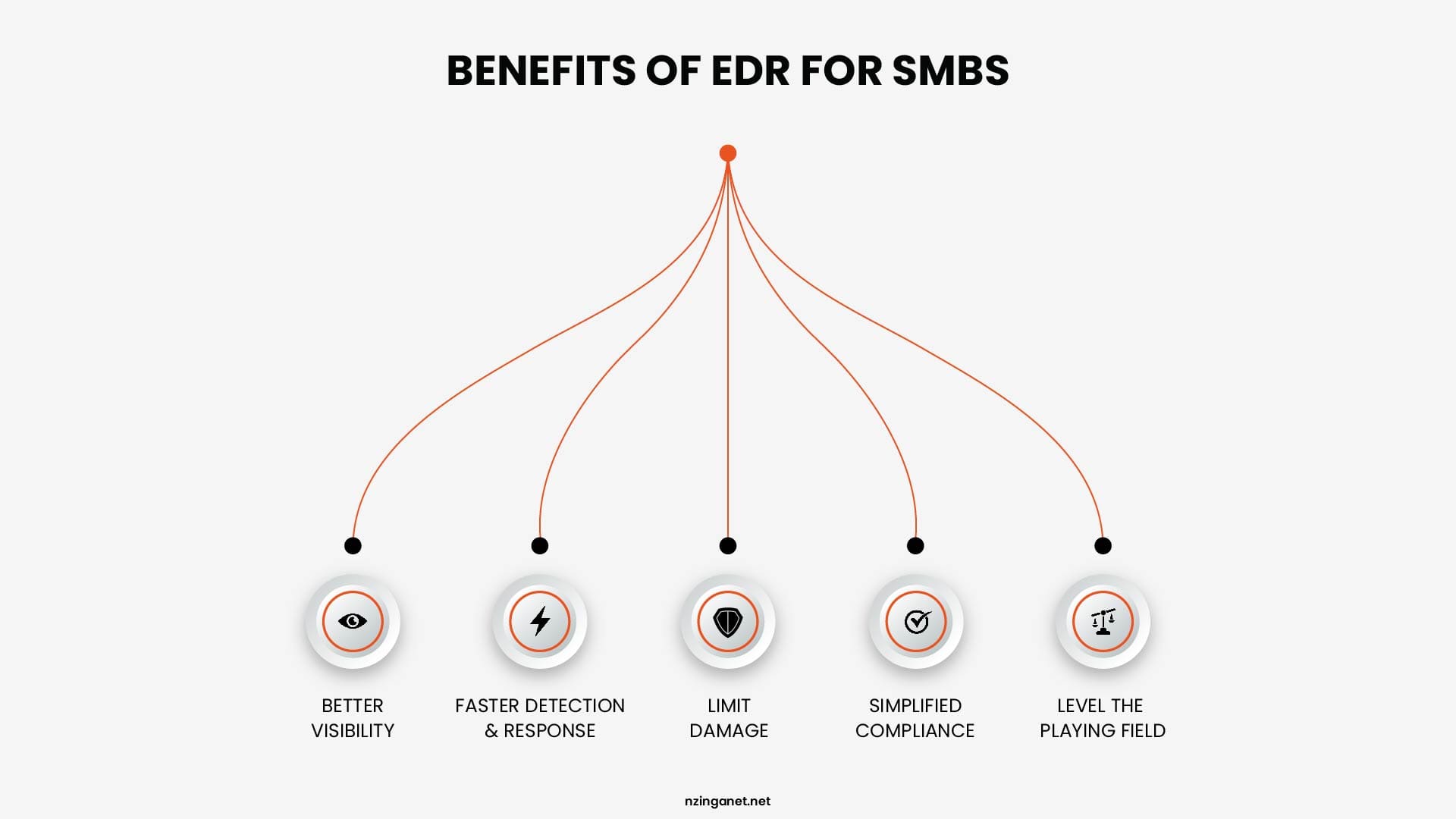
1. Visibility You Did Not Have Before
Most small businesses believe they have some visibility into their security environment because they have alerts configured somewhere. In practice, that visibility is fragmented. One tool shows antivirus events. Another shows firewall logs. A third tracks login activity. None of them tells a coherent story about what is actually happening across the organization's devices.
EDR unifies that view at the endpoint level. When an incident occurs, a security team or managed IT provider can trace the full attack path: which device was compromised first, what the attacker did on that device, whether they moved to other systems, and what data was accessed. That context is what makes a response effective rather than reactive and expensive.
2. Faster Detection and Containment
The IBM Cost of a Data Breach Report 2025 puts the average cost of a data breach at $4.4 million globally, and notes that the time to identify and contain a breach has a direct relationship with cost. The faster a threat is detected and contained, the lower the financial damage. EDR is specifically designed to compress that detection window.
Without EDR, the typical SMB discovers a breach through visible symptoms: systems slowing down, files becoming inaccessible, or an employee reporting something unusual. By that point, the attacker has usually been in the environment for days or weeks. EDR can detect the earliest indicators of compromise within minutes of them occurring.
3. Reduced Blast Radius
When an attacker compromises one device, their next goal is usually to move laterally to other systems. EDR can interrupt that movement by isolating the compromised device from the network at the moment a threat is confirmed, while maintaining the agent connection so investigation can continue. This containment, executed in minutes rather than hours, is what prevents a single compromised laptop from becoming a full organizational incident.
4. Compliance Documentation
Regulations including HIPAA, GDPR, PCI-DSS, and industry-specific frameworks require organizations to demonstrate that they have implemented endpoint security monitoring and incident response capabilities. EDR platforms generate the audit trails, event logs, and incident reports that these frameworks require. For businesses in regulated industries, EDR is not just a security tool but also a compliance documentation system.
5. Leveling the Playing Field
Large enterprises have security operations centers staffed around the clock. Most small businesses have one IT generalist who manages everything from printer jams to server maintenance. Managed EDR closes this gap by giving a small business access to the same quality of threat monitoring and response that a large organization's dedicated security team provides, without requiring the business to hire or manage that team internally.
PRICING
How Much Does EDR Cost?
EDR pricing varies based on features, number of devices, and whether you want it managed for you. Here's a realistic overview of current market prices for small and medium businesses:
| Tier | Typical Cost (per endpoint/month) | What You Get | Best For |
|---|---|---|---|
| Entry-level EDR | $3-$6 | Basic detection, next-gen antivirus, alerts | Very small teams with tight budgets |
| Mid-range EDR | $6-$12 | Behavioral analysis, automated isolation | Most SMBs (10-250 endpoints) |
| Full-featured EDR | $11-$16 | Threat hunting, forensics, advanced scanning | Businesses handling sensitive data |
| Managed EDR (MDR) | $10-$40+ | Full EDR + 24/7 expert monitoring & response | Teams without dedicated security staff |
| Microsoft Defender for Business | Often included in M365 Business Premium (~$22/user/month) | Built-in EDR for Windows & Microsoft environments | Microsoft-heavy SMBs |
What Drives Cost Up or Down
The primary factors that affect EDR pricing are the number of endpoints you need to cover, the depth of detection capabilities you require, and whether you need a managed service or are operating the platform in-house.
Volume discounts are significant. Most vendors offer 10 to 20 percent discounts for organizations with more than 1,000 endpoints, and multi-year contracts typically add another 10 to 15 percent reduction.
For smaller organizations buying their first EDR solution, bundling the product with other security tools from the same vendor, such as a next-generation antivirus or firewall, often unlocks better pricing than purchasing each product separately.
The Real Cost Comparison
The right comparison for EDR pricing is not the cost of antivirus. It is the cost of a breach. The average ransomware incident costs a small business between $120,000 and $1.24 million when recovery expenses, downtime, and customer impact are included.
Managed EDR for a 50-endpoint business might cost $700 to $1,500 per month. The math is not complicated. For businesses without an internal security team, managed EDR is almost always more cost-effective than the alternative, which is either hiring a full-time security analyst or discovering a breach after it has already caused significant damage. The question is not whether the cost is justified. It is whether the risk is manageable without it.
GETTING STARTED
EDR Implementation: Securing Every Device in Your Business
Deployment Prerequisites
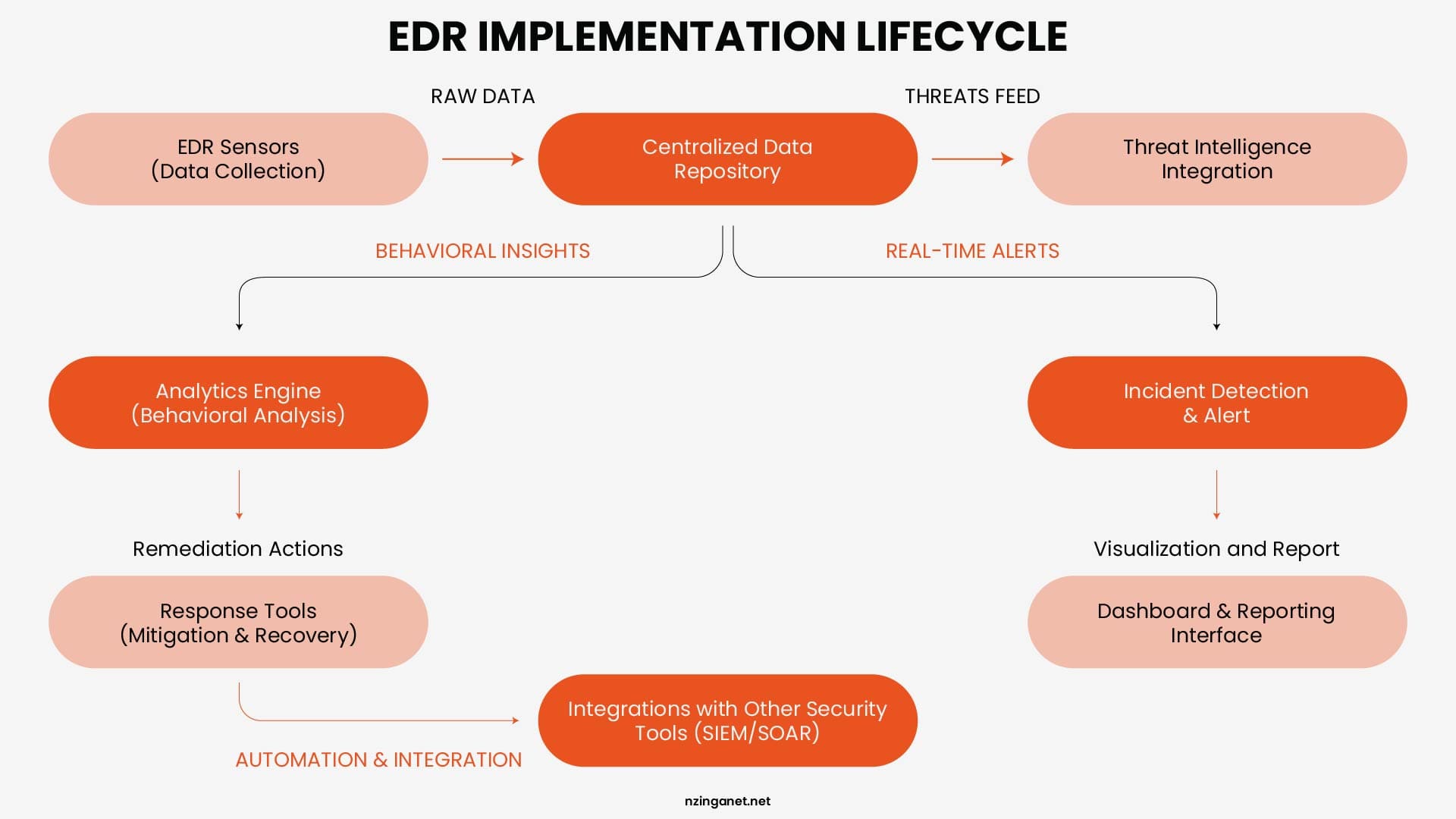
Most cloud-based EDR platforms can be deployed with minimal infrastructure requirements. The agent is lightweight, typically under 100 megabytes of memory during normal operation, and compatible with Windows, macOS, and Linux systems.
Deployment can often be completed across an entire organization within a single day using existing device management tools.
For managed EDR, the vendor handles platform configuration, alert tuning, and ongoing management. The internal IT team's primary responsibility is ensuring the agent is installed on all endpoints and that new devices are enrolled as they are added to the organization.
What to Define Before You Buy
- Number of endpoints that need protection, including remote devices.
- Availability of internal staff or need for managed service.
- Operating systems used across the organization.
- Compliance rules for logging, retention, or data location.
- Need to integrate with existing security tools and systems.
Integration with the Rest of Your Security Stack
EDR integrates well with SIEM (Security Information and Event Management) systems that aggregate log data from across the environment, with threat intelligence platforms that provide context on known attack groups, and with identity management systems that can correlate suspicious endpoint activity with login anomalies. For most SMBs, the practical starting point is EDR deployed alongside a next-generation antivirus and a managed firewall. These three layers cover the majority of attack vectors that small businesses face without requiring a complex or expensive security stack.
VENDOR COMPARISON
Best EDR Solutions for Small and Medium Businesses in 2026
Choosing the right Endpoint Detection and Response (EDR) solution for a small or medium business depends mainly on:
- Budget (per-endpoint or per-user cost)
- Use of Microsoft tools (e.g., Microsoft 365 and Windows)
- Whether you manage security in-house or via an MSP
- Desired level of automation and management (self-managed vs. fully managed)
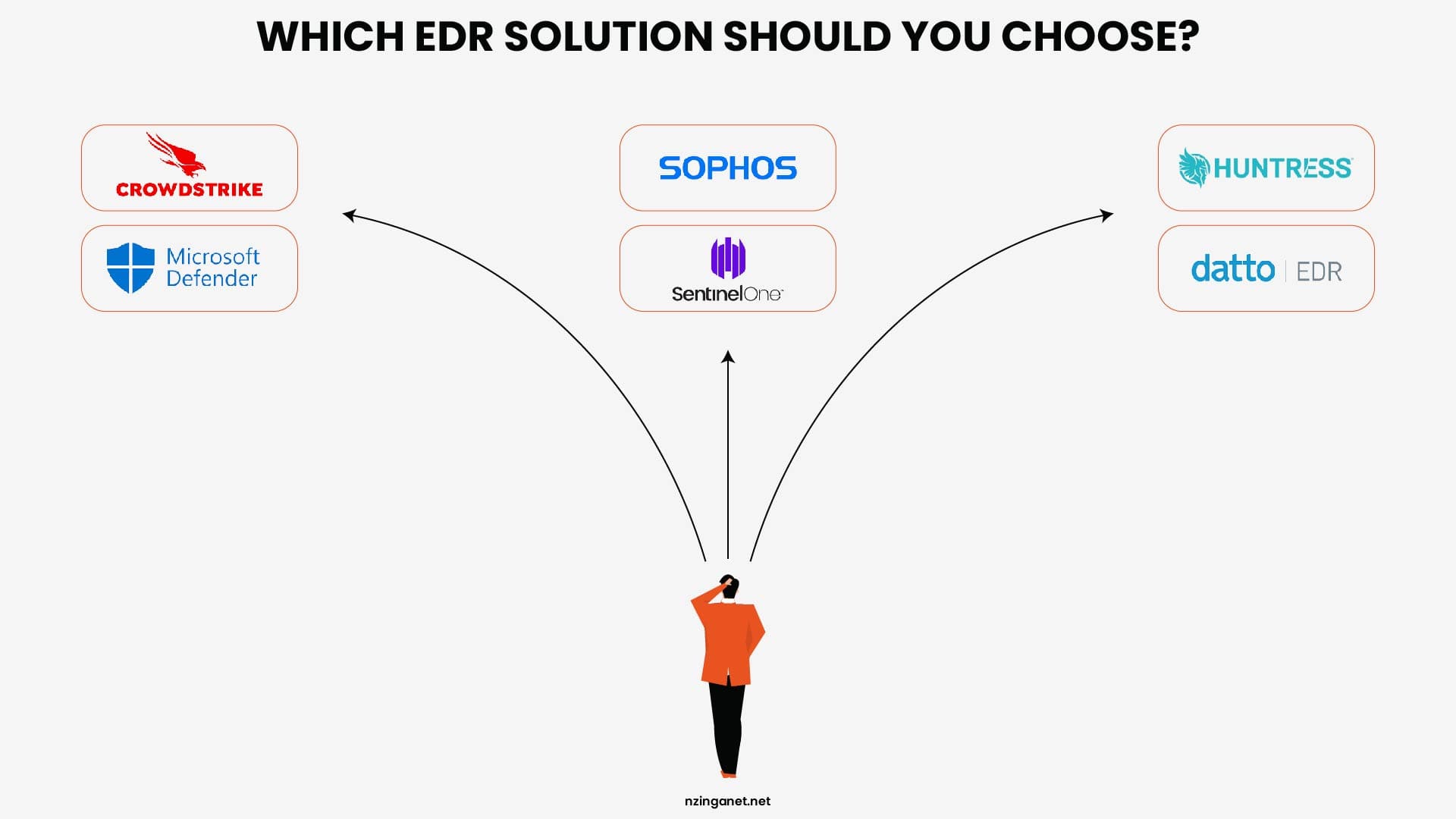
Below are some of the most widely recommended EDR-style endpoint platforms for SMBs in 2026:
| Provider | Best for / positioning | Typical pricing (2026) |
|---|---|---|
| CrowdStrike Falcon Go | Small businesses wanting cloud-native EDR | ~$59.99 per endpoint/year |
| Microsoft Defender for Business | Microsoft-centric SMBs | Included in M365 Business Premium (~$22/user/month) |
| SentinelOne | SMBs wanting AI-driven protection | ~$69.99 per endpoint/year |
| Sophos Intercept X | Teams without dedicated security staff | Quote-based |
| Huntress Managed EDR | SMBs wanting fully managed response | Per-endpoint via MSP |
| Datto EDR | Small businesses using MSPs | ~$2.50-$3.00 per endpoint/month (MSP channel) |
CrowdStrike Falcon Go
Falcon Go is a cloud-native endpoint security tier designed for small businesses. It includes next-generation antivirus, device control, and core EDR functions. Many SMBs use it as their primary EDR layer because it deploys quickly and does not need on-prem infrastructure.
Microsoft Defender for Business
If your business already uses Microsoft 365 Business Premium, Defender for Business adds EDR-level protection at no extra license cost. It integrates tightly with Windows and Microsoft's security ecosystem, making it a cost-efficient choice for Microsoft-centric SMBs.
SentinelOne
SentinelOne focuses on autonomous AI-driven protection and can roll back files after ransomware attacks. Its Singularity-style plans support Windows, macOS, and Linux, and sit in the mid-range in price for SMBs.
Sophos Intercept X
Sophos Intercept X emphasizes deep-learning-based malware detection and is often used in managed or co-managed environments. It is popular with teams that lack a full-time security team because it is easy to configure and manage. Pricing is typically custom-quoted per deployment.
Huntress Managed EDR
Huntress is built for SMBs and MSPs and takes a fully managed approach: its analysts review and respond to every alert. This model reduces the need for internal security staff and can sit alongside Microsoft Defender instead of replacing it.
Datto EDR
Datto EDR is positioned for affordability, with pricing starting as low as $2.99 per endpoint per month for organizations working through an MSP channel. It integrates with Datto's broader business continuity stack and offers ransomware rollback functionality. It is particularly well-suited for small businesses working with managed service providers who use Datto's platform.
SELECTION FRAMEWORK
How to Choose an EDR Solution: A Practical Framework
1. Start With Your Own Capacity
The most common mistake in EDR selection is choosing a platform based on feature lists without accounting for who is going to operate it. A highly capable standalone EDR platform that generates 50 alerts a day and has no one to investigate them provides far less actual protection than a simpler managed EDR service with 24/7 analyst coverage.
If your business has internal IT staff with security expertise and the bandwidth to monitor alerts continuously, standalone EDR with strong tooling is a viable option. If your IT team's primary focus is keeping systems running rather than investigating security events, managed EDR is the more realistic choice.
2. Questions to Ask Every Vendor
- What detection methods does the platform use? (Look for behavioral analysis and AI, not just signature-based detection.)
- What is the false positive rate, and how is alert fatigue managed?
- Does the platform support all operating systems in my environment?
- What response actions are automated, and which require manual approval?
- What does a typical investigation workflow look like for a suspected ransomware event?
- What data retention period is included, and can telemetry logs be used to support compliance audits?
- What is the deployment timeline for a business with our number of endpoints?
- How does pricing scale as we add devices?
3. Run a Proof of Concept
Most reputable EDR vendors offer trial periods or proof-of-concept deployments. Before committing to a platform for a multi-year contract, deploy it in a representative environment, review the alerts it generates, and assess how the investigation workflow feels for your team. The platform that works best for your organization is the one your team will actually use and respond to effectively, not necessarily the one with the longest feature list.
Explore the Right EDR Solution Today
Adding EDR to a security strategy should make things easier, not more complicated. The focus should be on choosing a solution that works well with existing tools and keeps the environment simple to manage.
It also helps to have a system that can learn over time. When past incidents are used to recognize and respond to similar threats, much of the routine work is reduced. This allows security teams to spend their time on more important tasks.
If guidance is needed in choosing the right approach, NzingaNet is here to help. Schedule a consultation today to explore what fits best for your environment.
COMMON QUESTIONS
Frequently Asked Questions
1. What is EDR and why do small businesses need it in 2026?
Endpoint Detection and Response (EDR) continuously monitors devices on your network, detects advanced threats in real time, and helps you respond quickly to ransomware and fileless attacks. For SMBs in 2026, EDR is critical because perimeter-only security no longer stops modern attacks that start on laptops, phones, and remote devices.
2. EDR vs antivirus: which is better for SMBs?
Traditional antivirus mainly blocks known threats using signatures, while EDR watches behavior and catches unknown and fileless attacks. For SMBs facing ransomware and sophisticated threats, EDR provides much stronger protection and faster response, making it the better core control, often layered on top of or replacing basic antivirus.
3. How much does EDR cost for a small business in 2026?
EDR typically costs between $3 and $15 per endpoint per month, depending on features and whether it's managed. Entry-level self-managed EDR starts around the lower end, while managed EDR (MDR) with 24/7 analyst support usually ranges from $10 to $40+ per endpoint per month, offering enterprise-grade coverage without hiring a full-time security team.
4. Should SMBs choose standalone EDR or managed EDR (MDR)?
If your team has limited time or security expertise, managed EDR (MDR) is usually the better fit, as vendor analysts investigate and respond to threats for you. Standalone EDR suits organizations with an internal security team that can monitor alerts around the clock. Most SMBs today lean toward MDR to reduce operational burden and improve response speed.
5. How can an SMB implement EDR with minimal IT overhead?
Start with a cloud-based or managed EDR that integrates with your existing Microsoft 365 or MSP stack, requires no on-prem hardware, and offers guided setup. Deploy the agent across all endpoints (including remote devices), then let the vendor or MSP handle alert tuning, investigations, and response. This approach gives strong protection without overwhelming your IT team.
6. What's the difference between EDR and XDR?
EDR focuses on endpoint telemetry: laptops, desktops, servers, and mobile devices. XDR (Extended Detection and Response) expands that same behavioral analysis across email, network, cloud workloads, and identity systems, correlating signals from all of them into a single investigation. Most SMBs start with EDR and grow into XDR once they need visibility beyond the endpoint.
PENNSYLVANIA & BEYOND
Stop Cybersecurity Mistakes Before They Cost You: NzingaNet Can Help
NzingaNet provides managed IT and cybersecurity services to small and mid-sized businesses across Pennsylvania and the surrounding region. From endpoint protection to compliance readiness, we handle the security so you can focus on your business.