May 8, 2026
Most small businesses that suffer a breach were not completely unprotected. They had antivirus installed, firewall rules configured, and kept their software mostly up to date. Yet attackers still got in, moved laterally across the network for days or weeks undetected, and caused significant damage before anyone noticed.
This highlights the core issue in the EDR vs antivirus debate. It's not about replacing one tool with another but about understanding what traditional antivirus was designed to do and why today's most damaging attacks are specifically built to evade it.
This guide breaks down exactly where antivirus works, where it falls short, and what that difference means for small and medium businesses trying to stay secure in 2026 without overspending or overcomplicating IT compliance and their security stack.
TABLE OF CONTENTS
- Key Takeaways: EDR vs Antivirus in 2026
- What Is Antivirus Software?
- How Does Antivirus Work?
- Limitations of Antivirus in 2026
- What Is EDR (Endpoint Detection and Response)?
- How Does EDR Work?
- EDR vs Antivirus: Feature Comparison Table
- When Should You Use Antivirus?
- When Do You Need EDR?
- EDR + Antivirus: Better Together?
- EDR vs Antivirus: Cost Comparison in 2026
- How To Choose the Right Solution for Your SMB in 2026
- The Final Verdict: EDR vs Antivirus in 2026
- Frequently Asked Questions
QUICK SUMMARY
Key Takeaways: EDR vs Antivirus in 2026
- Antivirus misses modern attacks: Signature-based AV fails against 82% malware-free detections and 29-minute breakout times, leaving SMBs vulnerable to fileless and zero-day threats.
- EDR provides full protection: Behavioral detection, automated isolation, ransomware rollback, and forensics stop advanced attacks that AV can't handle.
- Choose EDR + NGAV for SMBs: Integrated platforms like CrowdStrike or Microsoft Defender deliver both layers affordably ($6-$16/endpoint/month) vs. $1M+ breach costs.
- Upgrade now if: 10+ endpoints, remote workers, sensitive data, or compliance needs; opt for managed EDR if no IT team.
TRADITIONAL SECURITY
What Is Antivirus Software?
Antivirus software is one of the oldest and most widely used forms of endpoint protection. Its primary purpose is to detect, prevent, and remove malicious software (malware), including viruses, worms, trojans, and spyware, from computers and other devices.
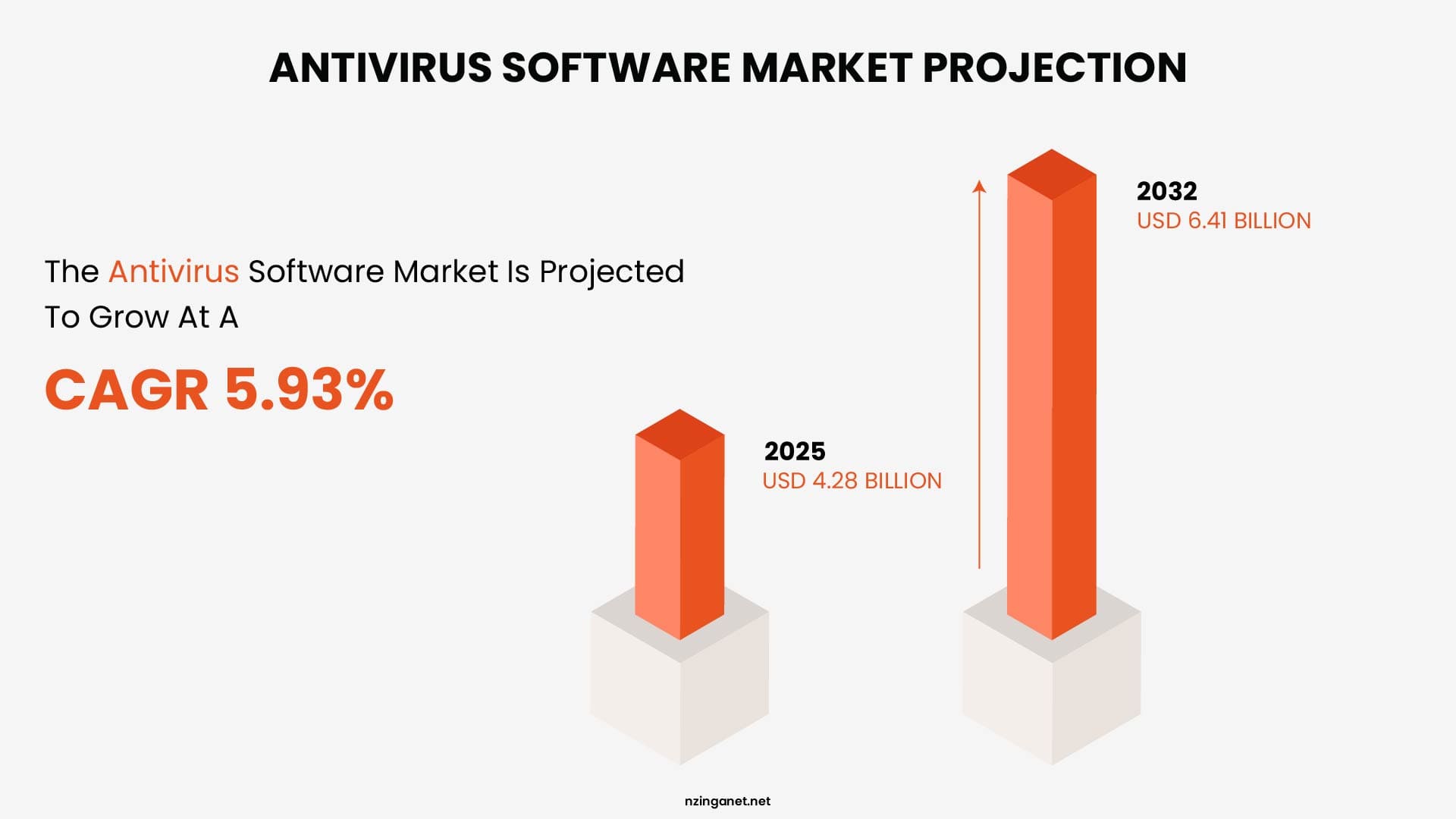
The Antivirus Software Market size was estimated at USD 4.28 billion in 2025 and expected to reach USD 4.53 billion in 2026, at a CAGR of 5.93% to reach USD 6.41 billion by 2032.
How Does Antivirus Work
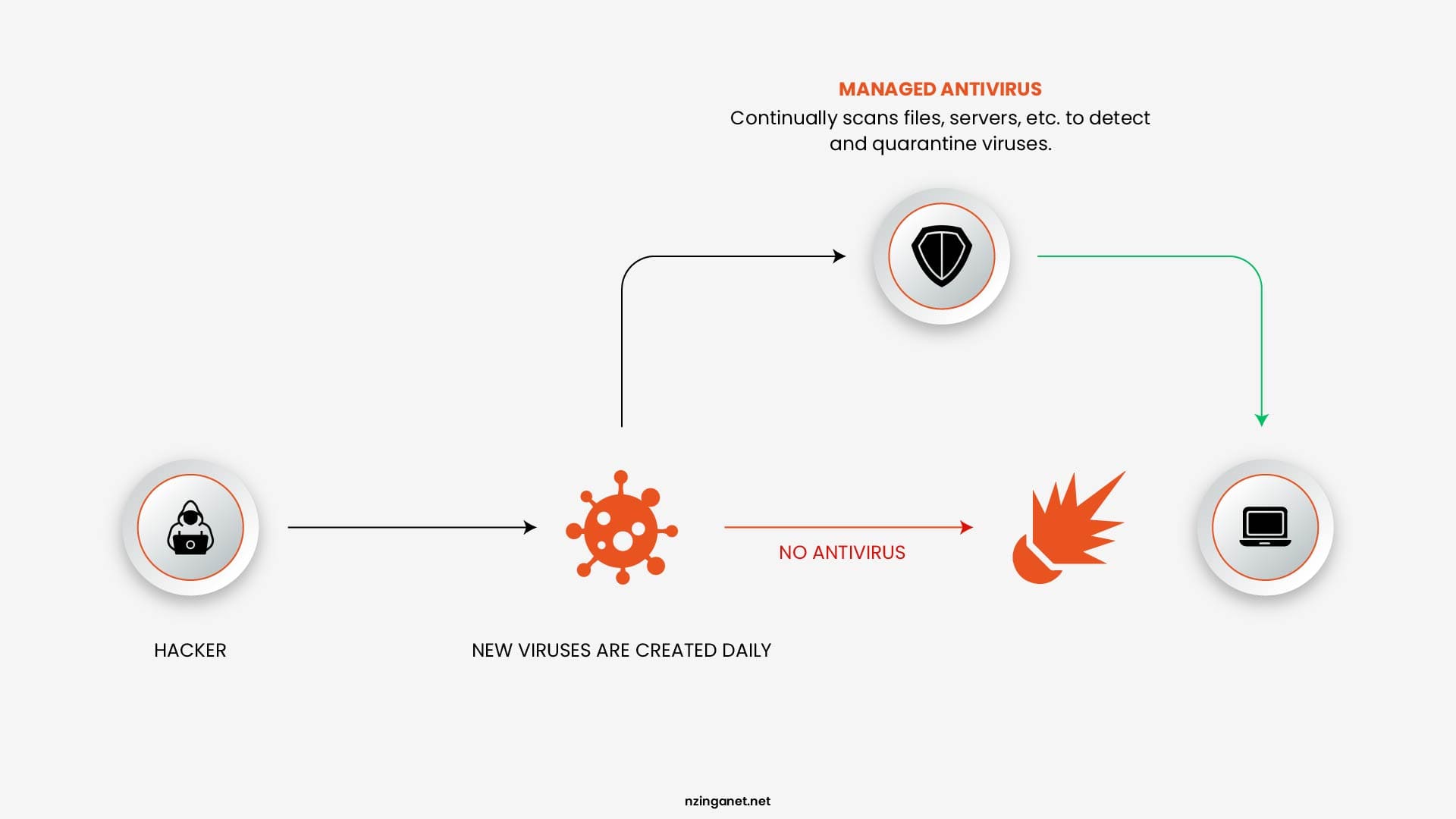
Traditional antivirus solutions rely heavily on signature-based detection. This method involves scanning files and programs for known patterns of malicious code, essentially digital fingerprints that have been previously identified and cataloged.
In addition to signatures, modern antivirus tools also use heuristic analysis, which attempts to identify suspicious behavior or code structures that may indicate previously unknown threats. This allows antivirus software to catch some new or modified malware variants, although its effectiveness can be limited compared to more advanced systems.
Key Features of Antivirus
- Real-time scanning: Continuously monitors files and processes for threats
- Malware detection and removal: Identifies and eliminates known malicious programs
- Scheduled scans: Allows users to run periodic system-wide checks
- Automatic updates: Regularly updates virus definitions to stay current
Limitations of Antivirus in 2026
- Struggles with zero-day and never-before-seen attacks
- Limited visibility into overall endpoint behavior
- Ineffective against fileless malware and living-off-the-land techniques
- Mostly reactive rather than proactive
MODERN ENDPOINT PROTECTION
What Is EDR (Endpoint Detection and Response)?
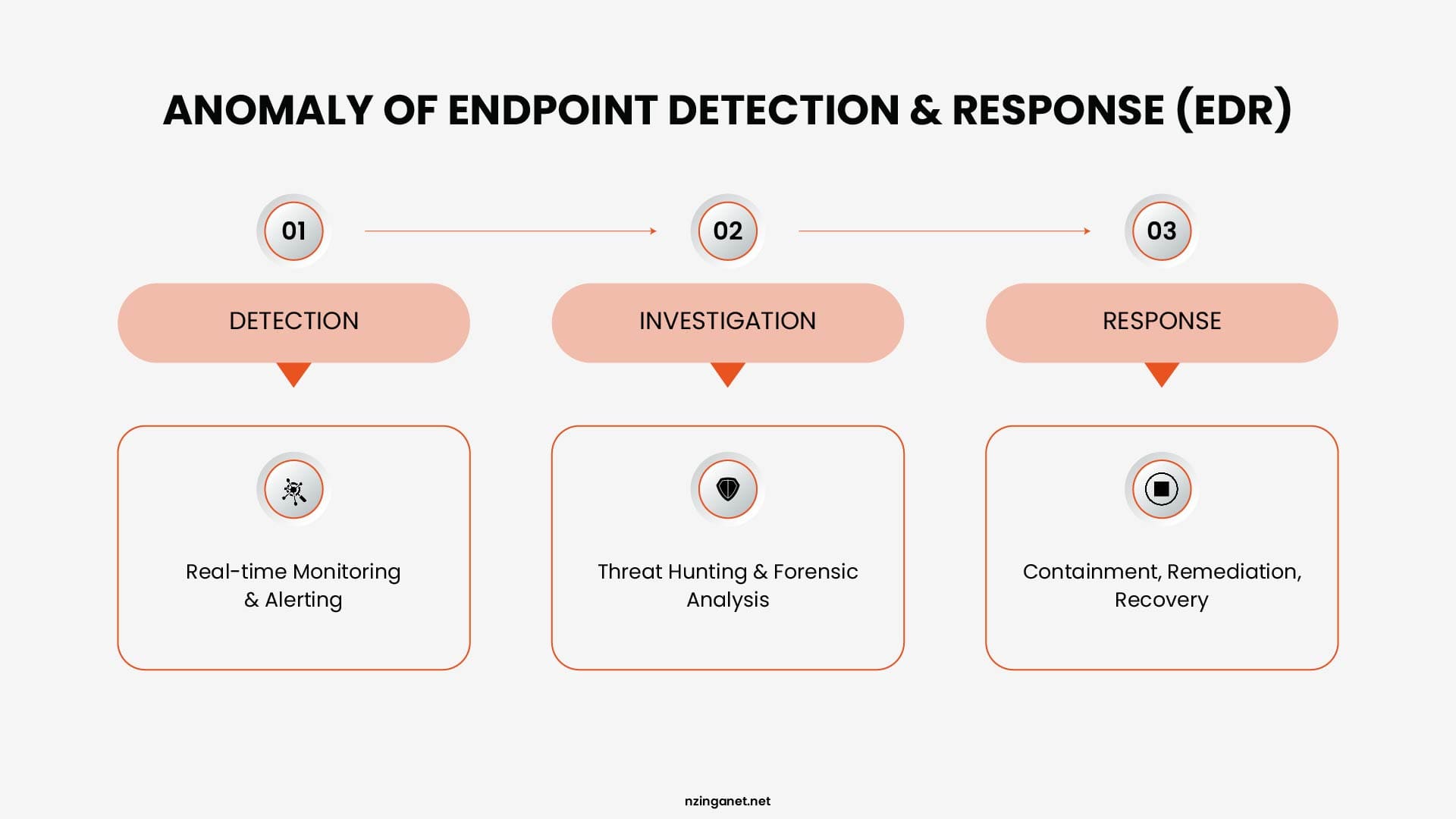
EDR, or Endpoint Detection and Response, is a security platform that installs a lightweight agent on every device in your network and continuously collects data about everything those devices do.
That data is analyzed in real time using behavioral rules and machine learning to identify suspicious activity, generate investigation-ready alerts, and take automated or analyst-guided response actions when a threat is confirmed.
How Does EDR Work
An EDR agent sits on each endpoint and streams telemetry to a central platform continuously. That telemetry includes every process that starts and what it does, every file that is created, modified, or deleted, every network connection that opens, every registry change, and every user action. The central platform builds a behavioral baseline for each device and user over time.
When activity deviates from that baseline in a way that matches known attack patterns or indicates anomalous behavior, the platform generates an alert with the full context attached: which device, which user, which process, what it did, and a timeline showing everything that happened before and after.
When a threat is confirmed, the platform responds. It can cut the device off from the network while leaving the agent active, terminate the malicious process, quarantine files, and on platforms that support it, roll back file changes to restore data that was in the process of being encrypted. These actions happen in seconds, not in the minutes or hours that manual processes require.
Core Capabilities of EDR
- Threat hunting: Proactively searching for hidden threats within the network
- Incident response: Rapid containment and remediation of attacks
- Forensics & visibility: Detailed logs and timelines of endpoint activity
- Root cause analysis: Understanding how an attack started and spread
Limitations of EDR
- Higher cost: More expensive than traditional antivirus.
- Requires active monitoring: Alerts need review and response.
- Initial setup needed: Requires tuning after deployment.
- Potential alert noise: Poor configuration can generate too many alerts.
DEEP COMPARISON
EDR vs Antivirus: Feature Comparison Table
While both antivirus and EDR aim to protect endpoints, they differ dramatically in detection, visibility, and response capabilities. With 82% of detections being malware-free and average eCrime breakout times as low as 29 minutes, these differences directly impact how much damage an attack can cause.
| Capability | Traditional Antivirus | EDR |
|---|---|---|
| Detection approach | Signature-based (known threats only) | Behavioral + AI/ML (known & unknown threats) |
| Threat coverage | Common malware, viruses, worms | Advanced threats, fileless attacks, zero-day exploits, ransomware |
| Response | Block or quarantine files | Isolate device, kill processes, rollback changes |
| Visibility | Limited to single device | Full organization-wide endpoint visibility |
| Monitoring | Periodic scans | Continuous real-time telemetry |
| Investigation & Forensics | None | Full attack timeline and root cause analysis |
| Ransomware rollback | No | Yes (on many platforms) |
| Management overhead | Very low | Higher (alerts require review and tuning) |
| Protection level in 2026 | Basic / First layer | Comprehensive / Modern standard |
USE CASES
When Should You Use Antivirus?
Antivirus still has a valuable role in 2026 as a lightweight, cost-effective first layer of defense against known commodity threats.
Ideal Use Cases for Antivirus
- Personal or home devices used for everyday browsing and email
- Very small businesses with tight budgets and no dedicated IT staff
- Low-risk environments that don't handle sensitive customer or financial data
Advantages of Using Antivirus
- Low cost (often just a few dollars per device per month)
- Easy and fast deployment with minimal configuration
- Very low system impact and management overhead
- Strong protection against widespread, known malware
Antivirus Is Usually Not Enough If:
- You handle customer data, payments, or intellectual property
- You have remote or hybrid workers connecting from various networks
- You want visibility into what's actually happening on endpoints
- Your business could face targeted or ransomware attacks
When Do You Need EDR?
You need Endpoint Detection and Response (EDR) when traditional antivirus is insufficient to stop advanced, fileless, or ransomware attacks that bypass perimeter defenses. It is essential for real-time visibility, detecting malicious behavior, and accelerating incident response to limit damage.
Ideal Use Cases for EDR in 2026
- Growing small and medium businesses with 10+ endpoints or remote/hybrid workers
- Organizations handling sensitive customer, financial, or proprietary data
- Compliance-driven industries (healthcare, finance, legal, e-commerce)
- Any business concerned about ransomware or advanced persistent threats
EDR Becomes Essential If:
- Your organization faces risk of sophisticated or targeted attacks
- Downtime or data loss would cause major financial or reputational damage
- You need detailed forensics, investigation timelines, or automated response
- You want enterprise-grade visibility without building a full security team
BEST PRACTICE
EDR + Antivirus: Better Together?
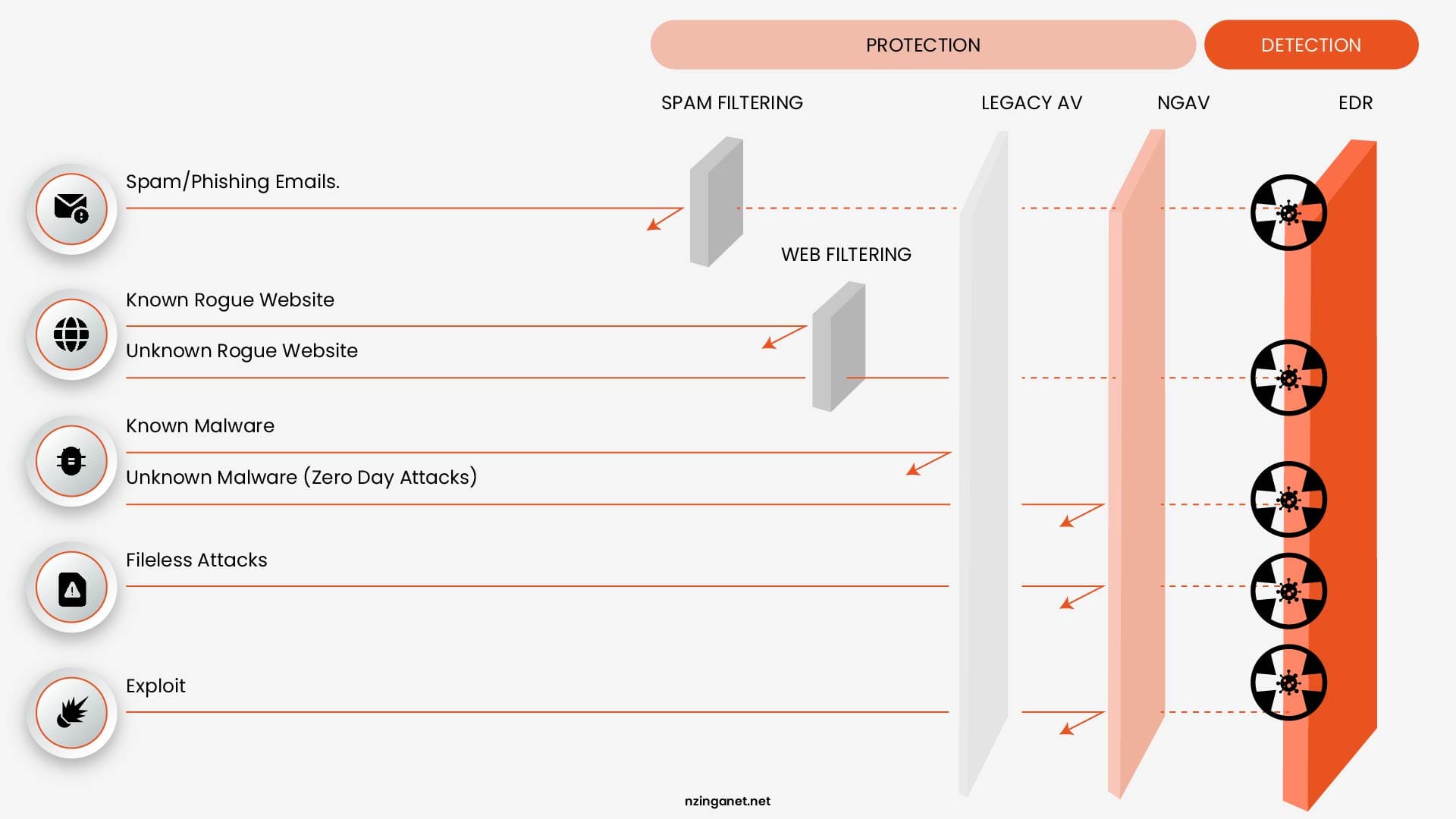
Most modern EDR platforms already include a built-in Next-Generation Antivirus (NGAV) component. This means you get signature-based protection against known malware plus behavioral detection and automated response in a single lightweight agent.
Leading solutions such as CrowdStrike Falcon, SentinelOne, and Microsoft Defender for Business all follow this integrated approach, so businesses usually don't need to manage two separate tools.
The only time antivirus alone makes sense in 2026 is for extremely low-risk environments with very tight budgets and minimal endpoints.
For any small or medium business that handles customer data, processes payments, operates in a regulated industry, or supports remote/hybrid workers, running EDR + Antivirus (or NGAV) together has become the practical standard.
Key Benefits of Combining EDR + Antivirus
- Comprehensive Protection: Catches both everyday known malware and advanced attacks
- Deeper Visibility & Forensics: Full attack timelines and root cause analysis
- Faster Containment: Automatically isolate devices and roll back ransomware
- Reduced Alert Fatigue: Basic threats handled quietly by NGAV
- Simplified Management: One agent, one console, one vendor
FINANCIAL REALITY
EDR vs Antivirus: Cost Comparison in 2026
Traditional antivirus may look like a bargain upfront, but its low price often hides higher long-term risk. Basic AV typically costs $3-$5 per endpoint per year, while EDR ranges from $8-$12 per endpoint per month ($96-$144 annually). Managed EDR with 24/7 response increases that to $15-$25 per endpoint per month.
For a 30-endpoint business, the annual cost difference is significant:
- Antivirus only: $90-$150
- Self-managed EDR: $2,880-$4,320
- Managed EDR: $5,400-$9,000
At first glance, EDR appears substantially more expensive. However, focusing on upfront cost alone misses the bigger picture.
The real benchmark isn't EDR vs AV. It's breach prevention vs. recovery. Sophos' 2025 State of Ransomware for SMBs clocks the average total cost at $2.73 million per incident. This includes downtime, recovery, ransom payments (with about half of victims paying an average of $742K), regulatory penalties, and reputational damage, costs that have risen 27% year over year.
When viewed through this lens, the economics shift quickly. For a 30-endpoint business:
- EDR investment: ~$3,000-$6,000 per year
- Single ransomware incident: $1M+
That means EDR represents roughly 0.3%-0.6% of the cost of a breach, effectively functioning as low-cost risk insurance.
It's also worth noting that for organizations already using Microsoft 365 Business Premium (around $22 per user per month), Microsoft Defender for Business is included at no additional cost. This significantly lowers the barrier to adopting modern endpoint protection, making EDR capabilities accessible without increasing overall security spend.
DECISION GUIDE
EDR vs Antivirus: How To Choose the Right Solution for Your SMB in 2026
Choosing between antivirus and EDR (or both) depends on your data sensitivity, risk level, workforce setup, and budget. The table below gives clear recommendations based on common SMB situations.
| Your Situation | Recommended | Why |
|---|---|---|
| Stores customer, financial, or health data | EDR | Behavioral attacks and credential theft target this data specifically |
| Has remote or hybrid workers | EDR | Endpoints leave your network. EDR travels with them. |
| Needs cyber insurance coverage | EDR | Most insurers now require it as a baseline condition |
| Operates in a regulated industry | EDR | Compliance logs, audit trails, and forensic reports are built in |
| Has no internal IT security staff | Managed EDR | 24/7 analyst coverage replaces in-house capability |
| Has very basic needs and a micro budget | Antivirus | Sufficient for minimal-risk environments only |
| Already pays for Microsoft 365 Business Premium | Microsoft Defender | Solid EDR capability included at no extra license cost |
1. Assess Your Organization Size and IT Complexity
If you handle sensitive customer data, payments, or intellectual property or if a breach would cause major financial or reputational damage, go with EDR. Low-risk businesses with minimal data exposure can often start with good next-generation antivirus.
2. Consider Your Workforce
Remote and hybrid work dramatically increases risk. If employees connect from home, coffee shops, or travel, EDR is strongly recommended because it provides continuous protection regardless of location.
3. Factor in Budget vs. Total Cost of Risk
Antivirus is cheaper upfront, but EDR (especially managed EDR) is usually far less expensive than recovering from one ransomware incident. For Microsoft 365 users, Defender for Business offers excellent value with little to no added cost.
4. Evaluate Your Internal Capabilities
Your choice of solution should reflect your team's experience and availability. If your organization has no dedicated security staff, a managed EDR service is ideal. If you have some IT resources, a self-managed EDR or Microsoft Defender may be sufficient.
5. Check Compliance and Insurance Needs
Businesses subject to regulations like HIPAA, PCI-DSS, or GDPR or those seeking cyber insurance usually need EDR. It provides detailed logs, forensic timelines, and audit-ready reporting that standard antivirus cannot deliver.
THE BOTTOM LINE
The Final Verdict: EDR vs Antivirus in 2026
Antivirus served businesses well for many years, and it's still fast, lightweight, and effective against common, known malware. It continues to play a valuable role as the first line of defense in any modern security setup.
However, it cannot stop the attacks causing the most significant breaches in 2026. Fileless techniques, credential-based intrusions, living-off-the-land tactics, and zero-day exploits aren't fringe scenarios; they target small businesses every day, especially those relying solely on antivirus.
EDR closes that gap. It's designed for the threat environment of today, catching what antivirus cannot, responding before manual review is possible, and providing the context needed to understand and recover from incidents.
If you're unsure which path best fits your business or simply want expert guidance tailored to your environment, team size, and risk level, NzingaNet makes enterprise-grade cybersecurity accessible and manageable for small and medium businesses.
Schedule a free consultation today and let's explore the simplest, most effective way to strengthen your endpoint protection in 2026.
COMMON QUESTIONS
Frequently Asked Questions
1. Is EDR better than antivirus?
EDR is far more capable than traditional antivirus at detecting advanced, fileless, and zero-day threats through behavioral analysis. Antivirus excels at efficiently blocking known commodity malware. They serve different roles, and the strongest setups use both as complementary layers.
2. Can EDR replace antivirus entirely?
Most experts recommend keeping (or upgrading to) next-generation antivirus even when deploying EDR. Antivirus provides lightweight, efficient protection at the entry point, while EDR handles behavioral detection and response for threats that bypass it. Many EDR platforms now bundle NGAV, effectively covering both layers in one agent.
3. Does traditional antivirus work against ransomware?
Traditional antivirus can block known ransomware families that match existing signatures. However, it struggles with new variants, fileless ransomware, or attacks that use legitimate tools and stolen credentials. With ransomware involved in a large portion of SMB breaches and constantly evolving, antivirus alone offers insufficient protection.
4. What is the main difference between EDR and antivirus for SMBs?
The biggest practical difference is response capability. Antivirus mainly blocks or quarantines known files. EDR detects suspicious behavior, isolates devices quickly, provides full attack timelines, and often rolls back changes (such as ransomware encryption). For businesses without a dedicated security team, managed EDR adds 24/7 expert investigation and response that basic antivirus cannot provide.
5. How much does EDR cost compared to antivirus?
Basic antivirus typically costs $2-$8 per device per year. EDR ranges from $6-$16 per endpoint per month (roughly $72-$192 per year), while managed EDR with 24/7 analyst support is often $10-$40+ per endpoint per month. The real comparison should be against the potential cost of a breach, not just the price of antivirus.
6. Should a very small business bother with EDR?
Yes, especially if you store customer data, handle payments, or operate in a regulated industry. Attackers frequently target small businesses precisely because their defenses are often weaker. Managed EDR brings strong protection without requiring you to hire a full internal security team.
PENNSYLVANIA & BEYOND
Stop Cybersecurity Mistakes Before They Cost You: NzingaNet Can Help
NzingaNet provides managed IT and cybersecurity services to small and mid-sized businesses across Pennsylvania and the surrounding region. From endpoint protection to compliance readiness, we handle the security so you can focus on your business.