April 14, 2026
Nearly half of all cyberattacks now target small and mid-sized businesses.
Let that sink in.
While the headlines focus on mega-breaches at huge companies, there's a quiet, devastating problem happening every day to organizations just like yours.
Small and mid-sized companies are getting hit hard, costing many of them hundreds of thousands to millions in lost money, damaging their reputation, and forcing them into tough recovery efforts. It's a real epidemic, and it's far more common than most people realize.
So what cybersecurity mistakes are putting SMBs at risk, and how do you fix them before they cost you?
In this guide, we'll explain the top 5 mistakes SMBs often make. More importantly, we'll show you exactly how you can avoid them.
KEY TAKEAWAYS
Small and mid-sized businesses now account for nearly half of all cyberattacks, and the five biggest reasons come down to preventable habits: weak backups, assuming you're too small to be a target, weak passwords without MFA, delayed patching, and dismissing managed security as unaffordable. Each mistake has a practical, budget-friendly fix: starting with the 3-2-1 backup rule and enabling MFA everywhere, both of which take under an hour to set up and close the gaps attackers exploit most often.
|
30,000 websites hacked every single day worldwide |
$10.5T estimated annual cost of cybercrime globally by 2025 |
95% of cybersecurity breaches are caused by human error |
TABLE OF CONTENTS
- What Is Cybersecurity and Why Does It Matter for SMBs?
- Why Are SMBs Being Targeted More Than Ever?
- How Do You Know If Your Business Is Already at Risk?
- The 5 Cybersecurity Mistakes SMBs Can't Afford to Make
- Mistake 1: Not Taking Backup & Disaster Recovery Seriously
- Mistake 2: Believing "We're Too Small to Be Targeted"
- Mistake 3: Using Weak Passwords and Skipping MFA
- Mistake 4: Delaying Software Updates and Security Patches
- Mistake 5: Dismissing Managed Security as "Too Expensive"
- You Don't Have to Figure This Out Alone
- FAQs
THE BASICS
What Is Cybersecurity and Why Does It Matter for SMBs?
Most small business owners hear the word "cybersecurity" and picture some IT guy in a dark room staring at lines of code. That's not what it is.
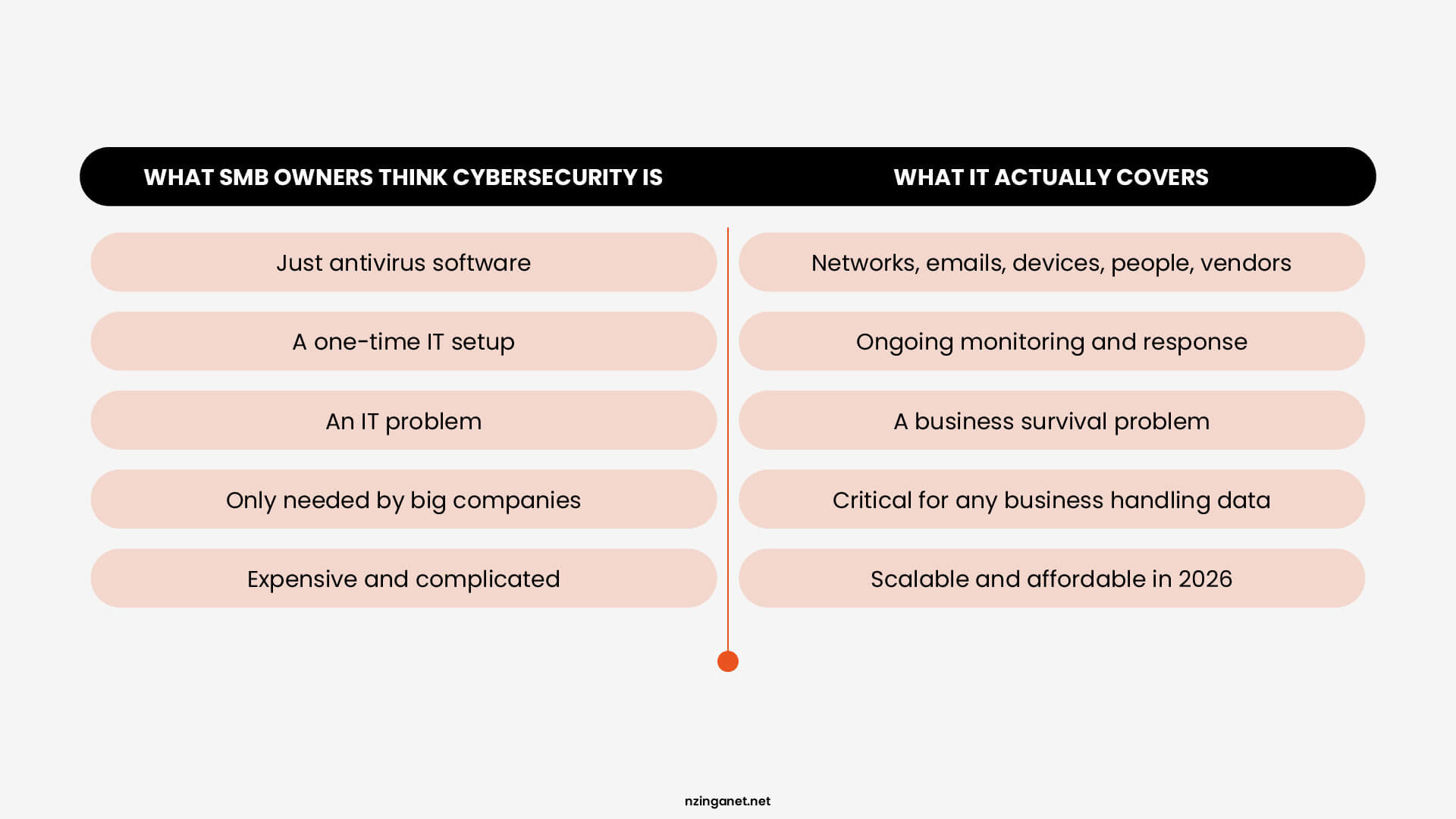
Cybersecurity is simply protecting your business from people who want to steal from you, shut you down, or hold your data hostage. And the targets aren't just big banks or tech companies anymore.
If your business has:
- Customer records
- Payment information
- Employee data
- Business emails
- Any cloud software
Then you have something worth stealing.
The problem is that most SMB owners think of cybersecurity as a one-time setup. Install antivirus, set a password, done. But that's like locking your front door and leaving every window wide open.
THREAT LANDSCAPE
Why Are SMBs Being Targeted More Than Ever?
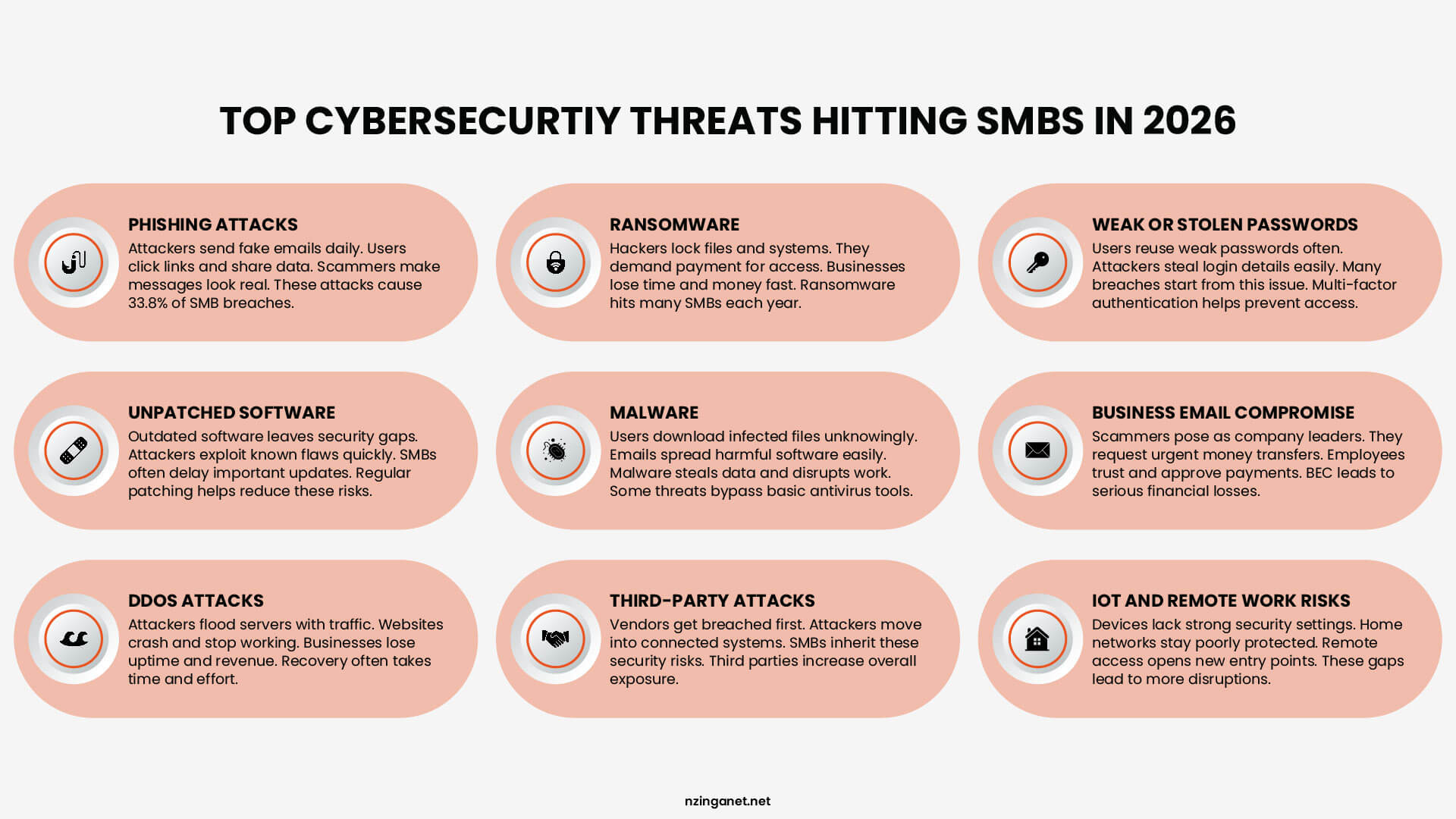
There's a myth that hackers only go after big companies because that's where the money is. That used to be partially true. But it hasn't been accurate for years.
Today, attacking a large enterprise is expensive and difficult. They have full security teams, advanced tools, and serious budgets. Breaking through takes real effort, and the risk of getting caught is high.
Attacking a small business? Much easier. And there are millions of them.
Cybercriminals think like business people. They want the best return on their effort. And small businesses consistently offer weak defenses, valuable data, and a high chance of paying up when things go wrong.
SELF-ASSESSMENT
How Do You Know If Your Business Is Already at Risk?
Before we get into the mistakes, it helps to run a quick security audit of where you actually stand right now.
Go through this checklist honestly. No one's grading you. But your answers will tell you a lot about how exposed your business really is.
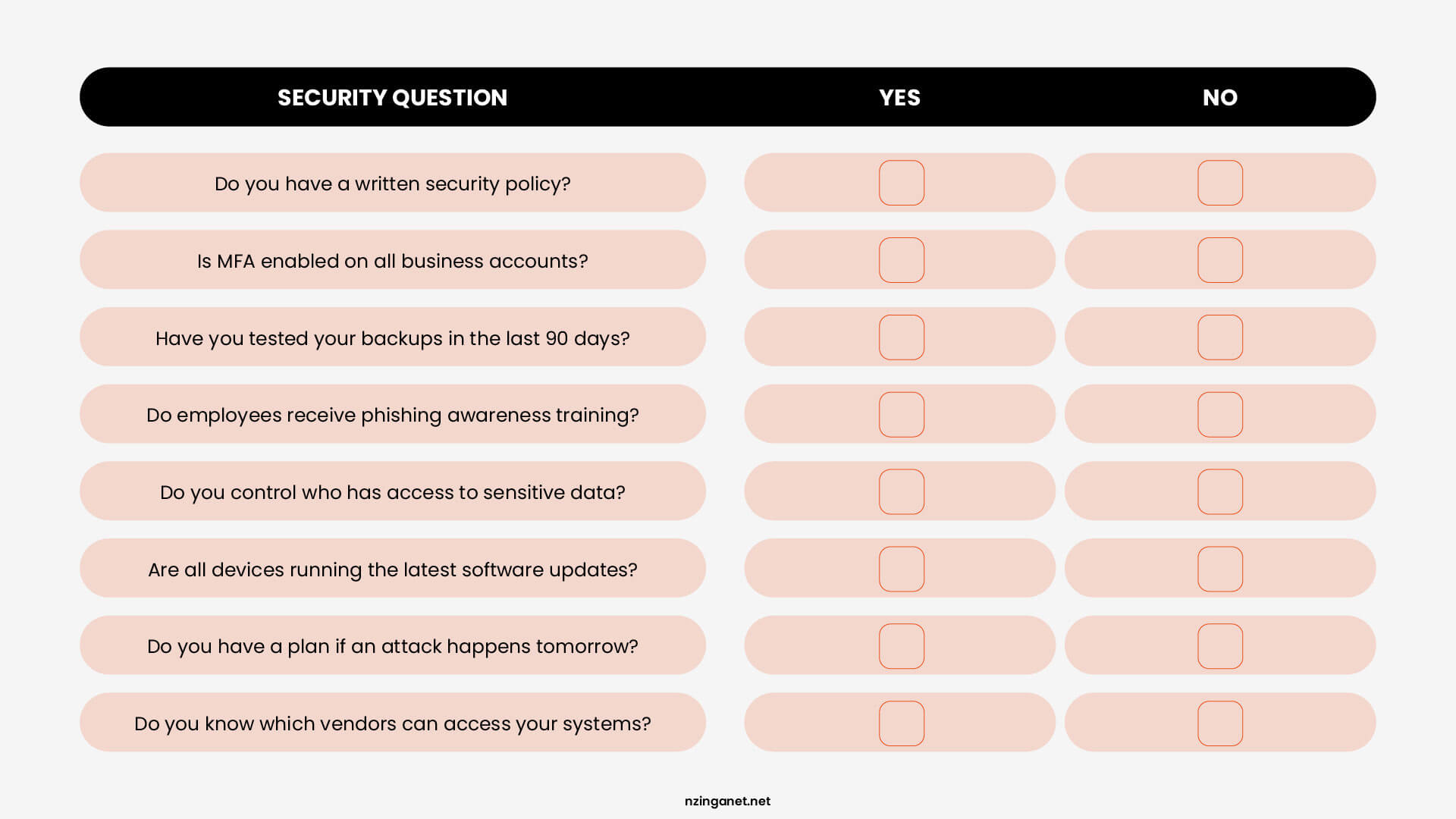
What your score means:
|
7-8 YES You're in decent shape. Focus on maintaining what you have and closing any remaining gaps. |
4-6 YES You have real exposure. Some quick fixes can make a big difference fast. |
0-3 YES Your business is at serious risk right now. The mistakes below apply directly to you. |
Most SMBs land in that middle range. They've done some things right but left enough gaps that a motivated attacker could find a way in. If you answered no to more than three of these, keep reading. The next section explains exactly what's going wrong and how to fix it.
THE CORE ISSUES
The 5 Cybersecurity Mistakes SMBs Can't Afford to Make
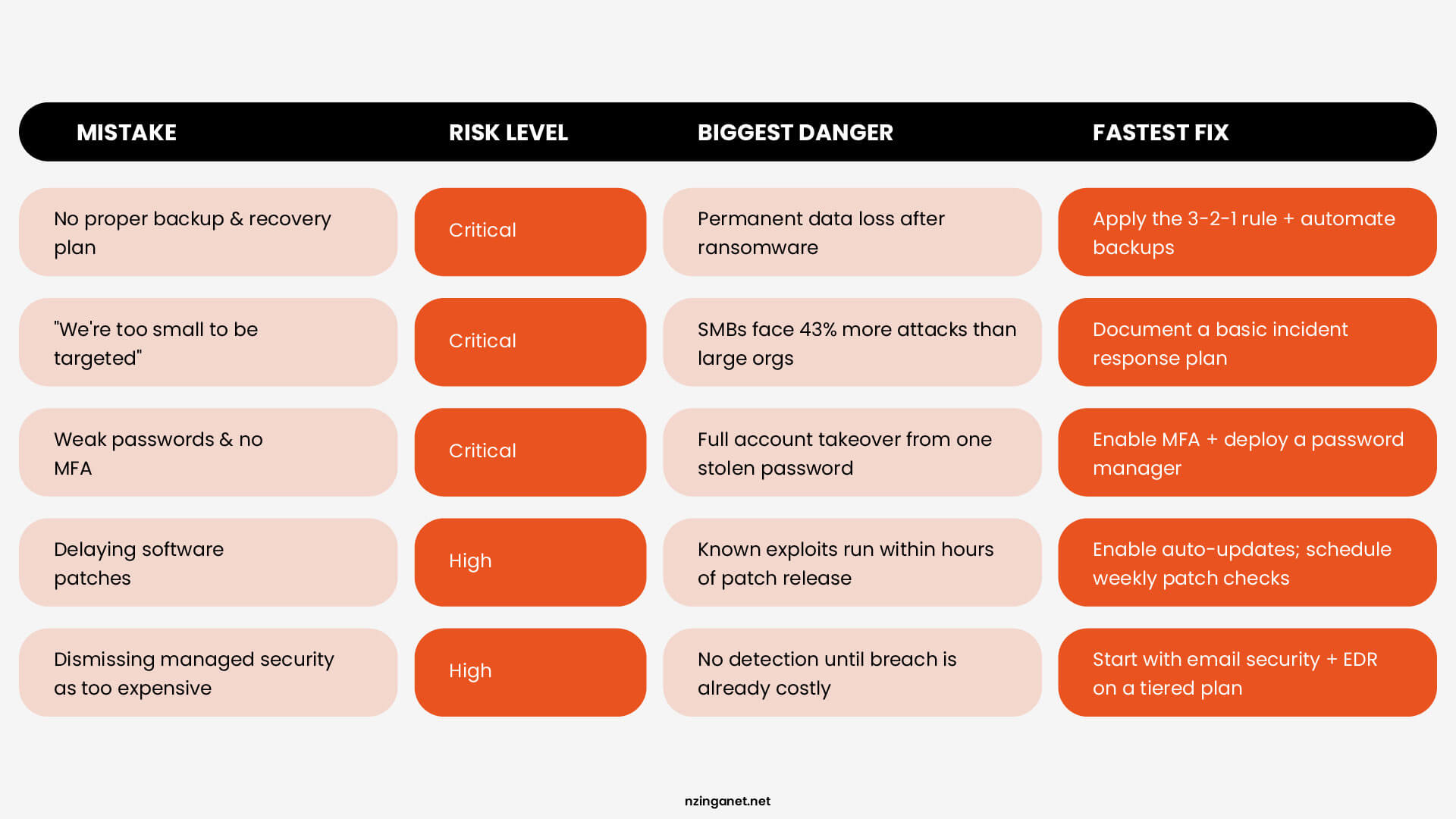
MISTAKE #1
Not Taking Backup and Disaster Recovery Seriously Enough
Many small business owners assume that saving files to Google Drive or Dropbox counts as a disaster recovery plan. It doesn't and that assumption has cost businesses weeks of downtime and permanent data loss.
Without proper backup and disaster recovery strategies, mid-market companies face average recovery costs exceeding $1.5 million per incident. Ransomware attacks on small businesses have increased by 41% year-over-year, and attackers specifically target businesses with weak or nonexistent backups because those owners are far more likely to pay up.
How to Fix It
|
1
|
Start With the 3-2-1 Rule Keep three copies of your data, on two different media types, with one stored offsite. This gives you recovery options no matter what fails. If your local backups are damaged or inaccessible, the offsite copy ensures you are not starting from zero. It is a simple way to build redundancy into your data protection without requiring complex systems. |
|
2
|
Automate for Consistency Automate your backup processes to eliminate human error and ensure consistency. Modern backup solutions can schedule regular snapshots of entire systems, not just individual files. This approach enables faster recovery times and reduces the risk of missing critical system configurations or databases. |
|
3
|
Test to Stay Ready Test your recovery procedures quarterly through tabletop exercises and actual restoration drills. Document every step of your recovery process and assign specific responsibilities to team members. The goal is to reduce your Recovery Time Objective (RTO) to hours, not days or weeks. |
|
4
|
Go Cloud for Speed Consider cloud-based disaster recovery services that provide secure, geographically distributed backup storage with rapid deployment capabilities. These services often cost less than maintaining physical backup infrastructure while offering better reliability and faster recovery times. |
MISTAKE #2
Believing "We're Too Small to Be Targeted"
This is one of the most common cybersecurity mistakes small business owners make, and it is also the most dangerous because it stops any protective action before it starts.
Cybercriminals love under-defended, small and midsize businesses because they offer the perfect risk-reward ratio. Unlike large corporations with dedicated security teams and unlimited budgets, or organizations with minimal valuable data, SMBs represent high-value targets with predictably weak defenses.
The statistics support this targeting strategy. Small businesses experience 43% more cyber attacks but deploy 31% fewer security controls than larger organizations. This gap creates opportunities that professional cybercriminals exploit systematically across entire industries.
How to Fix It
|
1
|
Accept You're a Target Accept that your organization is already a target and plan accordingly. Monitor dark web forums and threat intelligence feeds for mentions of your industry, competitors, or specific attack techniques affecting similar companies. This intelligence helps you prepare for likely attack vectors before they're used against you. |
|
2
|
Know Your Risk Profile Implement security measures based on your actual risk profile, not on perceived target attractiveness. If you store customer payment information, personal health records, or proprietary data, you're a target for attackers regardless of your organization's size or market profile. |
|
3
|
Build a Response Plan Document what your team does if an attack succeeds. Pre-written communication templates and clear response steps dramatically reduce damage when incidents occur. |
|
4
|
Monitor Threat Intelligence Stay informed on attack trends targeting businesses in your industry. Knowing what attackers are doing to similar companies helps you prepare before they come to you. |
MISTAKE #3
Using Weak Passwords and Skipping Multi-Factor Authentication (MFA)
Weak credentials rank among the most avoidable cybersecurity mistakes. Password habits that worked for a two-person team become serious vulnerabilities as the business grows.
These practices create credential-based vulnerabilities that attackers can exploit through password spraying, credential stuffing, or social engineering attacks.
And without Multi-Factor Authentication (MFA), a stolen password is all it takes to get full access to your email, accounting software, or customer data. Your business email is an especially high-value target, as it contains everything an attacker needs to impersonate you, defraud customers, or move deeper into your systems.
How to Fix It
|
1
|
Use a Password Manager Get a business-grade password manager. It creates strong, unique passwords for every account and stores them securely. Your team stops reusing passwords or leaving them on sticky notes. |
|
2
|
Enable MFA Everywhere Turn on multi-factor authentication for email, banking, accounting software, and any admin access. Use cloud-based MFA services that work through mobile apps, SMS backup codes, or hardware tokens. You do not need to run anything on site. |
|
3
|
Monitor Login Activity Set up alerts for logins that look suspicious. This includes access from unusual locations, attempts outside business hours, or multiple failed logins. Catching a compromised account early costs much less than cleaning up after a breach. |
|
4
|
Enforce a Password Policy Set clear rules for password strength across all staff accounts. Require password changes when someone leaves the company. Many small businesses skip this step, but it is one of the easiest ways to close a security gap. |
MISTAKE #4
Delaying Software Updates and Security Patches
We get it, updates pop up at inconvenient times and sometimes feel like they break more than they fix. But delaying patches is one of the most preventable cybersecurity mistakes an SMB can make.
When a vulnerability is discovered in software, attackers start scanning for businesses running outdated versions almost immediately. Automated tools can identify and exploit these weaknesses across thousands of targets within hours of a patch being released. If you're running old software, you're essentially leaving a known unlocked door in plain sight.
One unpatched application or device can give attackers a foothold to move through your entire network even if everything else is up to date.
How to Fix It
|
1
|
Automate Patch Management Many operating systems and business applications let you enable automatic updates. Turn this on so patches install as soon as they are released. You do not need to think about it, and you remove the delay that attackers exploit. |
|
2
|
Prioritize Security Patches For systems that cannot update automatically, set a firm schedule. Pick one day per week to check for and apply patches. Write it on the calendar and treat it like a bill payment. Consistency matters more than checking every single day. |
|
3
|
Audit Your Software Inventory Some older equipment or software may no longer receive updates from the vendor. If you must keep using it, isolate it from the rest of your network. Put it on a separate network segment with strict access rules so a compromise there does not spread everywhere else. |
|
4
|
Consider Managed IT Services If keeping up with patches feels overwhelming or your team has other priorities, consider using managed IT services. A good provider handles patch monitoring, testing, and deployment for you. They also watch for problems and can roll back updates that cause issues. |
MISTAKE #5
Dismissing Managed Security as "Too Expensive"
Dismissing managed security as too expensive is a cybersecurity mistake that tends to be the most expensive one on this list once a breach actually happens. When budgets are tight, cybersecurity often gets treated as a luxury rather than a necessity.
What many SMB owners don't realize is that managed security has evolved. You no longer need a full in-house IT team, enterprise-grade infrastructure, or a six-figure budget to get serious protection. Today's managed security service providers (MSSPs) offer scalable, subscription-based models designed specifically for organizations like yours.
How To Fix It
|
1
|
Reframe the Cost Conversation Don't ask "Can we afford managed security?" Ask "Can we afford to recover from a breach without it?" A single ransomware incident, regulatory fine, or client data loss will cost far more than a year of managed protection. When framed correctly, cybersecurity spending is risk management, not overhead. |
|
2
|
Start With High-Risk Areas You don't have to outsource everything at once. Email security, Endpoint Detection and Response (EDR), and vulnerability management deliver the most immediate protection per dollar spent. |
|
3
|
Look for SMB-Friendly Pricing Many security providers offer tiered, pay-as-you-grow plans built for small businesses. You don't need an enterprise contract to access enterprise-grade protection. |
|
4
|
Ask About Insurance Discounts Talk to your insurer about what security controls qualify you for lower premiums. MDR services, regular assessments, and endpoint protection often translate directly to savings. |
TAKE ACTION
You Don't Have to Figure This Out Alone
If reading through these cybersecurity mistakes made you realize your business has some gaps, that is a good thing. Awareness is the first step. The second step is talking to someone who can help you see exactly where you stand.
At NzingaNet, we work with small and mid-sized businesses every day to build practical, right-sized cybersecurity strategies that actually fit your budget and your reality.
If you'd like a clearer picture of your current security posture, we'd love to have a conversation.
COMMON QUESTIONS
Frequently Asked Questions
Q1. What cybersecurity mistakes do small businesses make most often?
Weak passwords, no backups, and skipping software updates. Most small businesses also skip multi-factor authentication and assume they are too small to be attacked. These gaps are why small businesses now account for nearly half of all cyberattacks.
Q2. How much does a cyberattack cost a small business?
Recovery from a single incident costs most small and mid-sized businesses over $1.5 million on average. That includes downtime, lost data, and cleanup. Ransomware attacks on small businesses went up 41% last year alone.
Q3. Does multi-factor authentication actually stop hackers?
Yes. Without it, one stolen password gives an attacker full access to your email, bank accounts, or customer data. With it, a stolen password is not enough to get in. It takes about 10 minutes to set up and costs nothing on most platforms.
Q4. How often should a small business test its backups?
Once a quarter at minimum. Most businesses set up backups and never check if they work. A quick quarterly restore test is what tells you whether your backup is real or just a false sense of security.
Q5. Is managed security too expensive for a small business?
No. Most providers now offer monthly plans built for small teams. Start with email security and endpoint protection. Those two areas stop the most common attacks and often qualify you for lower cyber insurance premiums.
PENNSYLVANIA & BEYOND
Stop Cybersecurity Mistakes Before They Cost You: NzingaNet Can Help
NzingaNet provides managed IT and cybersecurity services to small and mid-sized businesses across Pennsylvania and the surrounding region. From endpoint protection to compliance readiness, we handle the security so you can focus on your business.