June 5, 2026
Every business that depends on data, which is essentially every business operating today, faces the same fundamental acknowledgment that sophisticated cyber incidents are no longer a matter of probability but of eventual certainty. The critical differentiator for an organization's survival and continued market position will therefore be the quality of its pre-planned response.
Backup and disaster recovery (BDR) is essential for any business wanting to protect itself against downtime and secure its data. In the event of a catastrophic data loss or security breach, companies can fall back on BDR to restore their systems to a prior state.
The 2021 Colonial Pipeline ransomware attack disrupted fuel supplies across the U.S. East Coast and cost the company millions in ransom payments and operational losses. Incidents like this show how damaging poor cyber preparedness can be.
This guide explains what BDR is, why it matters, and how businesses can build a strong plan to respond effectively when a cyber crisis occurs.
TABLE OF CONTENTS
- What Is Backup and Disaster Recovery?
- Core Concepts Every BDR Plan Needs
- Why Is Disaster Recovery Important for Businesses?
- Business Continuity vs. Disaster Recovery
- Best Data Backup Strategies for Businesses
- Cloud Backup and Disaster Recovery Strategies
- Ransomware Protection and Backup Strategies
- Backup and Disaster Recovery Services: What to Look For
- How to Build a Backup and Disaster Recovery Plan
- BDR for Small and Medium Businesses
- Turning Recovery Planning into Capability
- Frequently Asked Questions
Main Highlights
- Backup and disaster recovery are related but distinct: backups protect your data, while a disaster recovery plan defines how quickly and in what order you restore full operations.
- Two metrics drive every BDR decision: Recovery Time Objective (RTO), how long you can be down, and Recovery Point Objective (RPO), how much data you can afford to lose.
- The 3-2-1 backup rule (3 copies, 2 media types, 1 offsite) remains the baseline standard, with immutable and air-gapped backups increasingly essential against ransomware.
What Is Backup and Disaster Recovery?
Backup and disaster recovery (commonly abbreviated as BDR) refers to the combination of processes, technologies, and policies that an organization uses to protect its data and restore normal operations after a disruptive event.
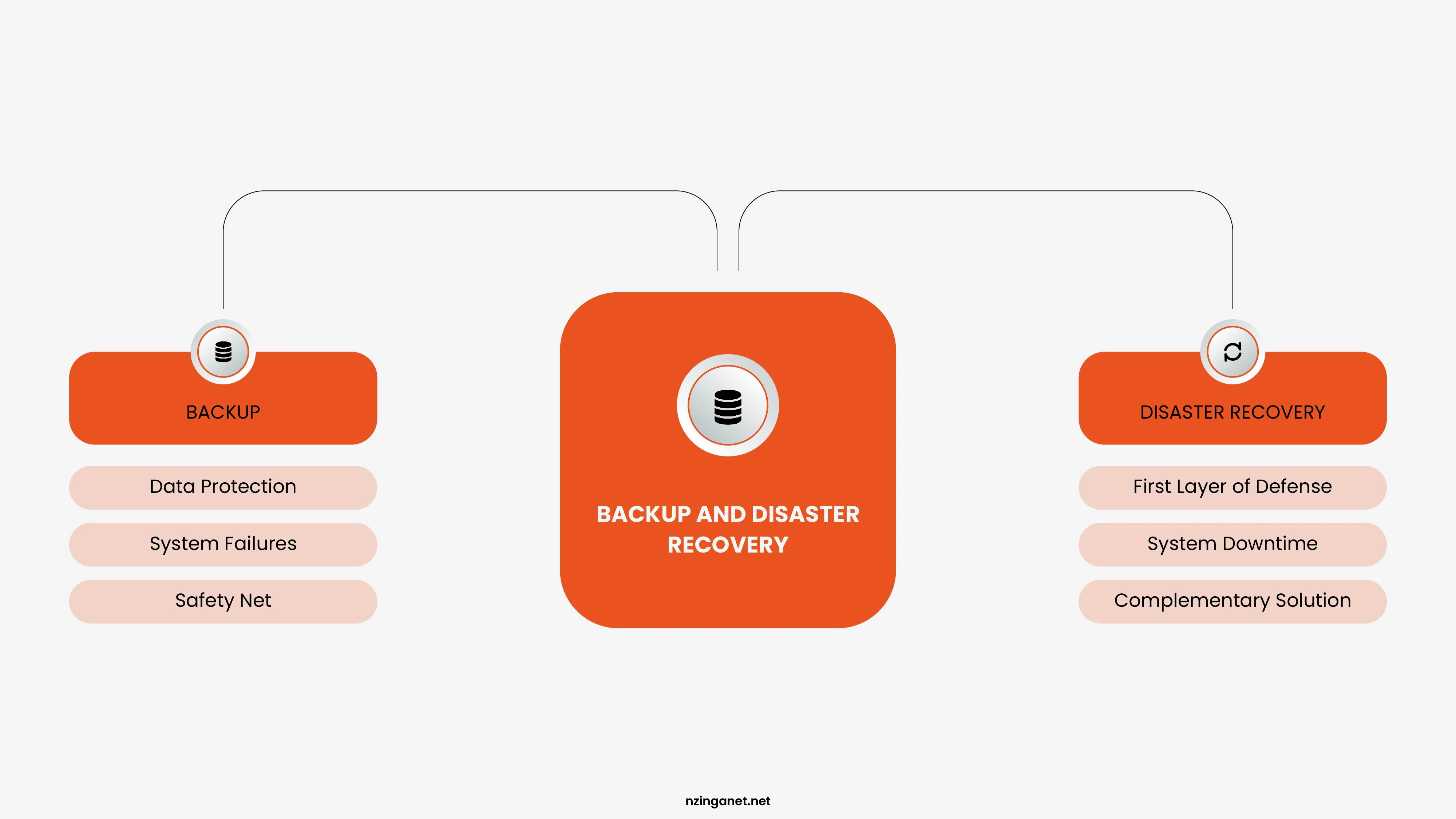
The two components are related but distinct:
Data backup is the practice of creating copies of data and storing them somewhere safe. If original data is lost, corrupted, or destroyed, the backup copy can be used to restore it.
Disaster recovery is the broader set of plans and procedures for restoring IT systems, applications, and infrastructure after a major incident. It covers not just data but the full technology stack a business depends on: servers, networks, applications, communications, and the ability of employees to do their work.
You can have backups without a disaster recovery plan. But backups alone do not tell you how quickly you can restore systems, in what order you should bring them back online, who is responsible for each step, or how you communicate with customers and employees during the recovery process.
A business that has thorough backups but no disaster recovery plan might spend days or weeks trying to restore operations after a major incident, even if the underlying data is intact. A business with both backup and disaster recovery has a structured, rehearsed path back to normal.
Core Concepts Every BDR Plan Needs
Before you can build a backup and disaster recovery plan or evaluate solutions, you need to understand the key terms and metrics that define how well your protection actually works.
Recovery Time Objective (RTO)
RTO is how long your business can afford to be without a system or service before the impact becomes unacceptable. If your e-commerce site going offline for 4 hours means losing $50,000 in revenue and you decide that is your limit, your RTO is 4 hours. Your RTO drives decisions about how much infrastructure to invest in. Getting back online in 15 minutes requires a very different (and more expensive) setup than getting back online in 48 hours.
Recovery Point Objective (RPO)
RPO is how much data you can afford to lose, measured in time. If you back up your database every 24 hours and a failure wipes out your data, you lose up to 24 hours of transactions. If that is acceptable, your RPO is 24 hours. If it is not, you need more frequent backups or real-time replication. RPO drives how often you back up data. The shorter your RPO, the more frequently you need to back up, which increases storage costs and infrastructure complexity.
The Gap Between RTO/RPO and Reality
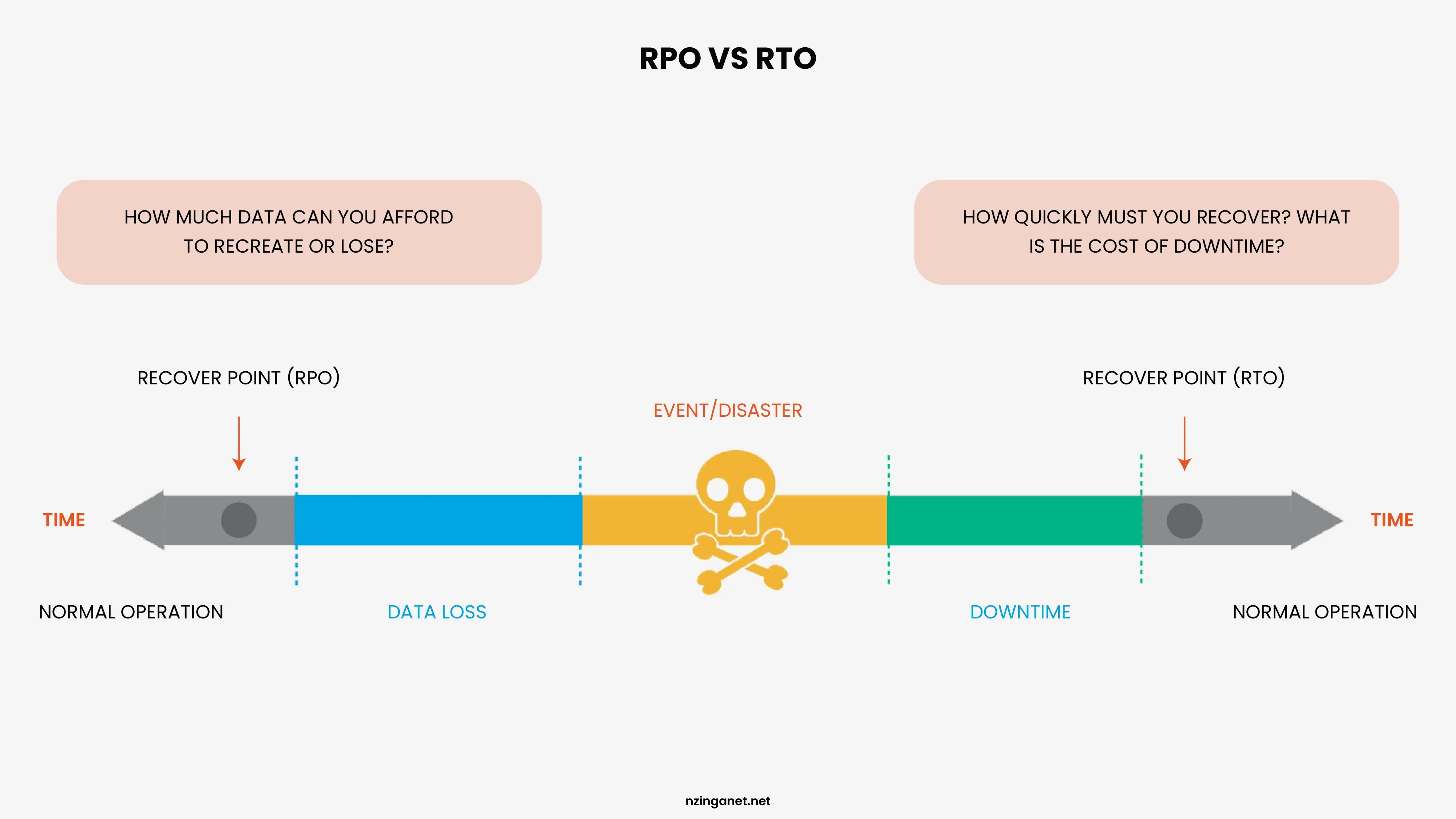
Most businesses significantly underestimate how long recovery actually takes when they have never practiced it. A backup that has never been tested is an assumption, not a guarantee. Part of any serious BDR plan is regularly testing your recovery procedures to confirm that your actual recovery time matches your target.
Why Is Disaster Recovery Important for Businesses?
The short answer: downtime costs money, and data loss can end a company. According to research from IBM, the average cost of a data breach has been climbing steadily year over year, now sitting well above $4 million for enterprise organizations. For smaller businesses, even a fraction of that can be catastrophic.
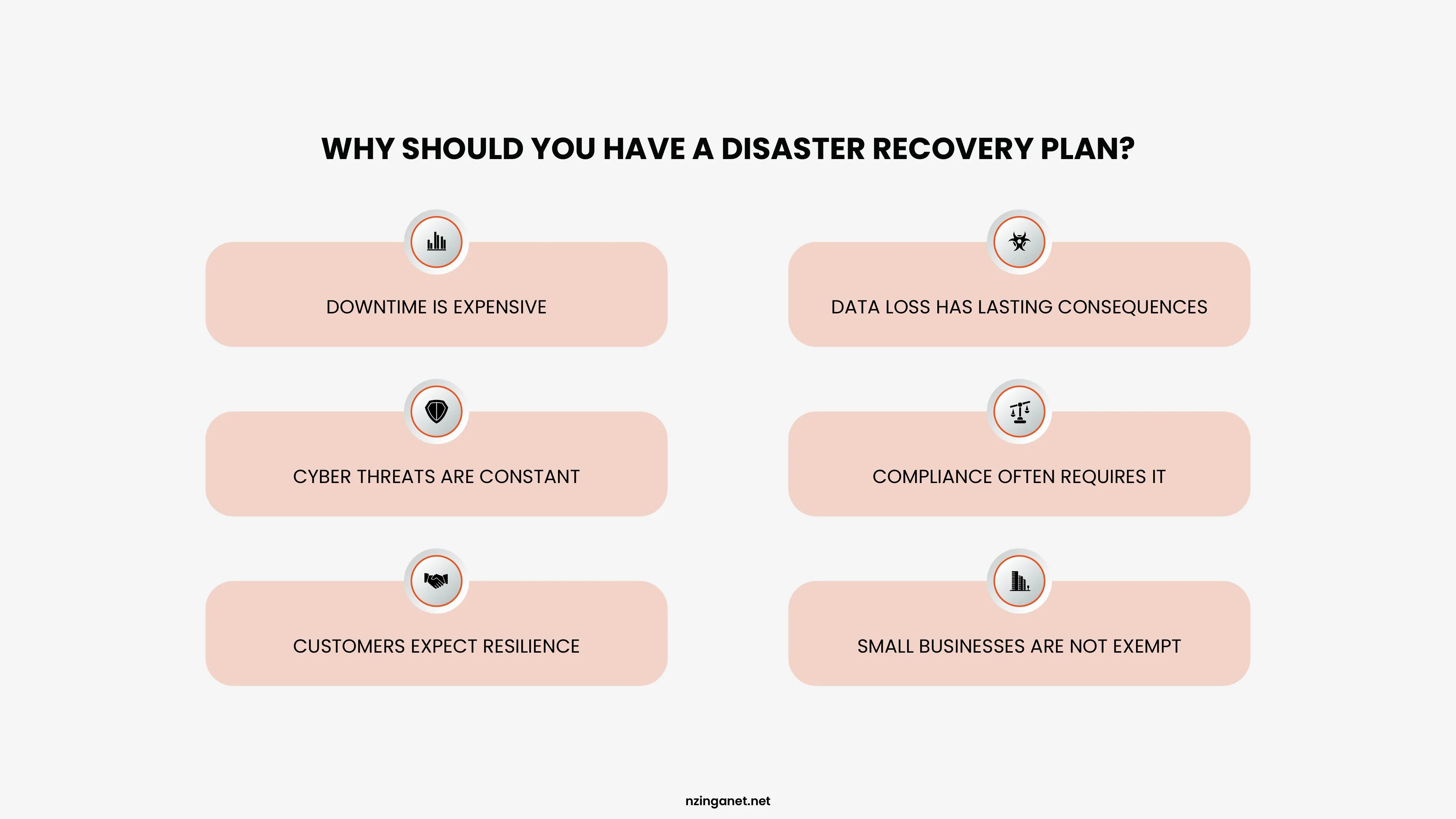
Here are a few other reasons why disaster recovery matters across the board:
Downtime is expensive: The cost of unplanned downtime varies by industry and organization size, but research consistently shows it runs into thousands of dollars per minute for mid-size businesses and far more for enterprises. Even a few hours of downtime can mean missed sales, broken customer commitments, regulatory penalties, and staff time spent on manual workarounds.
Data loss has lasting consequences: Lost customer records, financial data, or operational data can affect a business for years after the incident. Some data, once gone, cannot be reconstructed at any cost.
Cyber threats are constant: Ransomware attacks have become one of the most common causes of disaster recovery events. Attackers encrypt critical data and demand payment. Without clean backups and a recovery plan, organizations face a choice between paying ransom or losing data permanently.
Compliance often requires it: Many regulatory IT compliance frameworks, including HIPAA, PCI DSS, SOC 2, and GDPR, explicitly require organizations to have data backup and recovery strategies in place. Failing an audit because of missing recovery documentation carries its own penalties.
Customers expect resilience: When a service goes down, customers notice. Repeated outages or extended downtime damages trust and sends customers to competitors. A tested disaster recovery plan means faster recovery and less reputational damage.
Small businesses are not exempt: A common misconception is that disaster recovery is only for large enterprises. In reality, small and medium businesses are frequently targeted by ransomware precisely because attackers assume they have weaker defenses. And smaller organizations often have less capacity to absorb the financial shock of a major data loss event.
Business Continuity vs. Disaster Recovery
Business Continuity (BC) and Disaster Recovery (DR) are complementary risk management strategies: Business Continuity focuses on keeping critical business operations running during a crisis, whereas Disaster Recovery focuses on restoring IT systems, applications, and data after an incident.
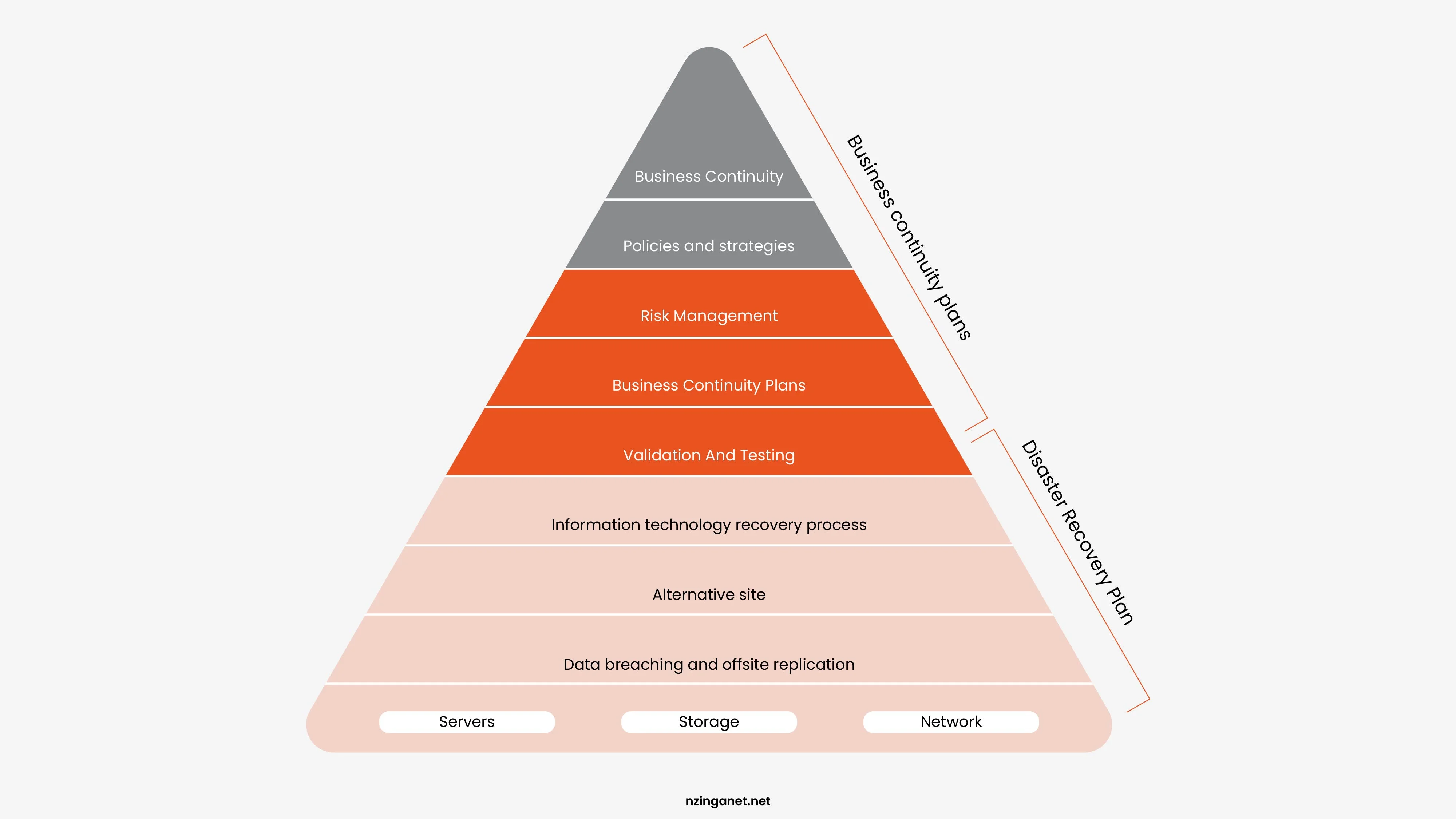
A strong Business Continuity and Disaster Recovery (BCDR) strategy combines both approaches to reduce downtime, maintain customer trust, and ensure rapid recovery from unexpected events such as cyberattacks, natural disasters, hardware failures, or power outages.
| Aspect | Business Continuity (BC) | Disaster Recovery (DR) |
|---|---|---|
| Scope | Entire organization: people, processes, facilities, supply chain | IT-specific: servers, apps, data, networks |
| Timing | Proactive: Operate during disruptions | Reactive: Restore after disruptions |
| Primary Goal | Minimal business interruption; keep serving customers | Recover systems (RTO) and data (RPO) |
| Key Metrics | Downtime tolerance, operational resilience | Recovery Time Objective (RTO), Recovery Point Objective (RPO) |
| Examples | Remote work setups, crisis communication | Data backups, server failover |
| 2026 Focus | Cyber resilience (per IBM: 60% of breaches involve human factors) | Cloud recovery (AWS: 99.99% multi-region durability) |
Business Continuity Focus Areas
- Employee safety and communication
- Remote work and alternate workspace planning
- Customer support continuity
- Supply chain and vendor management
- Crisis communication procedures
- Operational resilience
Example of Business Continuity
If a company experiences a cyberattack, a business continuity plan may allow employees to work remotely, reroute customer support operations, and maintain communication with stakeholders while systems are being restored.
Disaster Recovery Focus Areas
- Data backup and restoration
- Cloud and server recovery
- Network and infrastructure restoration
- Cybersecurity incident recovery
- System failover and redundancy
- Recovery testing and validation
Example of Disaster Recovery
After a ransomware attack encrypts company servers, the disaster recovery team restores backups, rebuilds affected systems, and verifies data integrity to resume normal operations.
When to Use Which?
Ideally, a comprehensive Business Continuity and Disaster Recovery (BCDR) plan links both, as DR is a critical subset of BC.
Use Business Continuity When:
- Employees need alternate ways to work
- Customer communication must continue
- Business operations must remain functional during disruptions
- Critical services cannot stop
Use Disaster Recovery When:
- IT systems fail or become compromised
- Data must be restored from backups
- Applications and servers need recovery
- Cybersecurity incidents affect infrastructure
Best Data Backup Strategies for Businesses
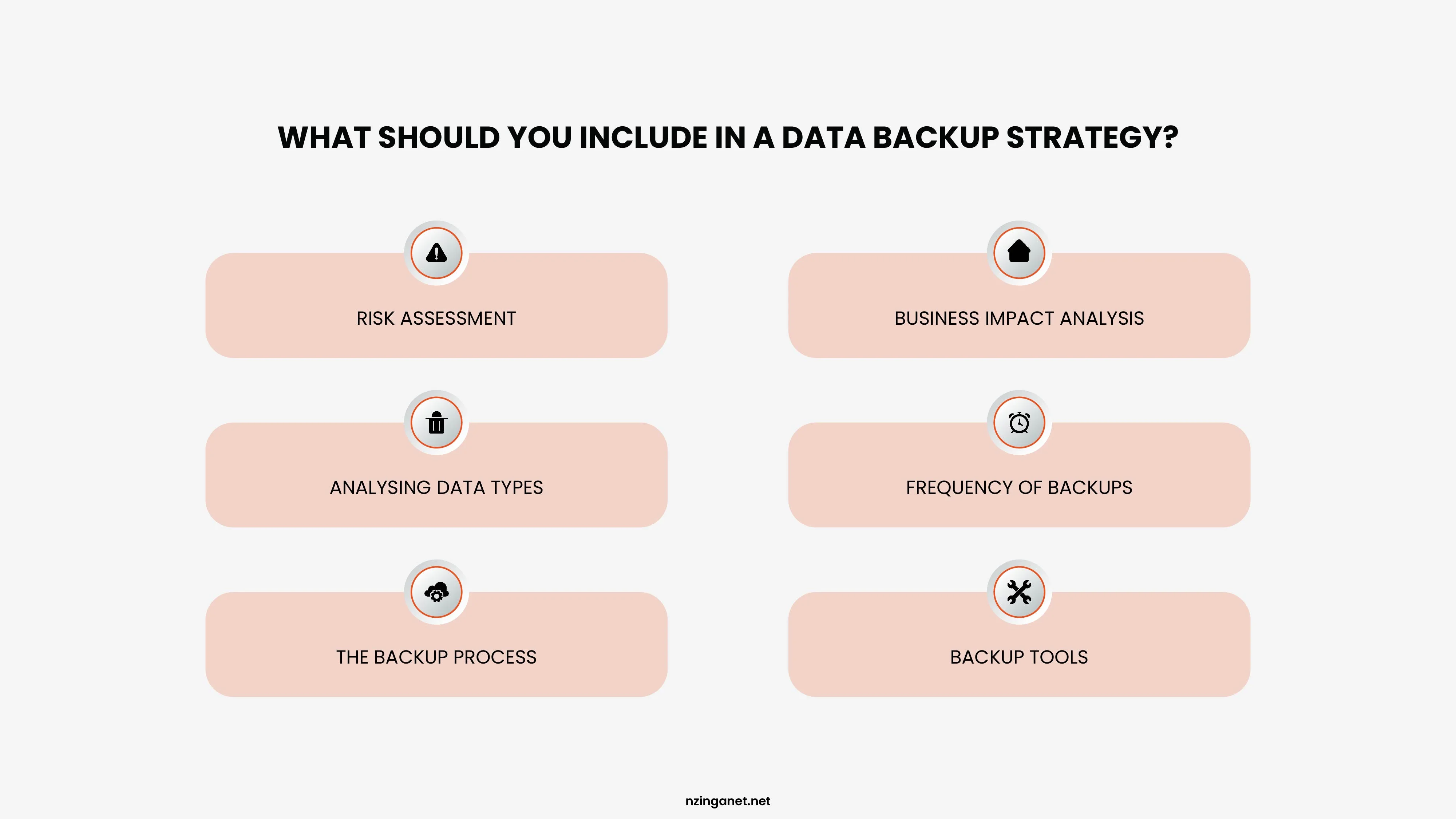
There are several approaches to backing up data, each with different tradeoffs between storage cost, recovery speed, and complexity. However, there is no single backup approach that works for every business. The right strategy depends on your data volume, how frequently it changes, your storage budget, and your RPO.
Full Backup
A full backup copies all selected data every time it runs. It is the simplest to restore from because everything is in one place. The downside is that full backups consume the most storage and take the longest to complete, making them impractical to run frequently on large datasets. Most organizations run full backups weekly or monthly and combine them with more frequent incremental or differential backups.
Incremental Backup
An incremental backup copies only the data that has changed since the last backup, whether that was a full backup or another incremental backup. This makes each incremental backup fast and small. The tradeoff is that restoring from an incremental backup requires the last full backup plus every incremental backup taken since then, which can complicate and slow down restoration.
Differential Backup
A differential backup copies all data that has changed since the last full backup. It is larger than an incremental backup but simpler to restore from: you only need the last full backup and the most recent differential backup.
The 3-2-1 Backup Rule
The 3-2-1 rule is the most widely recommended framework for data backup, and for good reason. It is simple, practical, and addresses the most common failure modes:
- Keep 3 copies of your data (the original plus two backups)
- Store them on 2 different types of media (for example, local disk and cloud storage)
- Keep 1 copy offsite (geographically separate from your primary location)
The logic is straightforward. If your only backup is stored on the same local server as your primary data, a fire or flood destroys both. If your backup is on the same type of media as your original, a firmware bug or ransomware attack might corrupt both. The 3-2-1 rule addresses these scenarios by ensuring redundancy across locations and media types.
Some security-conscious organizations have extended this to a 3-2-1-1-0 rule, which adds one offline or air-gapped copy (not connected to any network, making it unreachable by ransomware) and zero tolerance for unverified backups (all backups must be tested to confirm they restore cleanly).
Cloud Backup and Disaster Recovery Strategies
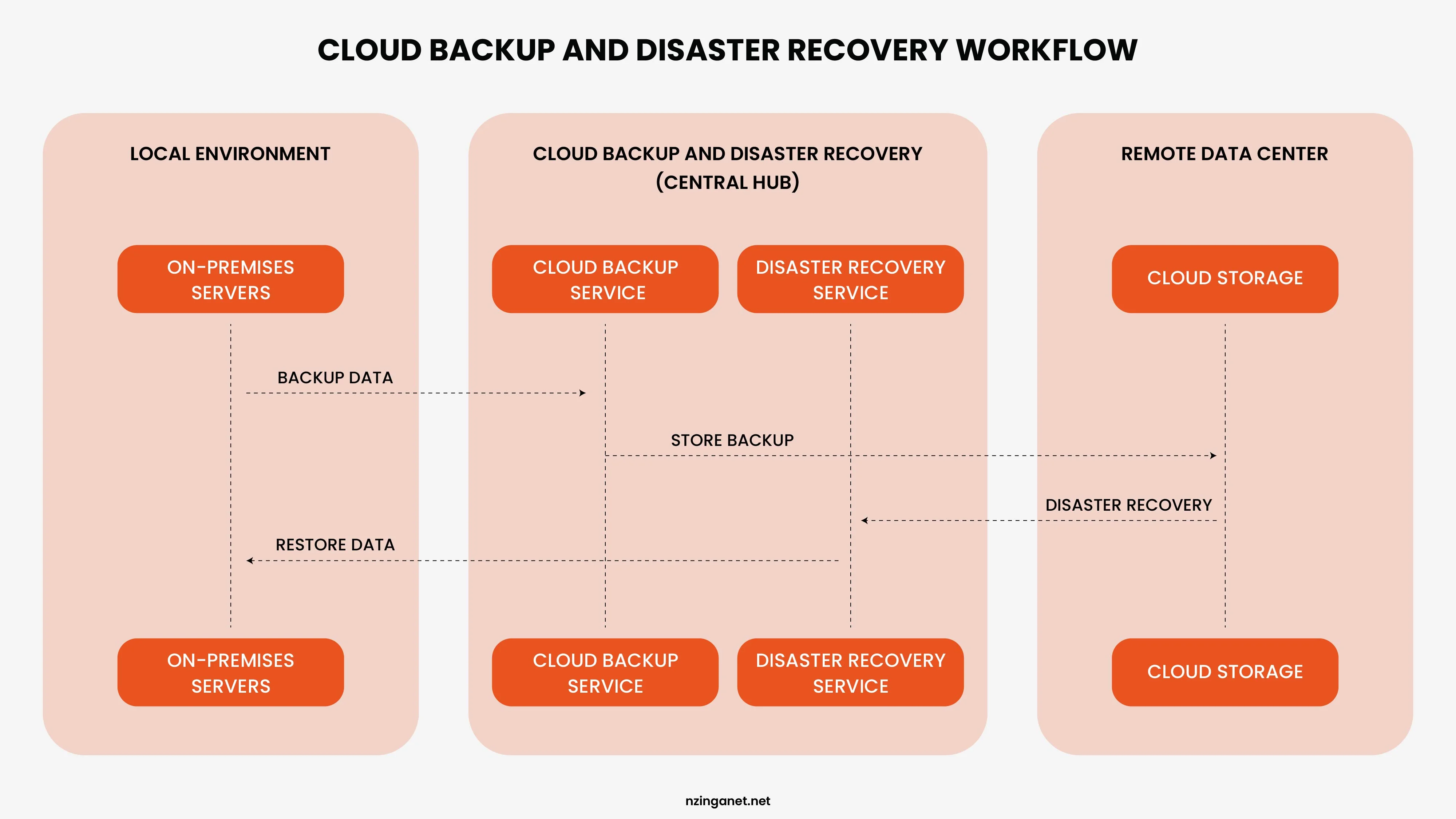
Cloud backup services automatically replicate data to remote cloud infrastructure. Organizations pay for the storage they use rather than purchasing and maintaining physical backup hardware. Major providers in this space include AWS Backup, Azure Backup, and Google Cloud Backup, alongside specialist providers like Veeam, Acronis, and Zerto.
Ransomware Protection and Backup Strategies
Ransomware has fundamentally changed how organizations think about backup and disaster recovery. Traditional backup strategies were designed to protect against hardware failure and accidental deletion. Ransomware introduces a different threat model: an attacker who can also encrypt or destroy backups if they are connected to the network.
Immutable backups: Immutable storage cannot be modified or deleted for a defined period, even by administrators. This protects against ransomware that attempts to destroy all traces of recoverable data.
Air-gapped backups: An air-gapped backup is stored on media or systems that are physically or logically disconnected from the network. Ransomware cannot reach what it cannot connect to.
Tested restoration: Many organizations discover their backups are unusable only when they try to restore from them during an incident. Regular testing reveals issues before they become critical.
Versioned backups: Retaining multiple versions of backups allows restoration to a point before the infection began. This is essential for ransomware recovery.
Backup and Disaster Recovery Services: What to Look For
Many organizations, particularly those without large internal IT teams, engage external backup and disaster recovery services providers to design, implement, and manage their BDR capabilities. When evaluating services, look for:
- Automated backup scheduling and monitoring
- Multi-destination storage (local, cloud, offsite)
- Immutable and encrypted backup options
- Tested recovery procedures and SLAs
- 24/7 support and incident response
- Compliance certifications (SOC 2, ISO 27001, etc.)
- Transparent pricing and no hidden costs
How to Build a Backup and Disaster Recovery Plan
If your organization does not have a formal BDR plan, or has one that has not been reviewed in years, here is a practical path to building one:
1. Assess Risks and Define RPO/RTO: Identify potential threats (ransomware, hardware failure, natural disasters, etc.) and set your Recovery Point Objective and Recovery Time Objective based on business impact analysis.
2. Choose a Backup Strategy: Decide between full, incremental, or differential backups based on your data volume and RPO. Apply the 3-2-1 rule as your baseline.
3. Select Backup Storage Locations: Combine local backups (fast recovery), off-site storage (disaster protection), and cloud storage (scalability and redundancy).
4. Automate and Schedule Backups: Run backups automatically on a schedule matched to your RPO. Eliminate manual backup processes that are prone to failure.
5. Test Restores Frequently: Perform scheduled restore drills quarterly at minimum. Verify that backups actually restore correctly and completely.
6. Document the Disaster Recovery Plan: Write step-by-step recovery procedures and assign roles and responsibilities. Ensure the plan is accessible even if primary systems are down.
7. Train and Communicate: Ensure relevant teams understand their roles in a disaster recovery scenario. Conduct tabletop exercises annually.
BDR for Small and Medium Businesses
Large enterprises often have dedicated teams and significant budgets for backup and disaster recovery. Small and medium businesses face the same risks but have fewer resources. The good news is that cloud-based backup and DRaaS (Disaster Recovery as a Service) solutions have made solid BDR accessible at a much lower cost than building equivalent on-premises infrastructure.
For SMBs, the priority should be getting the basics right first:
- Implement the 3-2-1 backup rule using a combination of local and cloud storage
- Test your restores quarterly to ensure backups actually work
- Document your recovery procedures, even if they're simple
- Assign someone responsibility for BDR oversight
- Review and update the plan annually
Do not let the complexity of enterprise BDR frameworks discourage you from doing the basics. An imperfect plan that exists and has been partially tested is infinitely better than no plan at all.
Turning Recovery Planning into Capability
Backup and disaster recovery is not a technology purchase. It is an operational capability that has to be designed, built, tested, and maintained over time. The organizations that come through disasters intact are the ones that defined clear recovery objectives before anything went wrong, implemented strategies aligned with those objectives, and tested their plans regularly enough to know they would actually work.
Data loss and downtime happen to businesses of every size. What separates the ones that recover quickly from the ones that do not is almost always the investment in backup and disaster recovery that happened long before the incident.
Whether you are building a strategy from the ground up or reviewing a plan that has not been updated in years, NzingaNet can help you identify risks, close recovery gaps, and strengthen your overall Business Continuity and Disaster Recovery (BCDR) readiness.
If you would like a clearer understanding of your organization's recovery preparedness, consider scheduling a disaster recovery assessment with the team to review your infrastructure resilience, backup processes, and business continuity strategy.
Need Help with Backup & Disaster Recovery?
NzingaNet can help you design, implement, and test a backup and disaster recovery strategy that fits your business needs, risk profile, and budget. From risk assessments to full BCDR planning, our team has the expertise to help you prepare for the unexpected.
If you would like a clearer understanding of your organization's recovery preparedness, consider scheduling a disaster recovery assessment with the team.
COMMON QUESTIONS
Frequently Asked Questions
1. How often should data be backed up?
It depends on your RPO. If you can tolerate losing one day of data, daily backups may be sufficient. If losing one hour of data would be damaging, you need backups running every hour. Critical transactional systems often use continuous replication so that data loss is measured in seconds rather than hours.
2. What is the difference between backup and replication?
Backup creates point-in-time copies of data that can be restored later. Replication continuously mirrors data to another location in near real-time. Replication alone is not a substitute for backup because if data is corrupted or deleted, that corruption or deletion is immediately replicated. You need both: replication for fast failover, and versioned backups for recovery from data corruption.
3. How long should backups be retained?
Retention periods depend on business requirements, regulatory obligations, and RPO considerations. Many organizations retain daily backups for 30 days, weekly backups for 3 to 6 months, and monthly backups for one to several years. Regulatory requirements may mandate specific retention periods for certain data types.
4. What is a hot site vs. a cold site?
A hot site is a fully equipped, fully operational recovery facility that can take over operations immediately. A cold site is a physical location with space and power but no pre-installed equipment, requiring hardware to be shipped and configured before recovery can begin. Most organizations today use cloud-based equivalents rather than physical sites.
5. Should small businesses invest in disaster recovery?
Yes. Small businesses are frequently targeted by ransomware and are less equipped to absorb the financial impact of extended downtime or data loss. Cloud-based backup and disaster recovery solutions have made robust protection accessible at a fraction of the cost it required a decade ago. A small business can implement effective BDR for a few hundred dollars per month.
6. What is a recovery runbook?
A runbook is a detailed, step-by-step operational guide for a specific recovery task. For example, a runbook for restoring the primary database would cover every command, configuration check, and verification step required to bring that database back online. Runbooks are essential for ensuring that recovery can be executed correctly under pressure.
PENNSYLVANIA & BEYOND
Ready for Backup & Disaster Recovery That Actually Protects Your Business?
NzingaNet provides backup and disaster recovery consulting services to small and mid-sized businesses across Pennsylvania and the surrounding region. From risk assessments to full BCDR planning, we give your business the resilience it needs.