September 22, 2026
Your data center may still be operational, but aging servers, limited capacity, rising energy costs, security gaps, and frequent maintenance can make legacy infrastructure increasingly expensive to manage. That raises a practical question: Is it better to extend the life of existing infrastructure or invest in modernization?
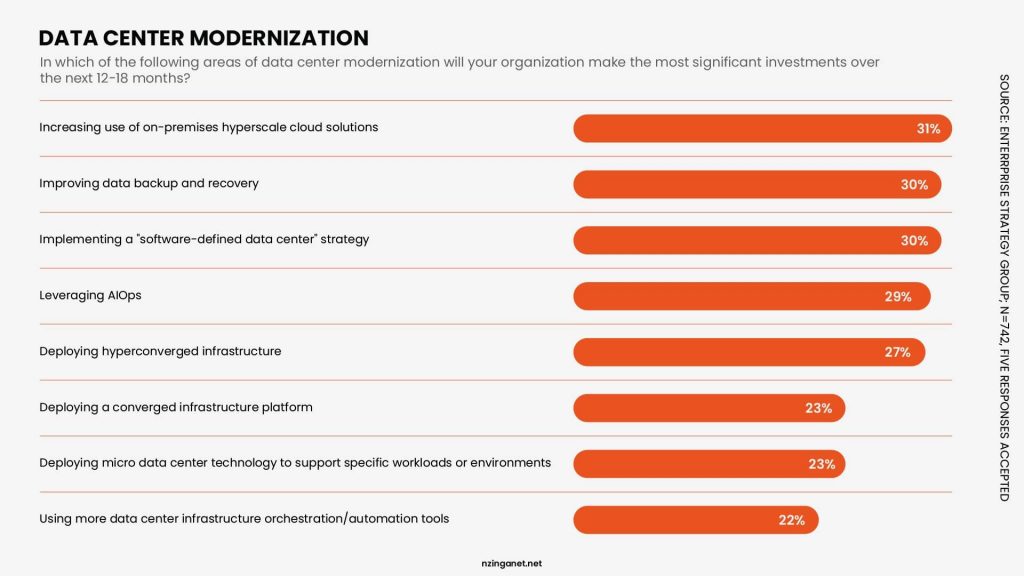
The answer depends on more than equipment age. Performance, reliability, security, scalability, and operating costs all matter. Modernization may involve replacing hardware, improving power and cooling, consolidating systems, automating operations, or moving selected workloads to the cloud.
This guide covers the signs your infrastructure needs an upgrade, what modernization involves, and the potential cost of delaying it.
TABLE OF CONTENTS
- What Is Data Center Modernization?
- Data Center Modernization vs. a Hardware Refresh
- What Does Data Center Modernization Cost?
- 8 Signs It Is Time to Modernize Your Data Center
- Should You Upgrade On Premises or Move to the Cloud?
- Which Infrastructure Should You Modernize First?
- The 8 Step Data Center Modernization Strategy
- How to Build the Business Case for Modernization
- Common Data Center Modernization Mistakes
- Build a Smarter Data Center Strategy With NzingaNet
- Frequently Asked Questions
What Is Data Center Modernization?
Data center modernization is the process of upgrading or transforming the technology, systems, and operations that support your data center to meet current business and IT requirements. It can range from replacing aging servers and storage systems to redesigning power and cooling infrastructure, improving network capacity, strengthening security, and adopting automation.
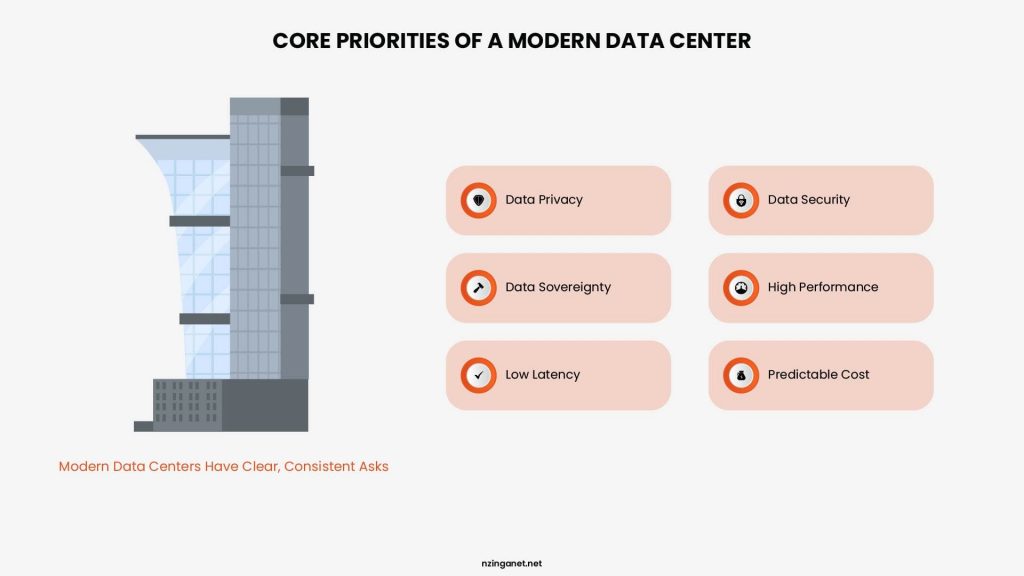
Cisco defines modernization as a broader transition from aging, hardware-siloed environments toward software-defined, automated, cloud-integrated infrastructure. It also distinguishes modernization from a simple hardware refresh.
For example, an organization might replace outdated servers, consolidate underused hardware, introduce virtualization, improve monitoring, or move selected workloads to cloud infrastructure. The right approach depends on what your existing environment can support, where it falls short, and what the business needs next.
Data Center Modernization vs. a Hardware Refresh
A hardware refresh and data center modernization can both involve replacing aging equipment, but they solve different problems. A hardware refresh typically focuses on replacing outdated servers, storage, networking equipment, or other physical components with newer versions. The underlying architecture and operating model may remain largely unchanged. Modernization takes a broader approach. It looks at how the entire infrastructure supports current and future business requirements.
| Hardware Refresh | Data Center Modernization |
|---|---|
| Replaces aging equipment | Reassesses the overall infrastructure |
| Focuses mainly on hardware | Covers hardware, software, networks, facilities, and operations |
| Addresses equipment age and performance | Addresses performance, scalability, efficiency, security, and business needs |
| Usually follows an existing architecture | May introduce a new infrastructure architecture |
| Often has a narrower scope | Can involve broader operational and technology changes |
A hardware refresh may be enough when your infrastructure architecture still meets business requirements and the main problem is aging equipment. Modernization makes more sense when the existing environment itself limits performance, scalability, security, efficiency, or future growth.
What Does Data Center Modernization Cost?
As of August 2026, data center modernization can cost anywhere from $250,000 for a limited infrastructure refresh to more than $25 million per MW for an AI-ready upgrade. The final budget depends on whether you are upgrading IT equipment, retrofitting power and cooling, migrating workloads, or converting the entire facility.
Current Cost Benchmarks
| Modernization project | Typical 2026 cost |
|---|---|
| Small server, storage, and network refresh | $250,000-$1 million |
| Mid-sized enterprise modernization | $1 million-$5 million |
| Large data center retrofit | $5 million-$20 million+ |
| AI/liquid-cooling retrofit | Approximately $2 million per MW in some retrofit models |
| Warehouse or industrial conversion | $7 million-$12 million per MW |
| New standard data center shell and core | Approximately $11.3 million per MW |
| AI facility including technology fit-out | Up to $25 million per MW for IT infrastructure alone |
JLL's 2026 global benchmark places average shell-and-core construction at $11.3 million per MW, up from $10.7 million in 2025 and $7.7 million in 2020. However, this figure excludes tenant IT equipment; AI infrastructure can add as much as $25 million per MW.
One 2026 retrofit analysis estimates liquid-cooling upgrades at approximately $2 million per MW, compared with more than $11 million per MW for new liquid-cooled capacity, although the actual price varies significantly by facility design and existing infrastructure.
Your budget should include hardware, power and cooling upgrades, software, security improvements, migration services, testing, staff training, and contingency costs.
Delaying modernization can also increase expenses through rising maintenance, energy consumption, downtime, security incidents, and emergency replacements. A detailed infrastructure assessment and total-cost-of-ownership analysis can help determine whether upgrading, relocating, or moving selected workloads to the cloud is the most practical option.
8 Signs It Is Time to Modernize Your Data Center
Data center modernization becomes easier to justify when existing infrastructure starts creating measurable operational problems. You may not need to replace everything at once, but recurring issues can indicate that your current environment is no longer keeping pace with business requirements.
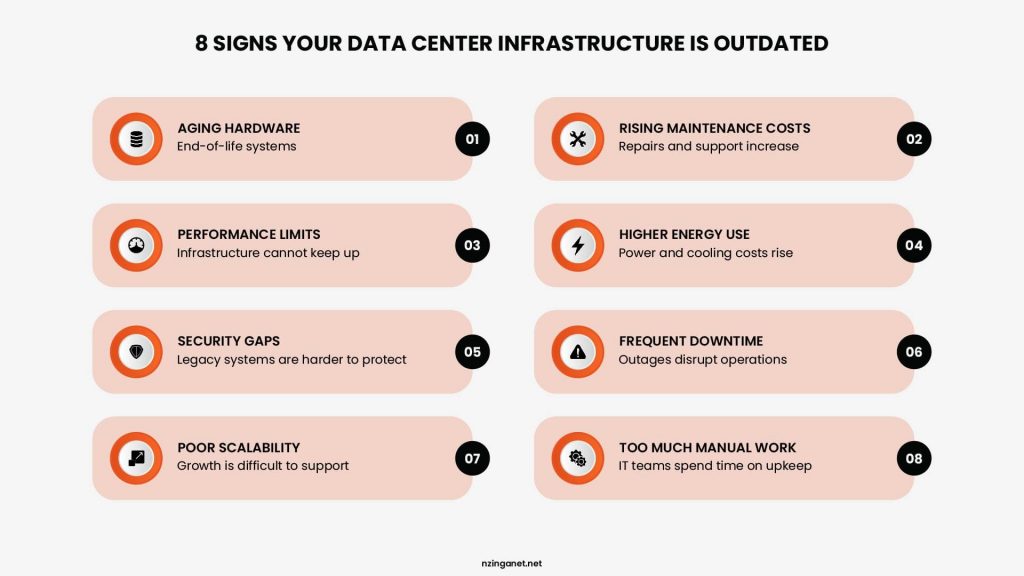
1. Hardware Is Reaching the End of Its Useful Life
Older servers, storage systems, and networking equipment are more likely to experience failures and may become difficult to support. If critical hardware is approaching the end of support or replacement parts are becoming harder to source, modernization deserves serious consideration.
2. Maintenance Costs Keep Rising
Frequent repairs, extended support contracts, replacement parts, and specialist labor can make aging infrastructure increasingly expensive. When maintaining older equipment costs more than the value it provides, an upgrade may offer a better long term return.
3. Your Infrastructure Cannot Keep Up With Demand
Growing workloads can expose limitations in computing power, storage capacity, memory, or network performance. If your IT team regularly adds capacity to keep up with business growth, your underlying architecture may need a broader review.
4. Energy and Cooling Costs Are Increasing
Older infrastructure often consumes more power and produces more heat than newer equipment. Rising electricity and cooling costs can therefore become a sign that your data center needs more efficient hardware, better cooling, improved power management, or a different infrastructure strategy.
5. Security Requirements Are Becoming Harder to Meet
Legacy systems may lack support for current security controls, receive fewer updates, or depend on outdated software. If your infrastructure makes it difficult to apply security patches, enforce access controls, segment networks, or meet regulatory requirements, modernization can help close those gaps.
6. Downtime Is Becoming More Frequent
Recurring outages, hardware failures, slow recovery, and maintenance windows can affect employee productivity and customer facing services. If your team spends too much time responding to infrastructure failures instead of improving IT operations, reliability should be a modernization priority.
7. Your Infrastructure Is Difficult to Scale
Modern businesses need infrastructure that can adapt to changing workloads. If adding resources requires lengthy procurement cycles, significant hardware changes, or complex manual configuration, your current environment may lack the scalability your business needs.
8. IT Teams Spend Too Much Time Managing Infrastructure
Manual provisioning, monitoring, patching, troubleshooting, and routine maintenance can consume valuable IT resources. Modernization can introduce automation, centralized monitoring, virtualization, and other technologies that reduce repetitive work and allow IT teams to focus on higher value initiatives.
Should You Upgrade On Premises or Move to the Cloud?
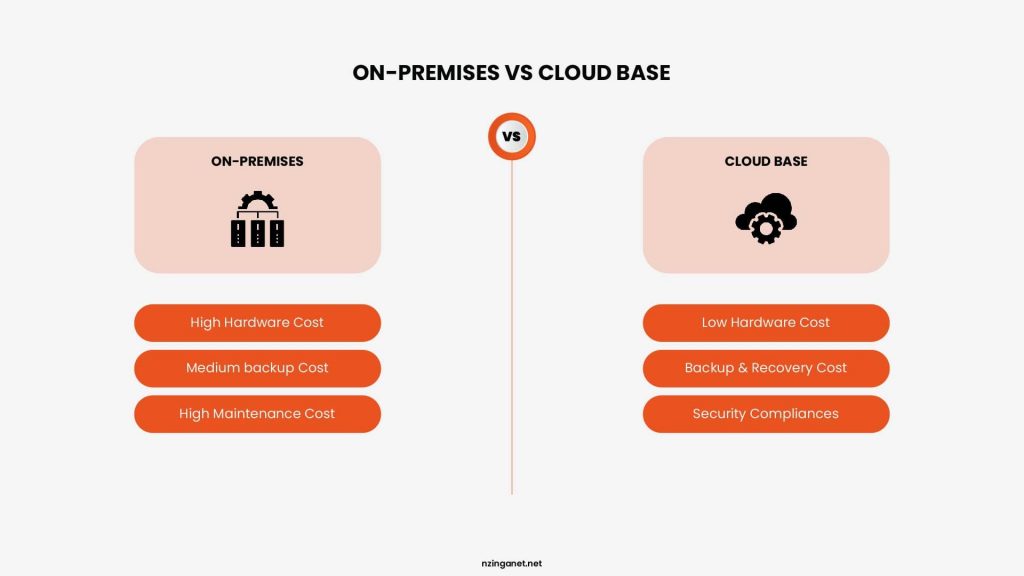
Modernizing a data center does not always mean replacing physical infrastructure. For some businesses, upgrading the existing on premises environment makes more sense. For others, moving selected workloads or applications to the cloud can provide greater flexibility. Many organizations may also benefit from a hybrid approach that combines both.
The right choice depends on workload requirements, security needs, performance, existing infrastructure, budget, and long term business plans.
| Consideration | Upgrade On Premises | Move to the Cloud |
|---|---|---|
| Infrastructure control | Provides greater control over physical systems and configurations | Relies more heavily on the cloud provider |
| Upfront investment | Usually requires significant hardware and infrastructure spending | Can reduce upfront hardware costs |
| Scalability | Capacity depends on available physical infrastructure | Resources can typically scale more easily |
| Maintenance | Your IT team manages the underlying infrastructure | The provider manages much of the underlying infrastructure |
| Performance | Can provide predictable performance for workloads with dedicated resources | Performance depends on workload design, provider services, and network connectivity |
| Data requirements | May suit workloads that require dedicated infrastructure or specific data handling arrangements | Can suit workloads that benefit from distributed access and flexible infrastructure |
| Long term costs | Costs include hardware, power, cooling, maintenance, and staffing | Costs shift toward recurring cloud service and usage charges |
When On Premises May Make More Sense
An on premises upgrade may be appropriate when your business needs tight control over infrastructure, predictable workloads, low latency, or specific hardware configurations. Existing facilities and equipment may also still have useful life, making a targeted upgrade more practical than a complete migration.
When the Cloud May Make More Sense
Cloud migration can be attractive when you need faster scalability, flexible capacity, reduced hardware management, or easier access to infrastructure without purchasing additional equipment. It can also make sense for workloads that experience significant changes in demand.
However, moving to the cloud does not automatically reduce costs. Storage, compute usage, data transfer, licensing, backup and disaster recovery, and management expenses can add up over time. A proper cost analysis should compare the expected cloud spending with the full cost of maintaining and upgrading the existing environment.
A Hybrid Approach May Be the Better Option
You do not have to choose one model for everything. A hybrid strategy can keep workloads that benefit from on premises infrastructure in the data center while moving suitable applications, backup environments, or variable workloads to the cloud.
The goal of modernization is not to move everything to the cloud or keep everything on premises. It is to choose the infrastructure model that provides the right balance of performance, security, scalability, control, and cost for each workload.
Which Infrastructure Should You Modernize First?
You do not need to modernize every part of your data center at the same time. A better approach is to prioritize the infrastructure that creates the greatest operational risk, limits performance, or costs the most to maintain.
Start by assessing each component based on its condition, business importance, security exposure, capacity, and replacement cost.
1. Servers and Compute Infrastructure
Servers often make sense as an early modernization priority when they are reaching the end of support, struggling with current workloads, or consuming excessive power. Aging compute infrastructure can also limit your ability to run newer applications and expand capacity.
2. Storage Systems
Review storage when capacity is becoming difficult to manage, performance is affecting applications, or existing systems lack reliable backup and recovery capabilities. Modern storage technologies can improve performance, capacity management, and resilience.
3. Network Infrastructure
Outdated switches, routers, firewalls, and other network equipment can create bottlenecks and security weaknesses. If users regularly experience slow connections or your network cannot support new workloads, network modernization may need to happen alongside server upgrades.
4. Power and Cooling Systems
Infrastructure upgrades are not limited to IT equipment. Inefficient power distribution, aging UPS systems, and inadequate cooling can increase operating costs and create availability risks. These systems should receive priority when they threaten equipment reliability or cannot support planned capacity increases.
5. Backup and Disaster Recovery
A data center modernization project should also examine how quickly your business can recover from hardware failure, cyber incidents, or other disruptions. Outdated backup infrastructure, long recovery times, or untested recovery procedures can create significant business risk.
6. Monitoring and Management Tools
If your IT team relies heavily on manual monitoring and troubleshooting, modern management tools can reduce administrative work and provide better visibility into infrastructure performance, capacity, and potential failures.
Prioritize Based on Business Impact
A useful way to sequence modernization is to rank each infrastructure component against four questions:
| Priority Factor | What to Assess |
|---|---|
| Business impact | What happens if this system fails? |
| Security risk | Does it have known vulnerabilities or limited security support? |
| Performance | Is it creating bottlenecks or limiting workloads? |
| Cost | How much does it cost to maintain, operate, and replace? |
The highest priority should usually go to infrastructure that combines high business impact with significant security, performance, or reliability concerns. This approach helps you invest where modernization can deliver the greatest benefit instead of replacing equipment simply because it is old.
The 8 Step Data Center Modernization Strategy
Data center modernization works best when you treat it as a planned infrastructure program rather than a collection of equipment upgrades. A clear strategy helps you prioritize investments, control disruption, and make sure each upgrade supports a specific business or IT requirement.
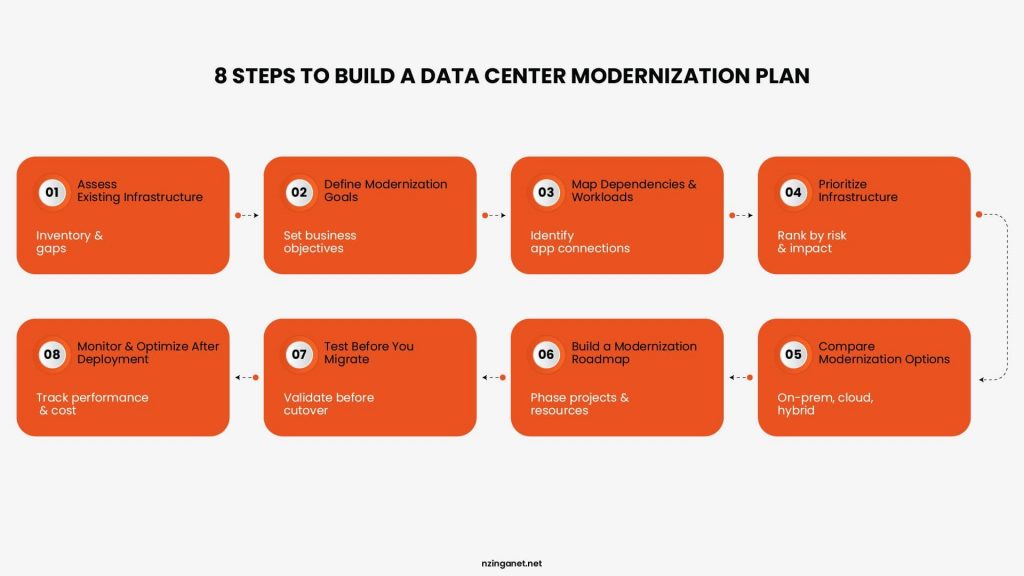
1. Assess Your Existing Infrastructure
Start with a complete inventory of your current environment. Document servers, storage, networking equipment, power and cooling systems, applications, dependencies, software versions, and support status. Look for aging equipment, performance bottlenecks, capacity constraints, security gaps, recurring failures, and systems that are approaching end of support.
2. Define Your Modernization Goals
Decide what you want modernization to achieve before selecting new technology. Your goals might include reducing downtime, improving performance, increasing capacity, lowering energy costs, strengthening security, simplifying management, or supporting business growth. Clear objectives make it easier to determine which upgrades deserve priority.
3. Map Dependencies and Workloads
Understand which applications depend on each server, database, storage system, and network component. This is especially important before replacing or moving infrastructure. Mapping dependencies helps prevent unexpected application failures and identifies workloads that could be consolidated, virtualized, moved to the cloud, or retired.
4. Prioritize Infrastructure
Not every system needs immediate replacement. Rank infrastructure based on business impact, security risk, performance, reliability, capacity, and operating cost. Start with systems where failure or poor performance would have the greatest effect on business operations.
5. Compare Modernization Options
Evaluate the available approaches for each workload or infrastructure component. Depending on your requirements, this could include new on premises hardware, virtualization, colocation, cloud infrastructure, managed services, or a hybrid model. Compare options based on total cost, performance, security, scalability, management requirements, and long term fit, rather than purchase price alone.
6. Build a Modernization Roadmap
Turn your priorities into a phased plan. Define what needs to change, when each project will happen, what resources it requires, and how systems will be migrated or replaced. A phased approach can reduce operational disruption and allow your team to address the highest priority infrastructure first.
7. Test Before You Migrate
Do not move critical workloads directly into production without testing. Validate application performance, network connectivity, security controls, backups, failover procedures, and recovery processes before completing each migration or infrastructure change. Testing gives your team an opportunity to identify problems while they are still manageable.
8. Monitor and Optimize After Deployment
Modernization does not end when new equipment or services go live. Monitor performance, capacity, availability, energy consumption, security events, and operating costs after each phase. Use those results to identify additional improvements and establish a regular infrastructure review cycle.
How to Build the Business Case for Modernization
A data center modernization project needs more than a technical justification. Decision makers need to understand what the business gains from the investment and what it risks by delaying it. A strong business case connects infrastructure problems to measurable financial and operational outcomes.
1. Document the Current Costs
Start by calculating what your existing infrastructure costs to operate. Include hardware maintenance, software licensing, power and cooling, support contracts, repairs, IT labor, and costs associated with downtime. This establishes a baseline for comparing your current environment with the proposed modernization plan.
2. Quantify the Cost of Downtime
Infrastructure failures can affect employee productivity, customer access, revenue, and critical business operations. Estimate how much downtime costs your organization and how frequently infrastructure related incidents occur. Even a modest reduction in downtime can strengthen the financial case for modernization when outages affect revenue generating or business critical systems.
3. Identify Security and Compliance Risks
Older infrastructure can increase exposure to vulnerabilities, unsupported software, weak access controls, and other security issues. Document the risks associated with keeping those systems in place and the potential business consequences of a security incident. If modernization will address specific security or compliance requirements, include those benefits in the business case.
4. Calculate Expected Savings
Identify where modernization could reduce ongoing expenses. Potential savings may come from:
- Lower power and cooling consumption
- Reduced hardware maintenance
- Fewer emergency repairs
- Lower software or licensing costs
- Less manual IT administration
- Reduced downtime
- Better use of existing infrastructure capacity
Use realistic estimates rather than assuming every modernization initiative will immediately reduce costs.
5. Connect Modernization to Business Growth
Infrastructure should support where the business is going, not just fix what is broken. Explain how modernization could help the organization launch applications faster, accommodate additional users, expand capacity, support new locations, or handle increasing workloads. This shifts the discussion from "How much will the upgrade cost?" to "What will the business be able to do with the upgraded infrastructure?"
6. Compare the Cost of Upgrading With the Cost of Waiting
A useful business case should present both scenarios. Compare the projected modernization investment with the expected cost of maintaining the existing environment over the same period. Consider future hardware replacements, maintenance costs, energy consumption, downtime, security exposure, and capacity limitations. Delaying an upgrade may appear cheaper in the short term while increasing costs and operational risk over time.
7. Present the Investment in Phases
A full data center modernization does not always need to happen in one project. Break the initiative into phases based on urgency, business impact, dependencies, and available budget. A phased roadmap can make the investment easier to approve while allowing the organization to address its highest priority infrastructure first.
Common Data Center Modernization Mistakes
Modernizing a data center involves more than selecting newer servers or moving workloads to the cloud. Poor planning can lead to unnecessary spending, migration problems, downtime, and an infrastructure environment that still fails to meet business needs.
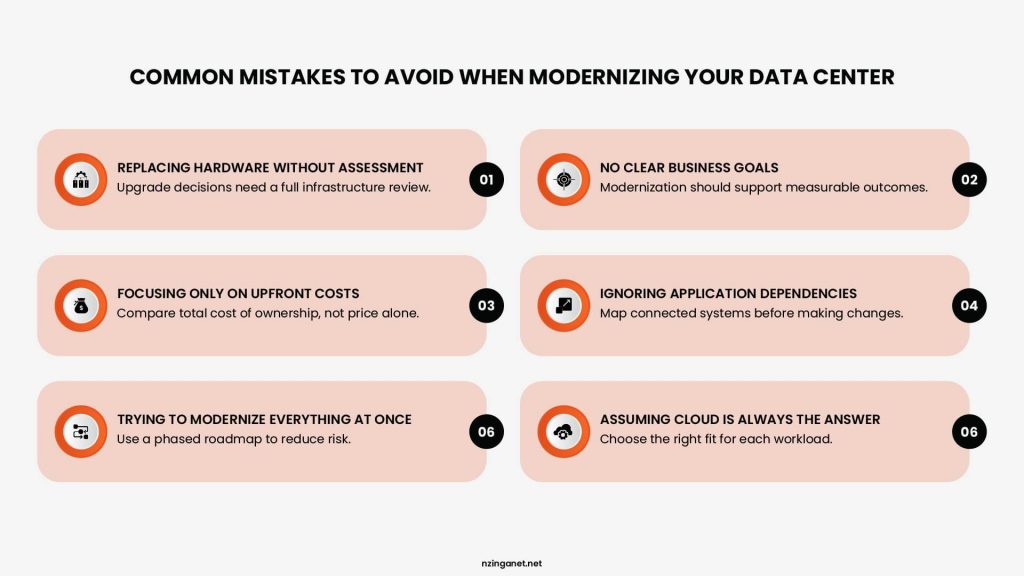
1. Replacing Hardware Without Assessing the Environment
Replacing aging servers may solve an immediate performance problem, but it may not address outdated network architecture, storage limitations, inefficient cooling, or application dependencies. Start with a full infrastructure assessment before deciding what to replace.
2. Modernizing Without Clear Business Goals
Technology upgrades should support a specific business objective. If the project lacks clear goals, teams may invest in capabilities they do not need or overlook infrastructure that creates greater operational risk. Define measurable goals such as improving availability, increasing capacity, reducing energy costs, strengthening security, or supporting business growth.
3. Focusing Only on Upfront Costs
A lower purchase price does not always mean a lower total cost. Hardware maintenance, licensing, power, cooling, administration, migration, and downtime can significantly affect the long term cost of an infrastructure decision. Evaluate the total cost of ownership before selecting an approach.
4. Ignoring Application Dependencies
Applications rarely operate in isolation. A server upgrade or workload migration can affect databases, storage, network connections, authentication systems, and other applications. Map dependencies before making major changes and identify which workloads need to move together.
5. Trying to Modernize Everything at Once
A complete infrastructure transformation can create unnecessary operational risk if too many systems change simultaneously. A phased approach allows your team to prioritize critical systems, test changes, and address issues before expanding the project.
6. Treating Cloud Migration as the Default Answer
Moving workloads to the cloud can provide flexibility and scalability, but it is not automatically the best option for every application. Performance requirements, data sensitivity, network dependencies, licensing, and long term operating costs should all factor into the decision.
Build a Smarter Data Center Strategy With NzingaNet
A modernization project needs a clear starting point. NzingaNet helps businesses evaluate their current infrastructure, identify priority areas, and determine where technology investments can deliver the most value. Our team supports infrastructure assessment, modernization planning, cloud strategy, network improvements, security, and implementation.
Start with a clear view of what your infrastructure needs next.
COMMON QUESTIONS
Frequently Asked Questions
1. How long does a data center modernization project take?
The timeline depends on the size and complexity of the environment. A focused hardware upgrade may take weeks, while a broader modernization involving multiple systems, migrations, or facility changes can take several months. Dependency mapping, testing, and phased implementation can help keep the project on track.
2. Can you modernize a data center without shutting it down?
Yes. Many modernization projects can use phased upgrades, workload migration, redundancy, and scheduled maintenance windows to reduce disruption. The approach depends on your infrastructure architecture, application dependencies, and availability requirements. Critical systems should have tested backup and recovery procedures before major changes begin.
3. What should be included in a data center modernization assessment?
A thorough assessment should review servers, storage, networking, power, cooling, security, applications, virtualization, backup systems, capacity, support status, and operating costs. It should also identify dependencies, performance limitations, aging equipment, and infrastructure that may create future risks.
4. How often should data center infrastructure be upgraded?
There is no single upgrade schedule that applies to every business. Infrastructure should be reviewed regularly based on equipment lifecycle, vendor support, performance, capacity, security requirements, operating costs, and business growth. A component approaching end of support may require attention sooner than equipment that continues to meet business requirements.
5. What is the difference between data center modernization and data center migration?
Modernization involves improving the infrastructure, technology, or operating model that supports your workloads. Migration focuses specifically on moving workloads, applications, or data from one environment to another, such as from an on premises data center to the cloud. A migration can be part of a broader modernization project, but the two terms do not mean the same thing.
6. How does virtualization support data center modernization?
Virtualization allows multiple workloads to run on shared physical resources, which can improve server utilization, resource allocation, scalability, and management. It can also reduce the amount of physical hardware required for certain workloads. The benefits depend on workload requirements and how the virtual environment is designed and managed.
7. How can businesses measure the ROI of data center modernization?
Businesses can measure ROI by comparing the modernization investment with measurable improvements such as lower maintenance and energy costs, reduced downtime, improved resource utilization, fewer infrastructure failures, and greater operational efficiency. Revenue enabled by improved capacity or faster deployment can also factor into the analysis.
8. What happens if you delay data center modernization?
Delaying modernization can increase maintenance expenses, security exposure, downtime risk, capacity constraints, and difficulty supporting newer applications. It can also make a future upgrade more complex if multiple aging systems reach end of life at the same time. The cost of waiting should therefore be evaluated alongside the cost of modernization.
PENNSYLVANIA & BEYOND
Ready to Modernize Your Data Center Infrastructure?
NzingaNet helps businesses evaluate their current infrastructure, identify priority areas, and determine where technology investments can deliver the most value.