September 21, 2026
Smartphones are central to how we work and communicate, and QR codes have become a simple way to access menus, log into accounts, make payments, and download apps with a quick scan.
Unfortunately, cybercriminals are taking advantage of this everyday habit. They are increasingly using these pixelated squares to deliver a silent, dangerous threat known as quishing, or qr code phishing.
Because a quishing attack hides a malicious link inside a normal-looking image, it easily slips past standard email filters and antivirus programs. If an employee scans one of these fake codes, a simple qr code scam can quickly turn into a major corporate data breach. Let's look at how qr code phishing attacks work, the common warning signs to watch for, and how to keep your business safe.
TABLE OF CONTENTS
- What Is Quishing?
- Quishing vs. Phishing vs. Vishing
- How Did Quishing Become So Common?
- How Common Is QR Code Phishing in 2026?
- How Does a QR Code Phishing Attack Work?
- Why Are Quishing Attacks Difficult to Detect?
- Common QR Code Phishing Examples
- How to Spot a Quishing Attack
- What Should You Do After Scanning a Suspicious QR Code?
- How Businesses Can Prevent QR Code Phishing
- Building a Practical Quishing Defense With NzingaNet
- Frequently Asked Questions
What Is Quishing?
Quishing, short for QR code phishing, is a type of phishing attack that uses a malicious QR code to trick someone into visiting a fraudulent website or taking an unsafe action. Instead of clicking a suspicious email link, the victim scans a QR code with their smartphone, which redirects them to a fake login page, payment portal, or malware download.
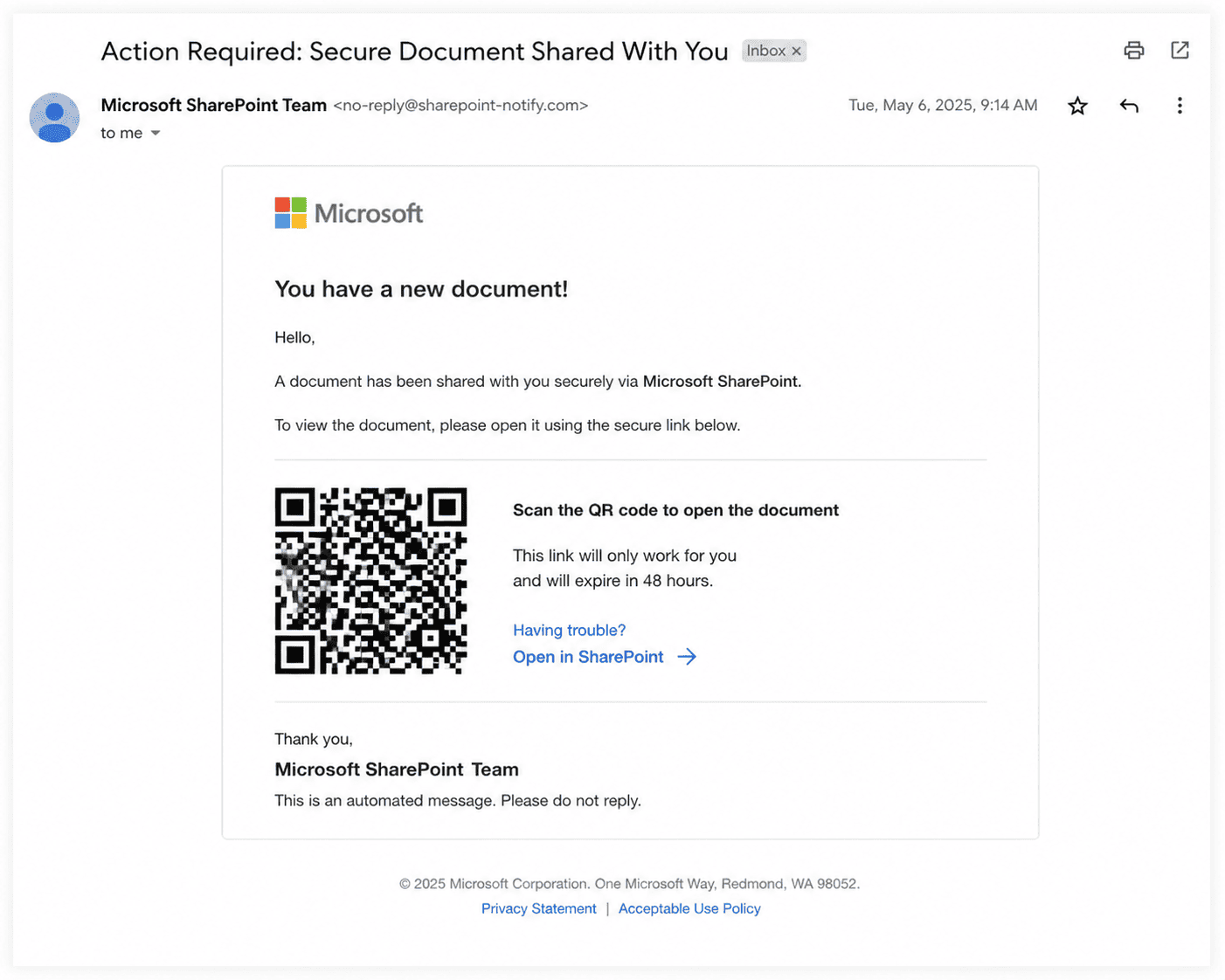
The goal is the same as traditional phishing: steal usernames, passwords, financial information, multi factor authentication (MFA) codes, or other sensitive data. The difference is the delivery method. QR codes often appear harmless, and because the destination URL is hidden until after the code is scanned, people have fewer visual cues to identify a scam.
Cybercriminals now embed malicious QR codes in emails, text messages, printed posters, invoices, parking meters, restaurant menus, package delivery notices, and even stickers placed over legitimate QR codes in public spaces. Once scanned, victims may be asked to sign in to Microsoft 365, Google Workspace, banking apps, or other trusted services, believing they are interacting with a legitimate website.
The Federal Trade Commission warns that fraudulent QR codes may direct people to convincing spoofed websites that collect login or financial information. They may also direct users toward malicious downloads.
Quishing vs. Phishing vs. Vishing
Quishing is just one type of social engineering attack. While all three scams aim to steal sensitive information, they use different methods to trick victims. Understanding the differences can help employees recognize suspicious requests, regardless of how they're delivered.
| Attack Type | Delivery Method | Typical Goal | Example |
|---|---|---|---|
| Phishing | Email, websites, or messages containing malicious links | Steal login credentials, financial information, or install malware | An email asks you to click a link to reset your Microsoft 365 password. |
| Quishing | Malicious QR codes in emails, PDFs, posters, invoices, or public places | Redirect victims to fake websites or malicious downloads | An email asks you to scan a QR code to review a secure document or verify your account. |
| Vishing | Phone calls or voice messages impersonating trusted organizations | Trick victims into sharing passwords, verification codes, or banking information | Someone claiming to be from your bank calls and asks you to confirm your account details. |
The key difference: phishing relies on clicking a link, quishing relies on scanning a QR code, and vishing relies on a phone conversation. Regardless of the delivery method, the attacker's objective is the same: convince you to trust the request and voluntarily disclose sensitive information.
How Did Quishing Become So Common?
QR codes have existed since 1994, when they were developed by the Japanese company Denso Wave to improve inventory tracking in manufacturing. For years, they remained a niche technology outside industrial use.
That changed during the COVID 19 pandemic. Businesses, restaurants, retailers, and healthcare organizations rapidly adopted QR codes for contactless menus, payments, event check ins, and product information. At the same time, smartphone manufacturers made QR scanning a built in feature of mobile cameras, removing the need for separate scanning apps.
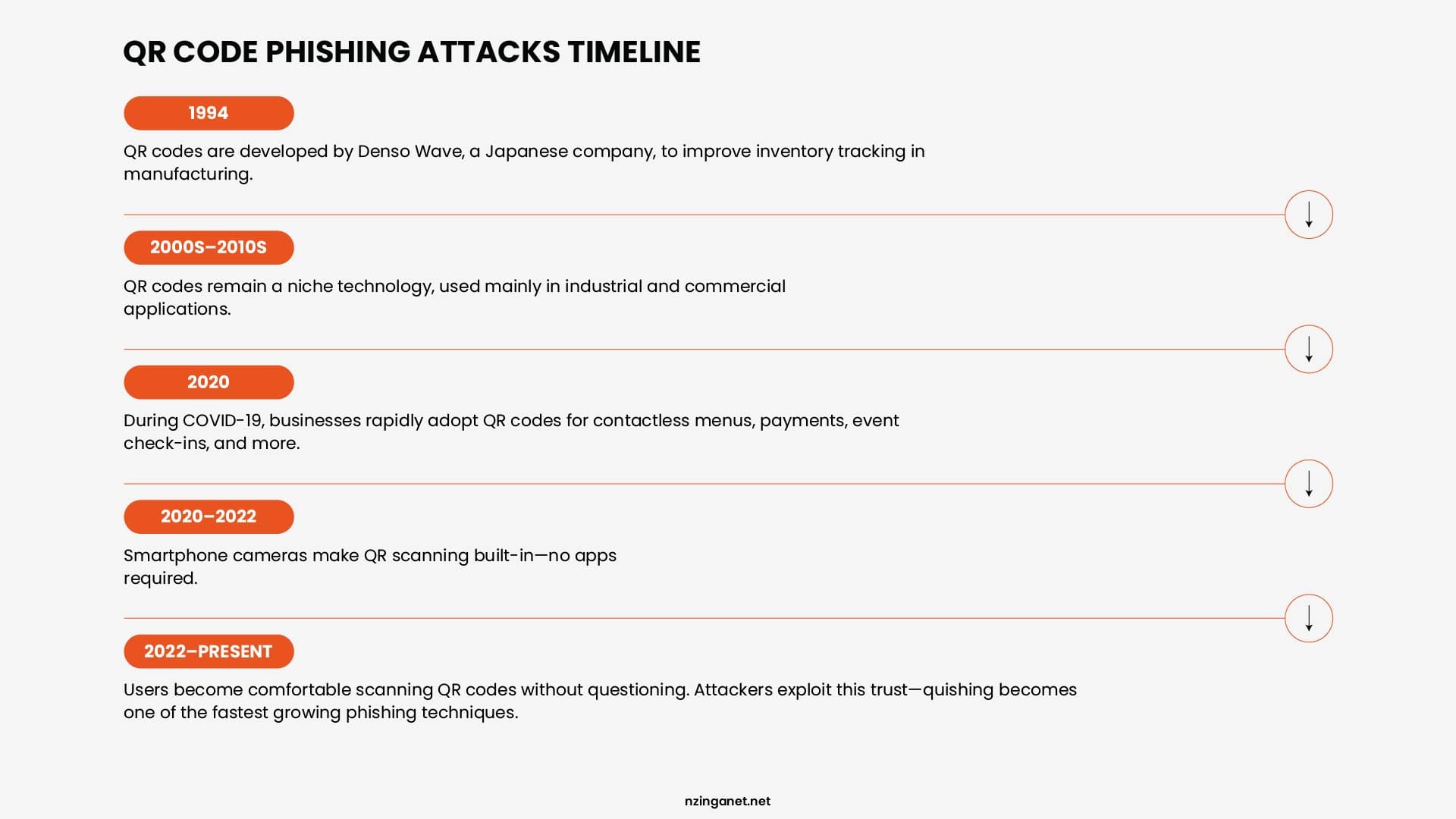
This widespread adoption changed user behavior. People became accustomed to scanning QR codes without questioning where they led. Cybercriminals quickly recognized the opportunity. Today, quishing has become one of the fastest growing phishing techniques because it combines trusted technology with human behavior.
According to Egress telemetry, QR-code payloads represented 0.8% of detected phishing attacks in 2021, rising to 12.4% in 2023 and 10.8% during the first quarter of 2024. These figures describe Egress's observed phishing-email dataset. In 2025, Mimecast detected hundreds of thousands of unique malicious QR codes in email attachments per quarter, including 635,672 in Q2, 716,306 in Q3, and 655,673 in Q4.
How Common Is QR Code Phishing in 2026?
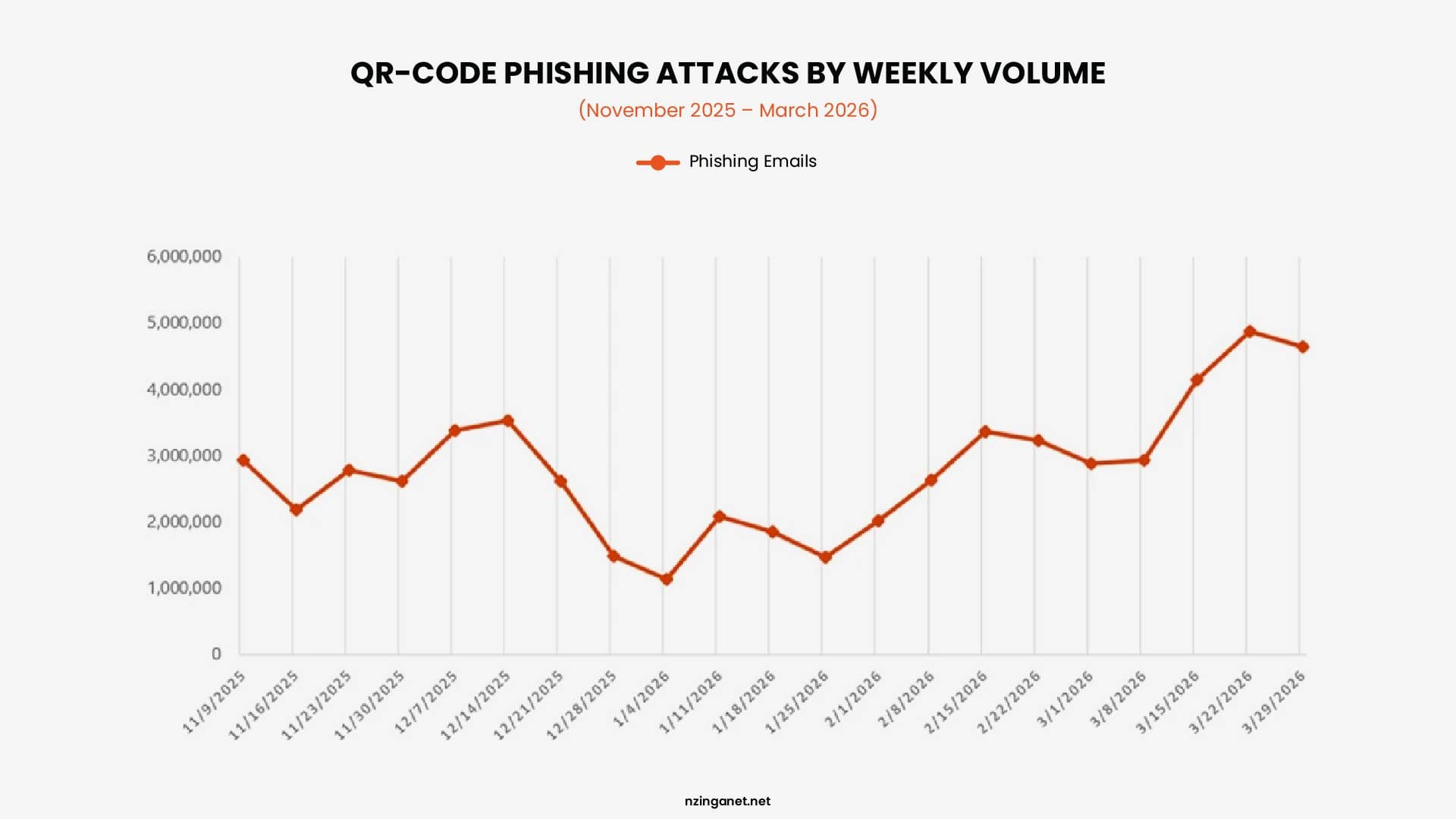
Data published by Microsoft Threat Intelligence reveals that during the first quarter of 2026 alone, QR code phishing attack volumes spiked by 146%, skyrocketing from 7.6 million monthly attacks in January to a staggering 18.7 million in March. Additionally, cybersecurity research indicates that over 12% of all global phishing incidents now deploy image-encoded payloads. Hackers are also shifting where they place these graphics.
How Does a QR Code Phishing Attack Work?
A quishing attack works by exploiting a blind spot in how human psychology and digital security filters interact. Instead of using a traditional text link that looks suspicious, hackers use an image to mask their true destination.
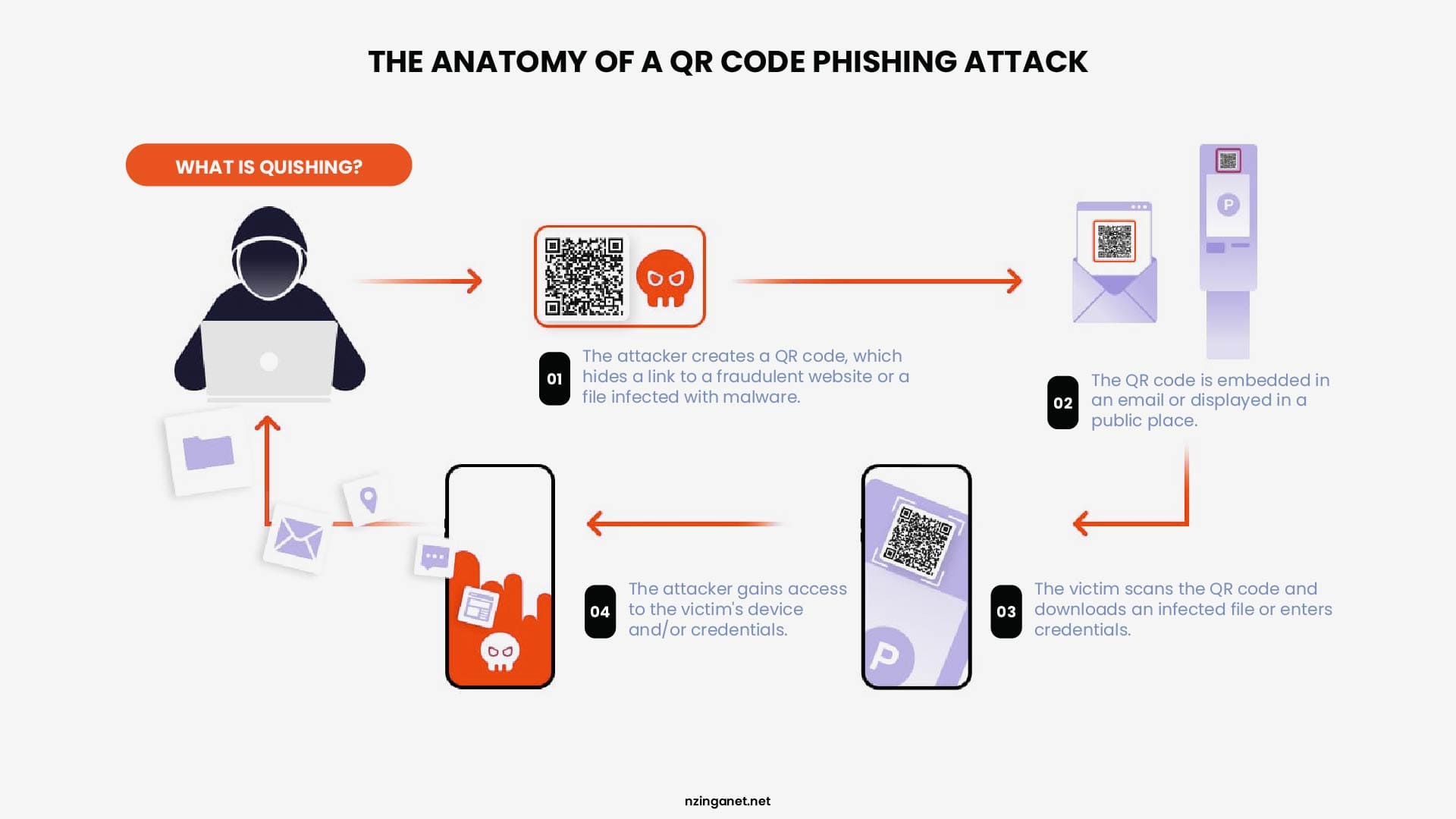
The attack typically unfolds in four distinct stages:
1. The Bait Delivery
The attacker creates a high-pressure scenario to grab your attention. This could be an email warning that your corporate account password expires in 24 hours, a fake invoice requiring immediate review, or a physical sticker slapped over a legitimate parking meter QR code. The message explicitly instructs you to scan the QR code to resolve the issue or access the document.
2. The Security Bypass
This is where the qr code scam succeeds technically. Traditional Secure Email Gateways (SEGs) are excellent at reading text, analyzing hyperlinks, and checking URLs against known blacklists. However, when an email contains a QR code, the security filter only sees an innocent image block. Because the filter cannot natively "scan" the image with a camera, the malicious email slides directly into the user's primary inbox.
3. The Device Shifting
When an employee opens the malicious email on their protected corporate laptop, they cannot click the QR code. They naturally pull out their personal smartphone or corporate mobile device to scan the screen. This action instantly shifts the entire attack vector away from the company's corporate network firewalls, web proxies, and endpoint detection tools. The user is now browsing on an unmanaged mobile device that lacks strict corporate security guardrails.
Sophos researchers documented QR phishing campaigns in which malicious codes were embedded in PDFs and scanned from mobile devices. This device shift can move the interaction outside protections applied to the original computer, corporate browser, or network.
4. The Data Harvest
Once scanned, the QR code redirects the mobile browser to a highly convincing, spoofed destination page. This is usually a flawless replica of a Microsoft 365, Google Workspace, or corporate payroll login portal. Unsuspecting users enter their corporate username, password, and even their Multi-Factor Authentication (MFA) codes. The attackers harvest these credentials in real time, granting them immediate, unauthorized access to the company's internal network.
Why Are Quishing Attacks Difficult to Detect?
Many organizations are surprised to learn that their advanced cybersecurity frameworks struggle to catch a simple pixelated image. The reality is that qr code phishing attacks are intentionally designed to exploit structural blind spots in modern digital defense networks.
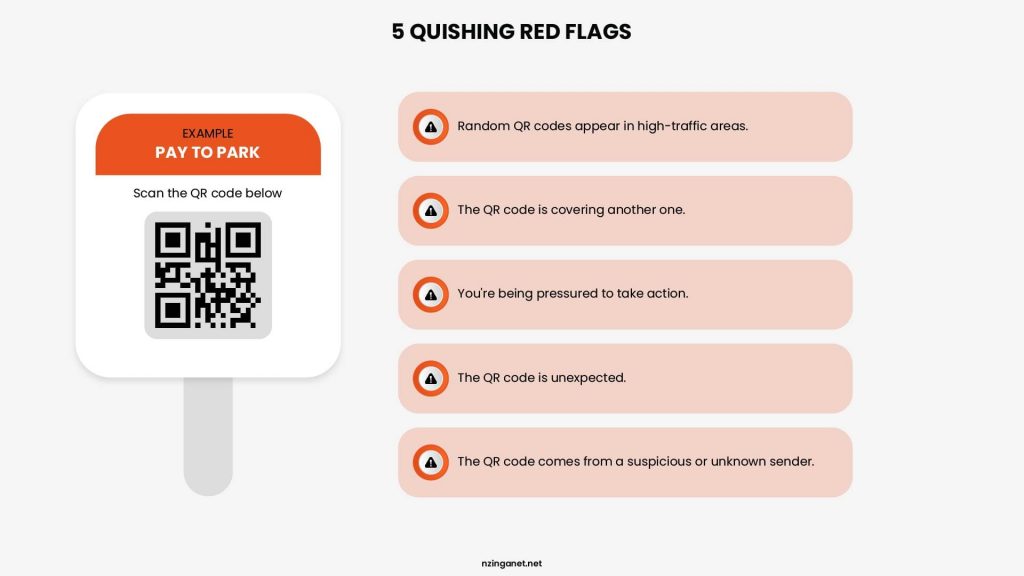
A quishing attack remains highly elusive for three main reasons:
1. They Blindside Traditional Secure Email Gateways (SEGs)
Standard email security systems are built to analyze text, attachments, and hyperlinked strings of code. When an email enters the server, the filter evaluates the visible links against massive global threat intelligence databases.
However, a QR code is fundamentally an image file (like a PNG or JPEG). To a standard text-based security filter, the email looks completely blank or entirely harmless. Because many traditional filters do not feature active Optical Character Recognition (OCR) or automated image-parsing tools to extract and test the hidden URL inside the graphic, the email sails past defenses directly to the user.
2. They Break the Corporate Security Perimeter
When an attacker sends a traditional phishing link, the user clicks it on their protected corporate computer. The company's network firewall, secure web gateway, and endpoint detection software immediately intercept the traffic, analyze the destination website, and block it if it looks suspicious.
Quishing completely bypasses this loop through "device shifting." When an employee scans a QR code off their laptop screen using a mobile device, the traffic moves to a personal phone or an unmanaged mobile browser. This instantly detaches the interaction from the company's defensive perimeter, leaving the user unprotected by corporate security protocols.
3. They Often Hide Behind "Clean" Redirection Layers
Cybercriminals rarely embed a raw, blacklisted malicious URL directly into a QR code. Instead, they leverage open redirect vulnerabilities on legitimate websites, utilize shortened links (like Bitly), or route traffic through reputable cloud storage platforms (such as Microsoft OneDrive or Google Docs).
When a basic security tool does attempt to preview the URL inside the QR code, it only sees a trusted domain name. It is only after the user's mobile browser hits that trusted page that the system redirects them to the actual credential-harvesting site. This multi-layered routing makes it incredibly difficult for automated scanners to flag the image as malicious.
Barracuda's 2026 Email Threats Report analyzed more than 3.1 billion emails from January 2026. Within its malicious-document dataset, 70 percent of malicious PDFs and 56 percent of malicious Microsoft 365 documents contained QR codes leading to phishing or other harmful destinations. These figures apply to malicious documents in Barracuda's dataset, not to all PDFs or Office documents.
Common QR Code Phishing Examples
QR code phishing attacks can appear almost anywhere people expect to scan a code. Cybercriminals take advantage of familiar situations and trusted brands to convince victims that the QR code is legitimate. Here are some of the most common examples:
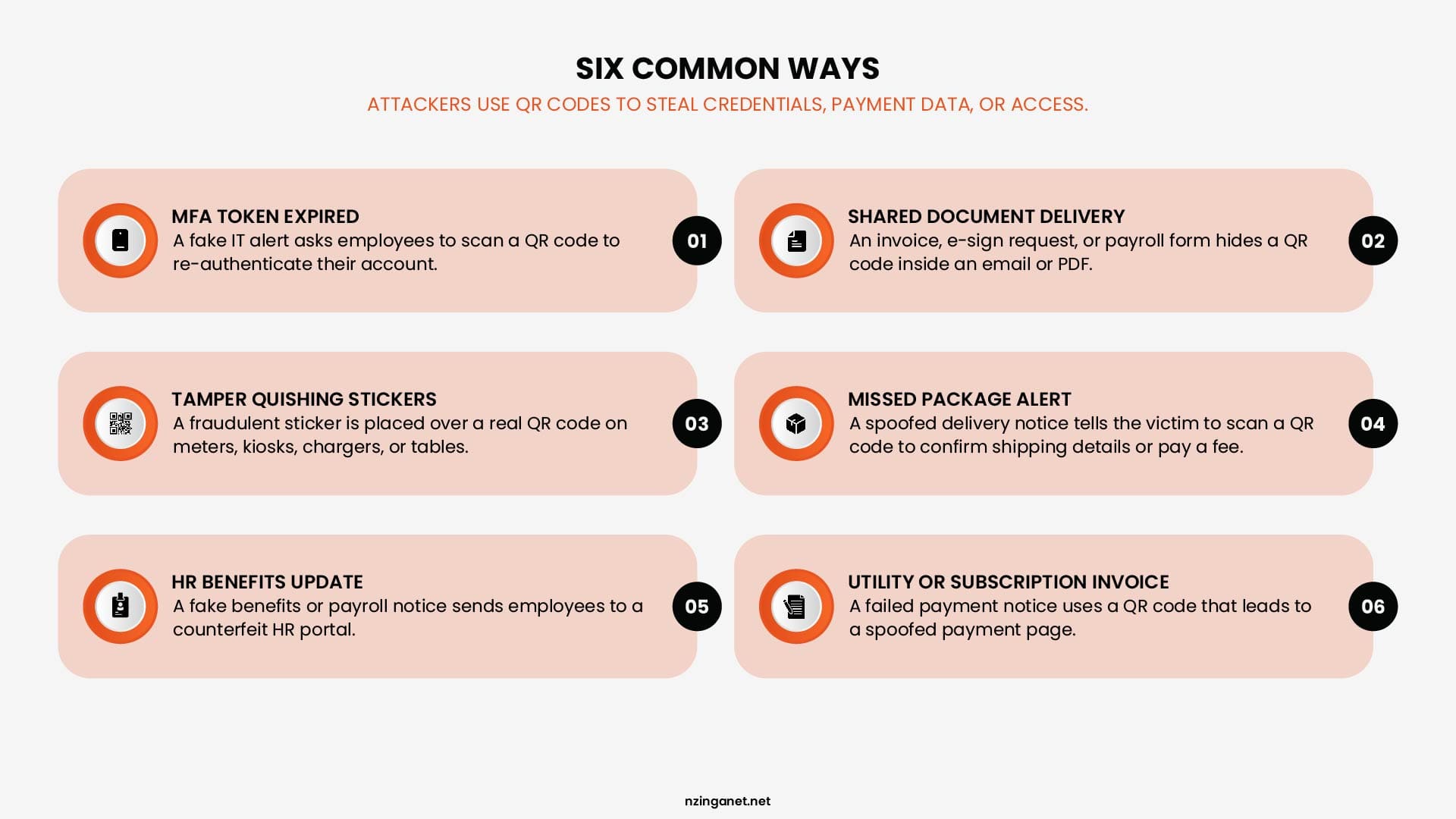
1. The Urgent "MFA Token Expired" Notification
In a corporate setting, attackers frequently spoof automated alerts from IT departments or core software suites like Microsoft 365, Google Workspace, or Salesforce. The email states that the user's Multi-Factor Authentication (MFA) token has expired, or that a security update is mandatory to prevent account suspension. The message explicitly instructs the employee to scan an embedded QR code with their mobile device to re-authenticate their profile. Once scanned, it leads to a flawless, fake login page that harvests their active session tokens and passwords.
2. The Shared-Document Cloud Delivery
Attackers frequently target accounting, human resources, and sales departments with emails regarding fake business documents. These messages are disguised as an "Urgent E-Sign Request," a "Q3 Payroll Adjustment Form," or a "Pending Vendor Invoice." Instead of providing a clickable link, the email contains a PDF attachment or an inline image block displaying a QR code. The text claims the file is hosted on a secure cloud server (such as OneDrive or DocuSign) and requires a mobile camera scan to bypass encryption and view the document.
3. The Physical "Tamper-Quishing" Sticker Overlay
This example moves out of the digital inbox and directly into public spaces. Cybercriminals print high-quality, weather-resistant adhesive stickers featuring malicious QR codes. They physically place these fraudulent stickers directly over legitimate codes on public parking meters, electric vehicle charging stations, restaurant ordering tables, or public transit ticketing kiosks. When users attempt to pay for their parking or order food, the fake code routes their mobile browser to a spoofed transaction portal that steals their credit card details and personal data.
4. The Missed Package Delivery Alert
This tactic targets both corporate mailrooms and individual consumers. Attackers send a spoofed email or text message impersonating major logistics providers like FedEx, UPS, or DHL. The message claims that a critical business package or high-value delivery could not be dropped off due to an incorrect address or an unpaid customs fee. The recipient is instructed to scan an embedded QR code to "confirm delivery preferences" or update their billing information. The link routes to a fraudulent tracking page that harvests full address records and credit card details.
5. Corporate HR Benefits and Open Enrollment Updates
Attackers frequently exploit internal company milestones, such as annual health insurance open enrollment or quarterly bonus rollouts. The phishing email mimics an official notification from the company's Human Resources department or an external payroll platform like ADP. It states that new corporate policy documents, updated 401(k) match guidelines, or mandatory tax forms require an immediate digital signature. Employees are prompted to scan the QR code to access their "secure HR employee portal," which is actually a credential-harvesting page designed to steal internal corporate identities.
6. Fake Utility and Consumer Subscription Invoices
This scam leverages household and business operational expenses. Attackers distribute realistic, fraudulent statements disguised as local electric companies, telecom providers, or popular software subscriptions (like Adobe or Zoom). The notice claims that an automatic monthly payment failed and that services will be disconnected within 48 hours unless the balance is settled. A prominent QR code is provided as a "Quick Pay" shortcut. The resulting website is a spoofed payment terminal that skims banking credentials and routing numbers in real time.
How to Spot a Quishing Attack
Train your team to look for these five critical warning signs to catch a qr code scam before scanning:
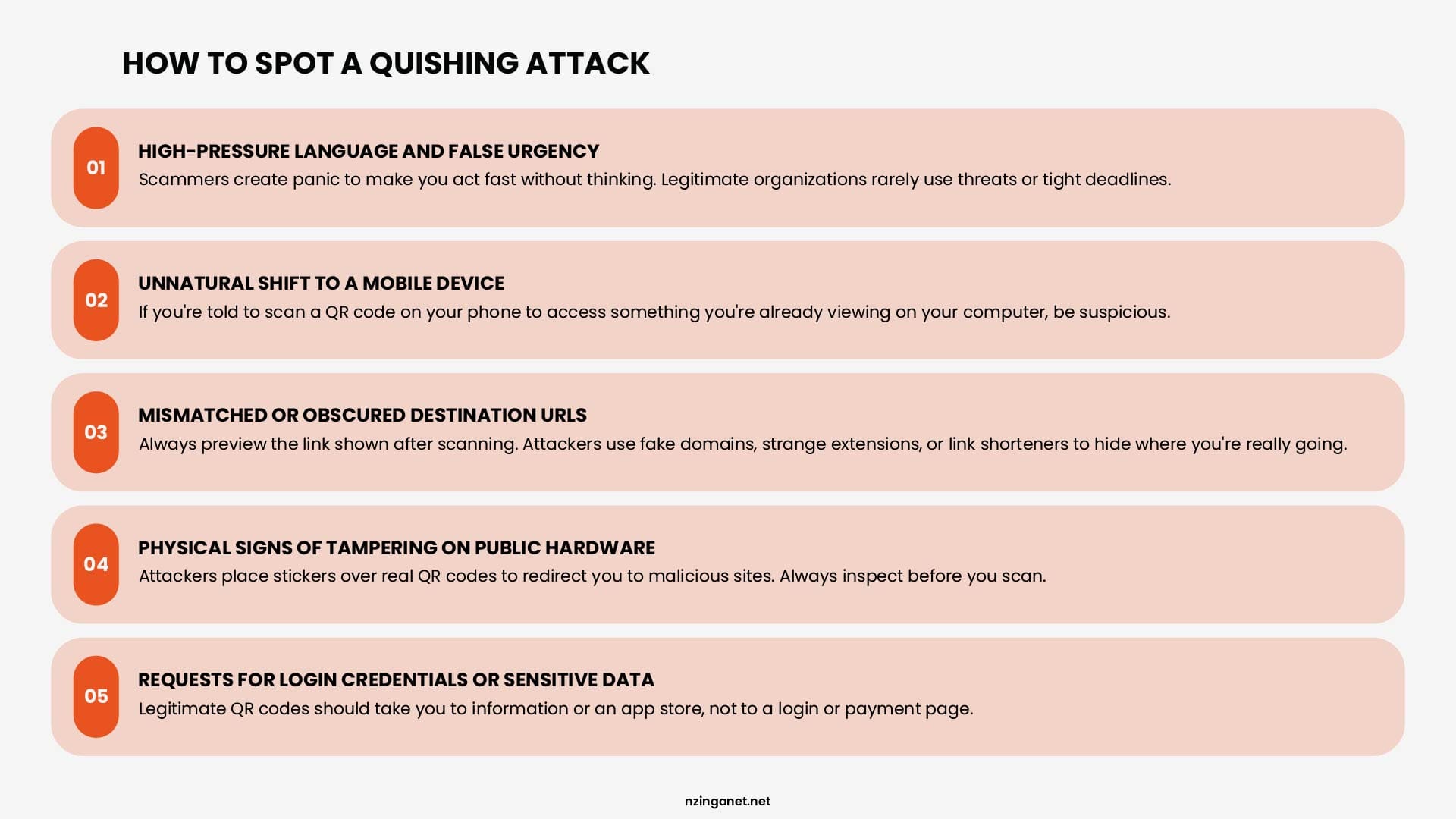
1. High-Pressure Language and False Urgency
The most reliable indicator of a quishing attack is the psychological trigger used in the accompanying text. If an email, text message, or printed flyer demands immediate action to prevent an account from being suspended, stop a payment penalty, or view an urgent file, it is highly likely a trap. Legitimate IT departments and service providers rarely require you to pull out a mobile phone to resolve a high-priority account crisis within a narrow timeframe.
2. Unnatural Shift to a Mobile Device
Always question why a QR code is being used in place of a standard text link. If you receive an email on your computer screen that instructs you to scan a code using your smartphone camera to log into an account, access an HR document, or view an invoice, treat it with extreme suspicion. Attackers intentionally use this tactic to force your web browsing off your protected corporate laptop and onto an unmanaged mobile device that lacks company security filters.
3. Mismatched or Obscured Destination URLs
When you hover your smartphone camera over a QR code, modern mobile operating systems (like iOS and Android) will display a small preview of the underlying web link right on your screen before you click it. Do not tap the link blindly. Inspect the URL carefully:
- Look for strange domain extensions (such as .ru, .xyz, or .cc).
- Check for subtle misspellings of trusted brands (e.g., micros0ft.com or secure-docusign-login.net).
- Watch out for shortened links (like Bitly or TinyURL) that intentionally mask the final web destination.
4. Physical Signs of Tampering on Public Hardware
When scanning a QR code in a public space (such as a parking meter, an electric vehicle charging station, an airport check-in counter, or a restaurant table) always perform a physical inspection. Run your finger over the printed graphic. If the QR code feels raised, looks slightly misaligned, or is printed on a separate adhesive vinyl sticker slapped directly over the original hardware surface, it is likely a malicious "tamper-quishing" overlay.
5. Requests for Login Credentials or Sensitive Data After Scanning
If you scan a QR code and the resulting webpage immediately prompts you to input your corporate password, provide Multi-Factor Authentication (MFA) codes, or type in full credit card numbers, close the browser immediately. A secure, legitimate QR code used for routine operations should route you to information or a verified app store download, not drop you directly onto a generic, unauthenticated credential-harvesting terminal.
What Should You Do After Scanning a Suspicious QR Code?
If you scan a QR code and immediately realize the destination website looks fraudulent or suspicious, your quick response can mean the difference between a minor incident and a full corporate network compromise. Cybercriminals rely on the user panicking or ignoring the warning signs once the page loads.
If you suspect you have interacted with a quishing attack, take these four immediate, practical steps to protect your data and your company.
1. Close the Browser and Disconnect Immediately
The moment you see a suspicious, generic login screen or a strange URL, close the mobile browser tab entirely. Do not tap any buttons, accept any pop-up permissions, or click "allow" on any download prompts. If the webpage appears to be actively loading unknown elements or spinning, immediately toggle your smartphone into Airplane Mode or disconnect from the local Wi-Fi and mobile data. This cuts off any active data transmissions between your device and the malicious server, stopping background malware downloads in their tracks.
2. Change Impacted Passwords and Revoke Active Sessions
If you fell for the qr code scam and actually typed your login credentials (username, password, or Multi-Factor Authentication codes) into the spoofed landing page, time is critical.
- Access a trusted, secure device (like your corporate computer).
- Immediately change the password for that compromised account.
- If you used corporate credentials (such as Microsoft 365 or Google Workspace), log into your security settings and select "Sign out of all sessions" or "Revoke active tokens." This instantly kicks the attacker out of your account, even if they managed to harvest your active login session during the attack.
3. Scan the Mobile Device for Malware
While most modern qr code phishing attacks focus on harvesting passwords, some sophisticated exploits are designed to execute silent "drive-by" malware downloads to compromise mobile operating systems. Open your smartphone's security settings to check for unauthorized app installations or profiles. Run a full system scan using a trusted mobile endpoint protection tool or corporate-approved mobile antivirus software to ensure no malicious tracking scripts or spyware were left behind in your temporary browser files.
4. Alert Your IT Security Team Immediately
If the incident occurred on a corporate device, or if you accidentally entered your company email and password into the fraudulent portal, you must report it to your IT Security or Security Operations Center (SOC) team immediately. Do not hide the mistake out of embarrassment. Provide them with a screenshot of the phishing email or physical flyer, the approximate time of the scan, and specify whether you entered any data. Early reporting allows security administrators to monitor network logs for unusual login locations, block the malicious domain corporate-wide, and prevent a broader network breach.
How Businesses Can Prevent QR Code Phishing
Because a quishing attack targets unmanaged mobile devices and bypasses traditional text filters, stopping this threat requires a multi-layered defense. Relying on basic security policies is not enough to protect your corporate perimeter from image-based scams.
Implementing these four practical security measures helps businesses defend their networks against sophisticated qr code phishing attacks:
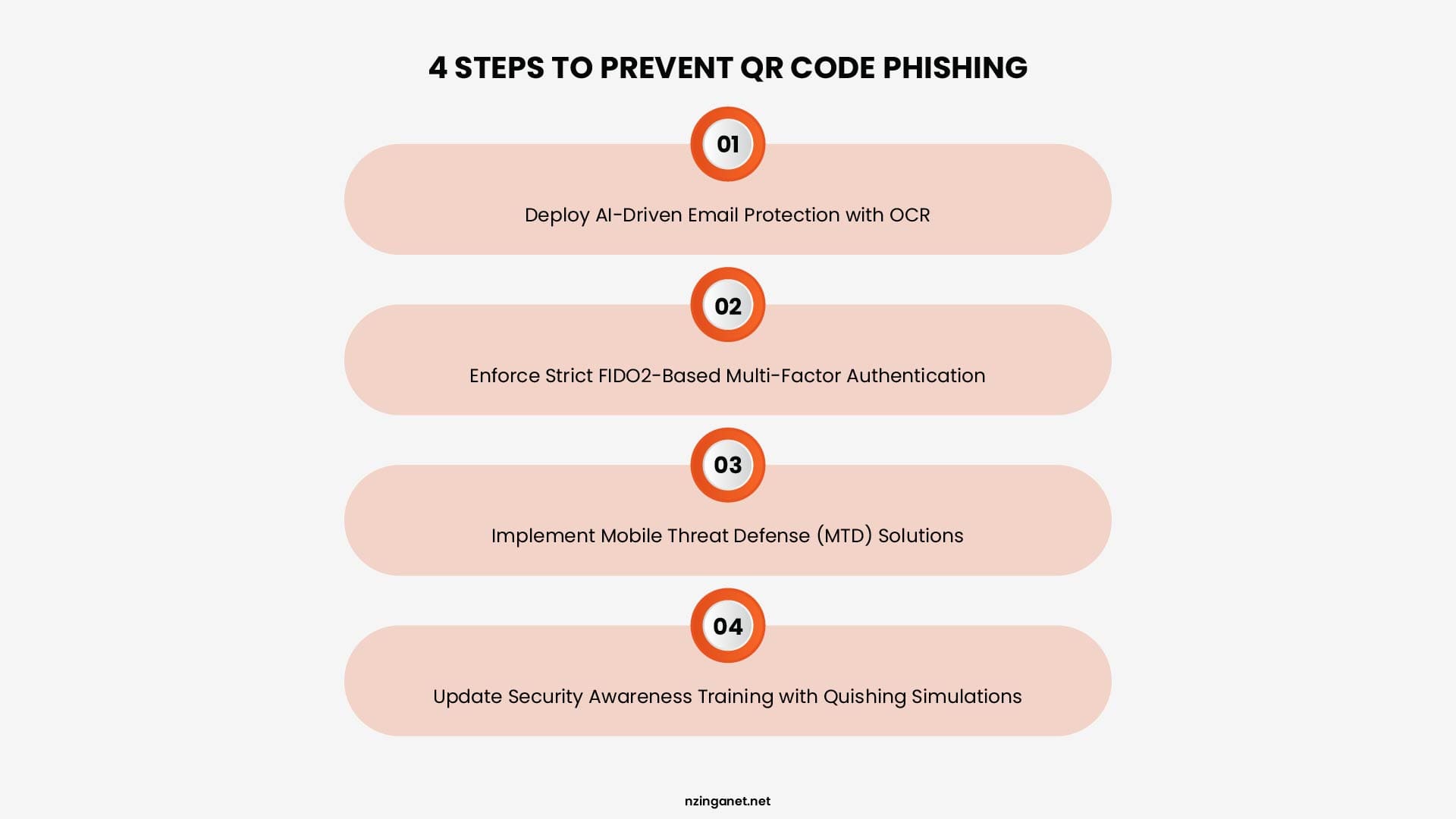
1. Deploy AI-Driven Email Protection with Optical Character Recognition (OCR)
Traditional Secure Email Gateways (SEGs) fail against quishing because they view images as empty blocks. To counter this, upgrade your email infrastructure to an integrated cloud email security (ICES) platform that utilizes advanced Optical Character Recognition (OCR) and computer vision.
These AI-driven security tools actively analyze image attachments and embedded graphics. The software pulls the image apart, extracts the hidden URL embedded inside the QR code pixels, and tests the link in a secure sandbox environment before the email ever reaches your employee's inbox.
2. Enforce Strict FIDO2-Based Multi-Factor Authentication (MFA)
Traditional Multi-Factor Authentication (MFA) using basic SMS text codes or standard push notifications is no longer secure against modern qr code phishing portals. Attackers use real-time reverse-proxy setups to capture your password and your temporary token simultaneously.
Transitioning your enterprise to FIDO2-compliant, phishing-resistant MFA, such as physical hardware security keys (like YubiKeys) or biometric passkeys (like Windows Hello or Apple FaceID), eliminates this risk. Because these authentication protocols are cryptographically tied to the exact, verified website domain, your security key will refuse to authenticate your identity if you are tricked into visiting a fake, spoofed quishing page.
3. Implement Mobile Threat Defense (MTD) Solutions
Since quishing forces a user to move from a protected laptop to a mobile device, your security measures must extend to mobile screens. Install corporate-managed Mobile Threat Defense (MTD) or Mobile Device Management (MDM) profiles on all company-issued and personal Bring Your Own Device (BYOD) smartphones.
These security applications monitor web traffic at the device level. If a worker scans a malicious code, the software instantly blocks the connection before the mobile browser can load the fraudulent credential-harvesting terminal.
4. Update Security Awareness Training with Interactive Quishing Simulations
Your employees are your primary line of defense against social engineering. If your security training only covers traditional email hyperlinks, your staff will remain completely vulnerable to an aggressive qr code scam.
Update your corporate security protocols to include simulated quishing exercises alongside your standard testing programs. Train employees to adhere to a strict company-wide rule: Never scan a QR code inside an unexpected email or a physical document to handle routine corporate operations.
Building a Practical Quishing Defense With NzingaNet
No single security tool can stop every quishing attack. The most effective defense combines technology, clear security policies, and employees who know how to recognize suspicious requests.
Organizations should regularly review how QR codes are used across their business, educate employees about emerging phishing tactics, and implement layered security controls that help detect suspicious activity before it leads to compromised accounts.
At NzingaNet, we help businesses strengthen their overall cybersecurity posture through services such as managed detection and response, email security, endpoint protection, identity security, and security awareness training.
If you'd like to evaluate your current security posture or identify gaps in your phishing defenses, schedule a consultation with NzingaNet. Our team can assess your environment, answer your questions, and recommend practical steps to better protect your users, devices, and data.
Need Help Defending Against QR Code Phishing?
NzingaNet helps businesses strengthen their cybersecurity posture through managed detection and response, email security, endpoint protection, identity security, and security awareness training.
COMMON QUESTIONS
Frequently Asked Questions
Is quishing the same as phishing?
No. Quishing is a form of phishing that uses malicious QR codes instead of traditional links. The goal is still to steal credentials, financial information, or other sensitive data, but the attack begins when a victim scans a QR code rather than clicking a hyperlink.
Can QR code phishing infect your phone with malware?
Yes. While many quishing attacks are designed to steal login credentials, some can redirect users to websites that download malicious apps or prompt them to install fake software. Keeping your device updated and downloading apps only from official app stores can help reduce this risk.
Can iPhone and Android devices be affected by quishing?
Yes. QR code phishing can target both iPhone and Android users because the attack relies on social engineering rather than a specific operating system. Any device capable of scanning a QR code and opening a web page can be targeted.
Are QR codes safe to scan?
Most QR codes are legitimate and are widely used for payments, menus, event registration, and product information. However, you should only scan QR codes from trusted sources. If the code appears in an unexpected email, text message, or has been placed over another QR code, verify its authenticity before scanning.
Can QR code phishing bypass multi factor authentication (MFA)?
In some cases, yes. Attackers may use fake login pages that capture both a user's password and one time verification code in real time. Organizations can reduce this risk by using phishing resistant authentication methods, such as passkeys or FIDO2 security keys.
What industries are most vulnerable to quishing attacks?
Any organization can be targeted, but industries that rely heavily on cloud applications, mobile devices, and digital workflows are often at greater risk. This includes healthcare, financial services, education, manufacturing, retail, government, and professional services, where employees regularly scan QR codes for business operations.
PENNSYLVANIA & BEYOND
Ready to Defend Your Business Against QR Code Phishing?
NzingaNet helps businesses strengthen their cybersecurity posture through managed detection and response, email security, endpoint protection, identity security, and security awareness training.