June 4, 2026
Confused about whether your business needs an MSP, an MSSP, or both? You should be. While these terms are often used interchangeably, choosing the wrong one can leave your business either technically inefficient or dangerously exposed.
The stakes for getting the MSP vs MSSP balance right have never been higher, especially considering that the average data breach cost reached a staggering $4.4 million in 2025, and many of those incidents occurred at companies that had IT support in place but lacked the right kind.
Read on to learn exactly how MSPs and MSSPs differ, what each one covers, and which model (or combination) delivers the security and reliability your business actually needs.
TABLE OF CONTENTS
- What Is an MSP?
- What Is an MSSP?
- Market Size and Growth
- Which Is Better: MSP or MSSP?
- What It Costs to Get Security Wrong
- What Compliance Rules Actually Require
- Industry Specific Guidance
- How to Choose Between MSP or MSSP
- MSP and MSSP Pricing
- Red Flags When Evaluating an MSP or MSSP
- Frequently Asked Questions
Main Highlights
- The managed IT services market is deliberately confusing. Vendors bundle MSP and MSSP offerings together, which makes it easy to pay for the wrong coverage or assume you have protection you do not actually have.
- Regulatory frameworks like HIPAA, PCI DSS, and SOC 2 have specific security requirements that most MSPs cannot satisfy on their own, regardless of what their service agreement says.
- Choosing the right provider is a process, not a gut decision. This guide gives you a five-step framework, a pricing benchmark, and a list of red flags to evaluate any provider objectively.
MANAGED SERVICE PROVIDER
What Is an MSP?
A Managed Service Provider (MSP) is your outsourced IT operations team handling the IT infrastructure such as servers, networks, cloud environments, backups, software updates, and the help desk ticket when someone forgets their password. Their core metric is uptime. If your email works, your files are accessible, and your WiFi does not drop during a client call, the MSP has done its job.
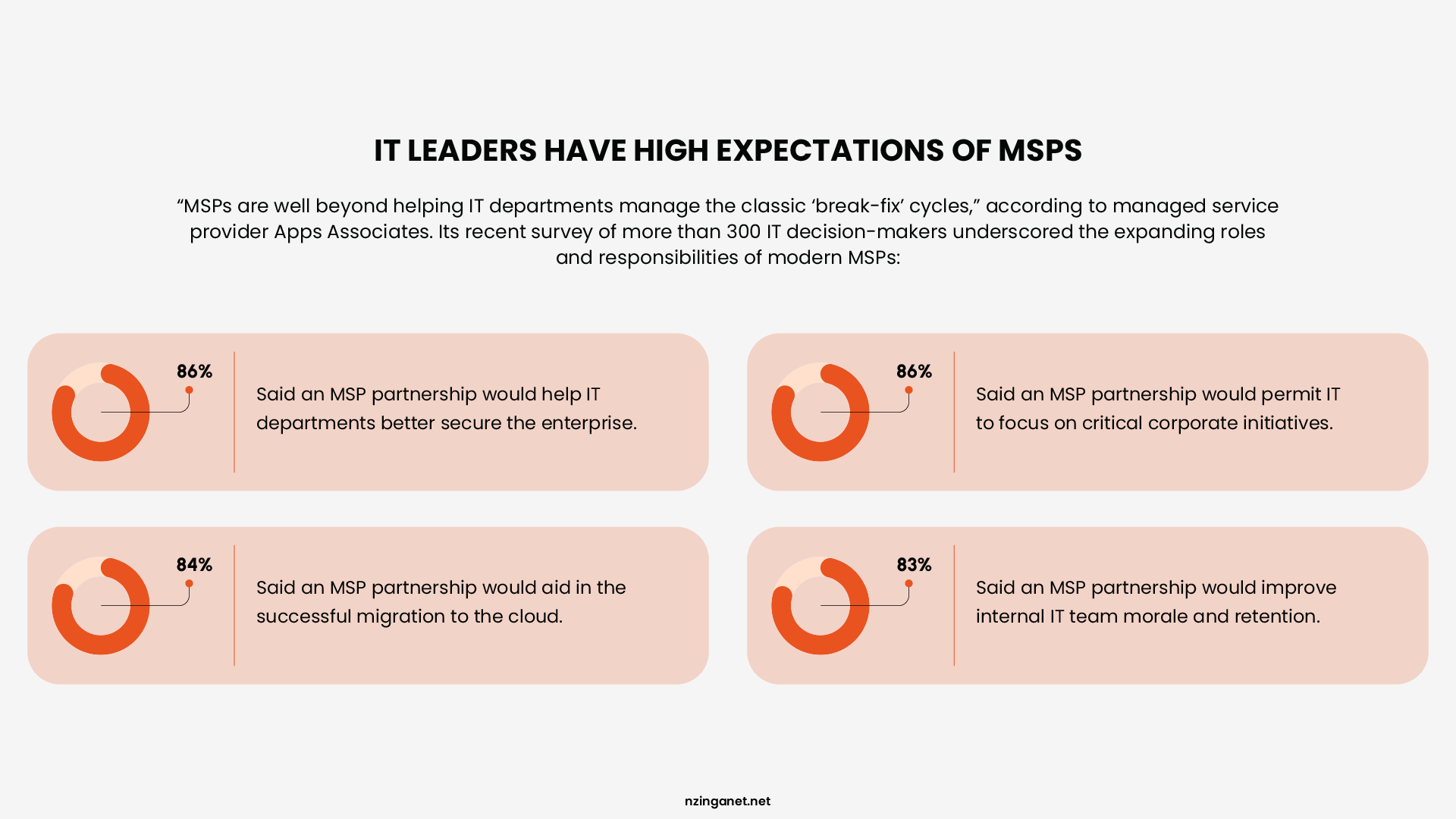
Today, most Managed Service Providers (MSPs) operate on a subscription basis, charging a fixed monthly fee per user or device. This predictability is why small and mid-sized businesses love them. You get enterprise-grade IT support without the enterprise-grade payroll.
Core MSP services include:
- Network monitoring and management
- Device and endpoint management
- Cloud infrastructure management
- IT help desk and user support
- Software patching and updates
- Backup and disaster recovery
- Vendor management
According to Datto, 97% of MSPs now offer some level of managed security services. That sounds reassuring until you realize that "some level" often means basic antivirus, a firewall, and maybe a vulnerability scan once a quarter. That is not cybersecurity. That is checkbox compliance.
MANAGED SECURITY SERVICE PROVIDER
What Is an MSSP?
An MSSP (Managed Security Service Provider) is a specialized third-party company that delivers continuous cybersecurity services, including monitoring, threat detection, incident response, and IT compliance management. MSSPs exist to defend organizations against cyberattacks, data breaches, and regulatory violations by proactively identifying threats, responding to incidents, and helping maintain required security standards that could otherwise lead to financial or reputational damage.
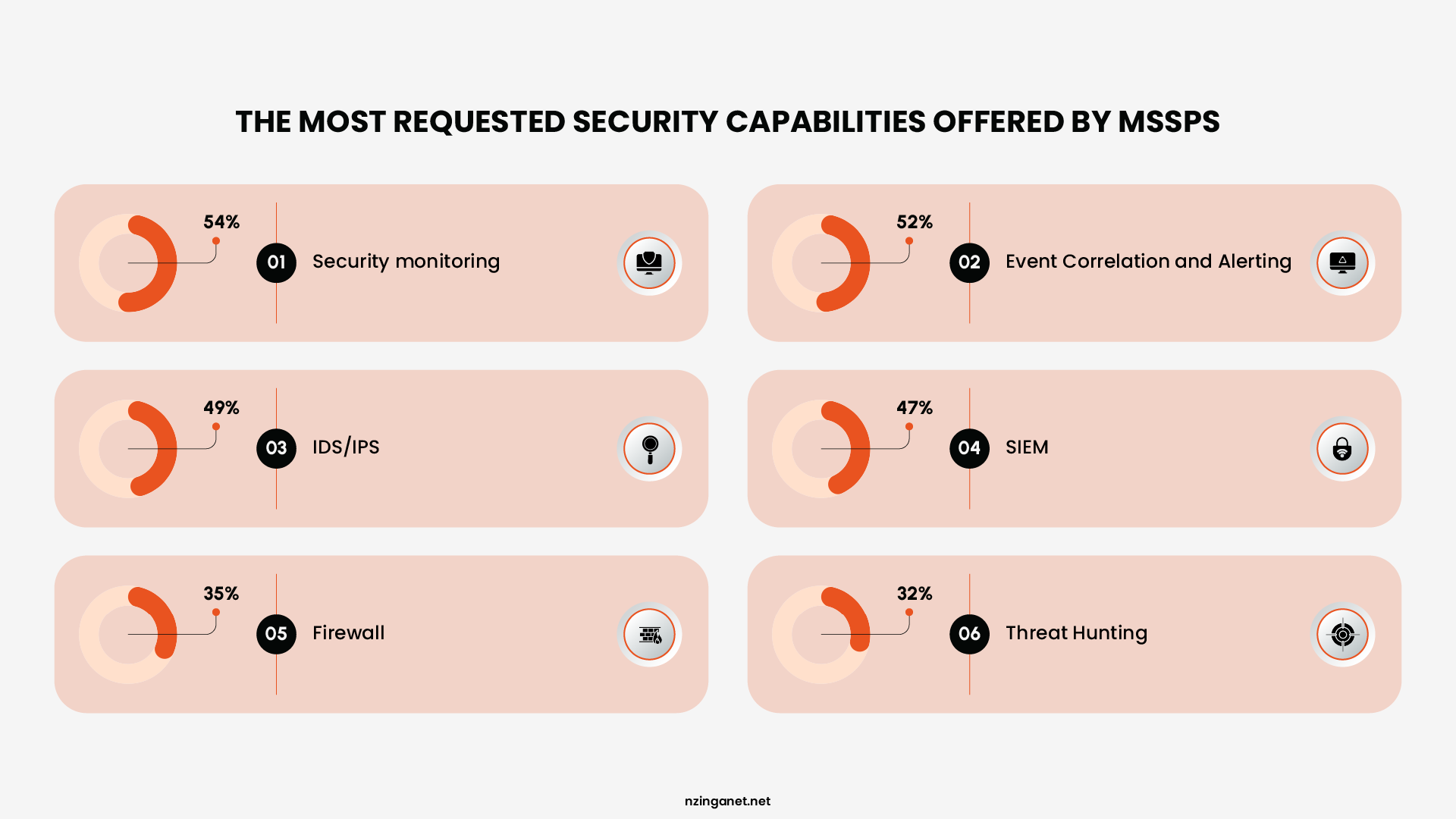
Unlike MSPs, MSSPs operate dedicated Security Operations Centers (SOC) staffed around the clock by analysts trained in threat intelligence, forensics, and incident response. They deploy and manage advanced security technologies such as SIEM (Security Information and Event Management), EDR (Endpoint Detection and Response), firewalls, intrusion detection systems, and vulnerability scanners.
Core MSSP services include:
- 24/7 SOC monitoring and threat detection
- SIEM management and log analysis
- Endpoint detection and response (EDR)
- Vulnerability assessment and penetration testing
- Incident response and forensic investigation
- Firewall and IDS/IPS management
- Compliance management (HIPAA, PCI-DSS, SOC 2, GDPR, NCA ECC)
- Dark web monitoring and threat intelligence feeds
MARKET DATA
MSP vs MSSP: Market Size and Growth
Follow the money to see where the industry is headed. Both markets are massive and accelerating, but security demands are outpacing general IT.
The MSP Market
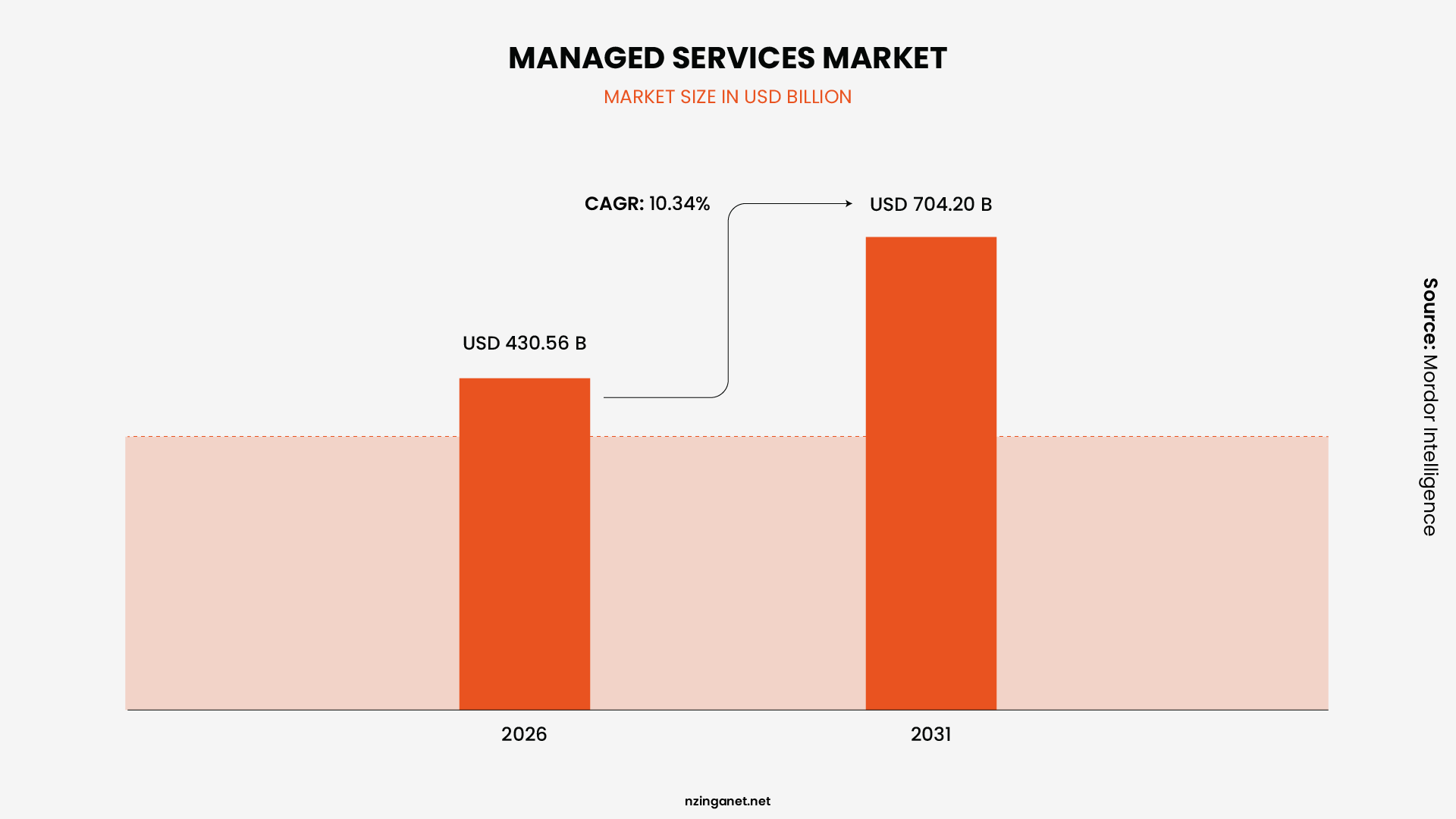
The global managed services provider (MSP) market reached about $430 billion in 2026. By 2031, it could exceed $970 billion at a 10.34% CAGR. North America commands ~39% share, fueled by digital transformation and IT expertise gaps. Security now forms the largest revenue segment (up to 32% in related MSSP breakdowns), outpacing networks, as demand surges for integrated protection.
The MSSP Market
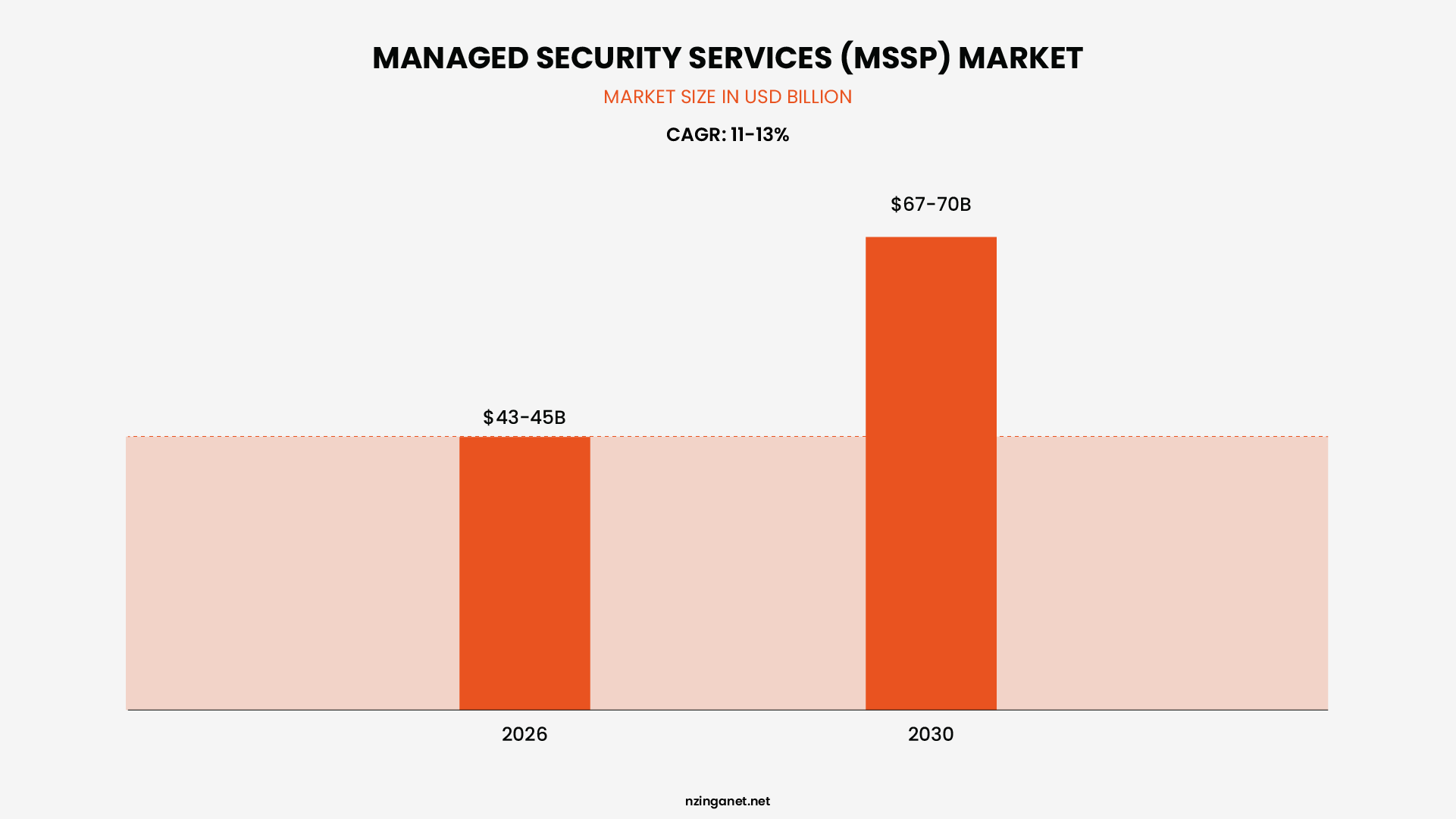
The global Managed Security Services Providers market is valued at $43-45 billion in 2026. By 2030, it is expected to grow to $67-70 billion, with a CAGR of 11-13% depending on the research firm.
North America dominates with roughly 30% of global MSSP revenue, but Asia-Pacific is the fastest-growing region at nearly 13% annual growth. Cloud-based security services now account for over 71% of the MSSP market, reflecting the reality that most business infrastructure lives in the cloud.
What the Growth Data Means for You
The MSP market is ten times larger than the MSSP market because every business needs IT operations. But the MSSP market is growing faster in percentage terms because the threat landscape is accelerating. Ransomware attacks, supply chain compromises, and AI-powered phishing campaigns are forcing companies that never thought they needed dedicated security to reconsider. If you are reading this guide, you are probably one of them.
MSP VS MSSP
Which Is Better: MSP or MSSP?
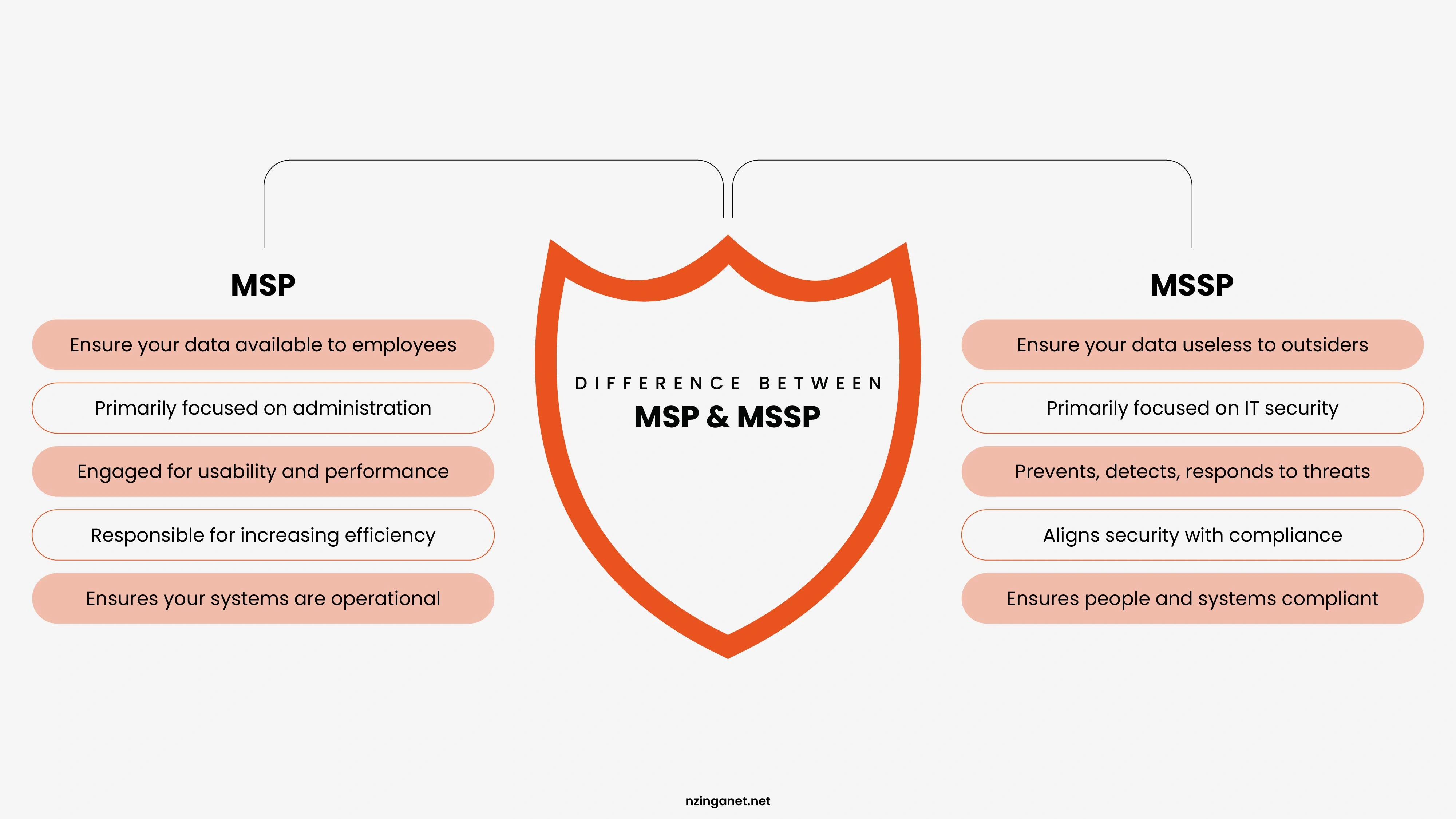
Let me be blunt. Neither is better. They serve different purposes. Asking which one is better is like comparing a contractor to a fire alarm. The answer depends on what problem you are trying to solve.
When to Choose an MSP
An MSP fits businesses that need reliable IT support but do not have an internal team. It works well when the priority is keeping systems running, managing devices, and handling routine issues. This option suits companies with typical data protection needs that do not require constant security oversight.
When to Choose an MSSP
Pick an MSSP if your company handles sensitive data in fields like finance or healthcare. Select it when internal IT exists but can't manage constant threat checks. Go this route if regulations demand expert oversight of advanced risks that basic tools overlook.
When You Need Both
Some businesses require both services. In this setup, the MSP handles daily IT operations while the MSSP focuses on security. This approach works well for growing companies that need stable systems and strong protection at the same time, especially when oversight and separation of roles are required.
FINANCIAL IMPACT
What It Costs to Get Security Wrong
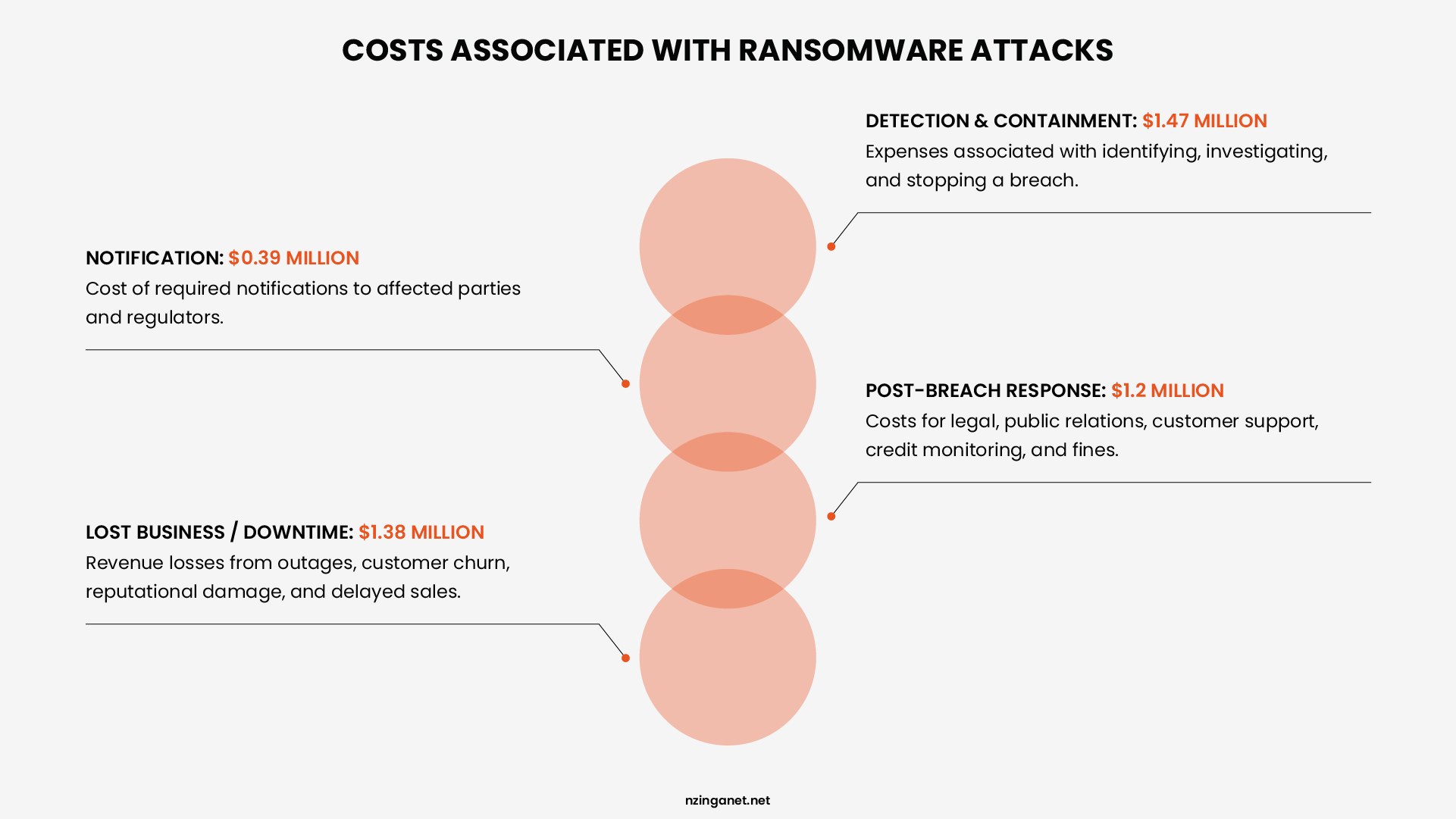
In 2025, ransomware attacks cost businesses an average of $1.85 million in recovery expenses, excluding reputational damage or regulatory fines. Without a SOC, the average time to detect a breach was 197 days, but active MSSP monitoring reduced this to hours or days.
The typical MSSP engagement costs $150 to $500 per user per month, functioning not as an expense but as insurance with a clear payout structure.
For businesses unable to afford a full MSSP, co-managed security offers a proven middle ground: an MSSP augments the internal IT team with SOC monitoring and threat response, while the internal team manages daily operations.
REGULATIONS
MSP vs MSSP: What Compliance Rules Actually Require
Regulators do not care which company you hire to manage your technology. They only care whether your security controls meet the required standard. Choosing the wrong type of provider can leave you noncompliant even if your systems seem to work fine.
HIPAA
HIPAA requires three kinds of safeguards for patient health information: administrative, physical, and technical. These include audit logs, access controls, and a clear plan for responding to security incidents. If you use an MSP to manage your electronic medical records system, that MSP must be a formal Business Associate. They must have documented security controls in writing. Just having them fix your servers or reset passwords does not meet HIPAA requirements. Without the proper agreement and controls, you are the one who gets fined.
PCI DSS version 4.0
This standard applies to any business that accepts credit cards. It requires continuous monitoring of the systems that handle cardholder data. You also need regular penetration tests, log management, and a written incident response plan that you actually practice. These are not typical MSP services. An MSP keeps your network running. An MSSP actively watches for threats and responds to them. If you rely on an MSP alone for PCI compliance, you will likely fail an audit.
SOC 2 Type II
SOC 2 audits test whether your security controls worked properly over a period of time, usually six months or more. To pass, you need evidence that someone was watching your systems, detecting threats, and responding to issues consistently. An MSSP provides the ongoing operations that generate this evidence. An MSP that only does backups and help desk tickets will not leave an audit trail that satisfies a SOC 2 auditor. If your business falls under any regulatory framework, find an MSSP that specializes in your specific compliance rules. Do this before your next audit, not after you get a warning letter or a fine. The cost of an MSSP is almost always lower than the cost of failing compliance.
BY SECTOR
MSP or MSSP? Industry Specific Guidance
Healthcare
If you run a healthcare organization, an MSSP is not an optional add on. It is a requirement. You have HIPAA liability, valuable patient data, and often old systems that are hard to protect. Hackers know this and target healthcare more than most other sectors. Do not treat security as something you can upgrade later.
Financial Services
Banks, credit unions, and investment firms have two problems. Regulators watch them closely. Attackers watch them even more closely. If you process credit cards or manage investment accounts, you need an MSSP that understands PCI DSS and SOC 2. These are not nice to have. They are mandatory.
Law Firms
Law firms hold confidential client information. Attackers, including some backed by foreign governments, want that information for intellectual property or litigation strategy. Many law firms think they are too small or unimportant to be targeted. That belief is wrong, and it costs them real money when they get hit.
Ecommerce and Retail
If you take credit card payments online, your cardholder data environment must be monitored constantly. An MSSP does that. PCI rules are strict. Noncompliance fines start at five thousand dollars per month and can go up to one hundred thousand dollars per month if you keep violating the rules.
Manufacturing and Industrial
Factories and industrial sites use operational technology, or OT, to run machines. This is different from office computers. Standard security tools do not work on OT systems without significant changes. You need an MSSP with specific experience in OT and industrial control systems. Otherwise, you could stop production without even knowing you were attacked.
DECISION FRAMEWORK
How to Choose Between MSP or MSSP (A Decision Framework)
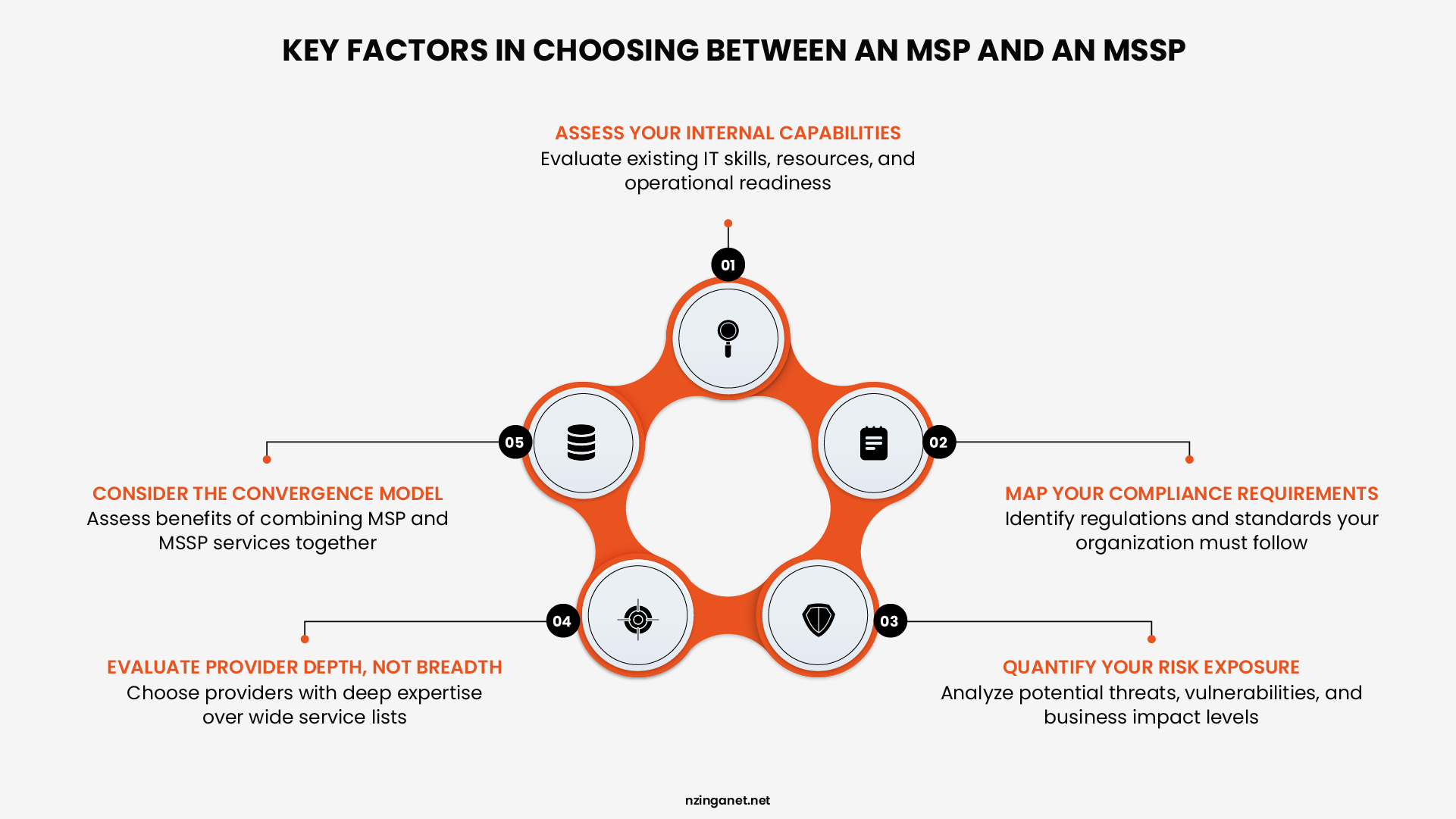
Step 1: Assess Your Internal Capabilities
Be brutally honest. Do you have an internal IT team? If yes, do they have dedicated security expertise, or are they generalists who handle everything from WiFi to Excel support? If you have strong IT operations but no security specialists, you need an MSSP, not a full MSP. If you have neither, you need both.
Step 2: Map Your Compliance Requirements
If you handle healthcare data, payment card information, defense contracts, or operate in the European Union, compliance is not optional. HIPAA, PCI DSS, CMMC, GDPR, NIS2, and DORA all require continuous monitoring, documented controls, and evidence of incident response. An MSP cannot deliver this. An MSSP can, and increasingly, a vCISO must validate it.
Step 3: Quantify Your Risk Exposure
Ask yourself: what happens if we get hit with ransomware tomorrow? Can we operate without our primary systems? Do we have immutable backups? Can we afford the downtime? For small businesses, 60% close within six months of a major cyberattack. If your business would not survive a week without its data, you need an MSSP now.
Step 4: Evaluate Provider Depth, Not Breadth
When interviewing providers, dig deeper than their service lists. Ask these questions: "Walk me through how you would respond to a ransomware attack at 2 AM on a Saturday." If they cannot describe the exact sequence of alerts, escalations, and containment actions, they are a monitoring service, not a security partner. "Who staffs your SOC, and what certifications do they hold?" Look for CISSP, GCIH, GCFA, or equivalent. A college intern watching a dashboard is not a SOC. "How do you handle false positives, and what is your average alert-to-investigation time?" A provider that floods you with alerts is worse than useless; they create alert fatigue that hides real threats. "Can you provide references from clients in my industry who faced a real incident?" Theory is easy. A battle-tested response is what you are paying for.
Step 5: Consider the Convergence Model
If you are a small business with 20 employees and basic IT needs, a single MSP with security add-ons may suffice for now. If you are a mid-sized company with sensitive client data, regulated industry requirements, or a distributed workforce, you need a provider that offers MSP operations, MSSP protection, and strategic advisory under one roof. The operational drag of managing three separate vendors will cost you more in coordination failures than you save in contract fees.
PRICING MODELS
MSP and MSSP Pricing: What You Should Expect to Pay
Managed Service Providers (MSPs) and Managed Security Service Providers (MSSPs) typically charge using subscription-based models (monthly or annual). Managed IT Services Pricing varies widely based on your business size, number of users/devices, service tier, and specific needs like cloud support or advanced compliance.
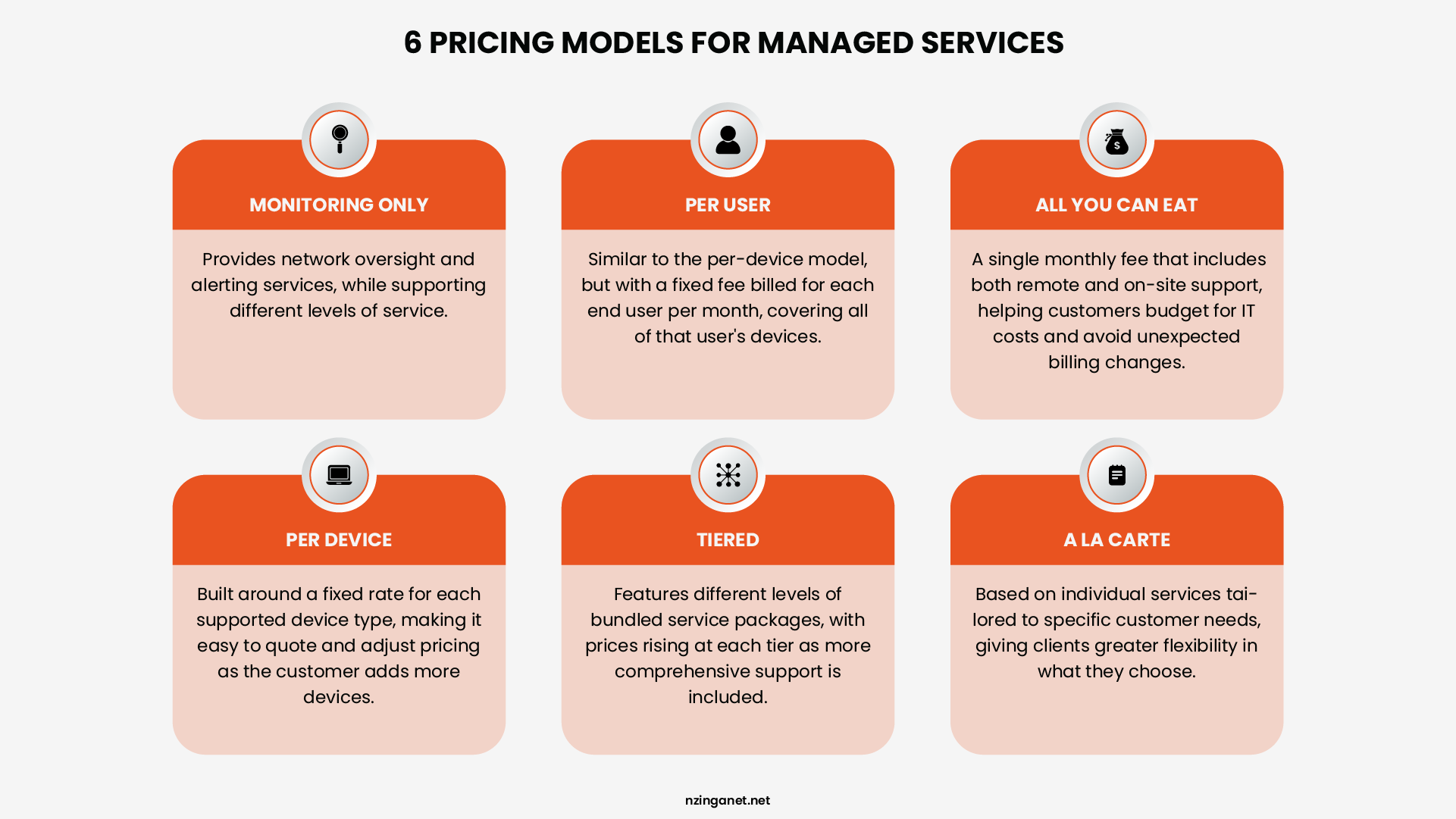
On average, an MSP will charge $100 to $250 per user, per month for comprehensive support. For a 50-person company, this results in a predictable monthly spend of $5,000 to $12,500, though add-ons like advanced cloud management or offsite backups can push these figures higher.
The cost of an MSSP, however, is significantly more variable because it is driven by risk rather than just seat count. For a small business, entry-level monitoring might start between $2,000 and $5,000 monthly.
However, for those requiring a true 24/7 Security Operations Center (SOC) with Managed Detection and Response (MDR), the investment often jumps to $10,000-$50,000+ per month. These premium costs reflect the high-level expertise needed for active threat hunting and the complex regulatory requirements common in modern enterprise environments.
WARNING SIGNS
Red Flags When Evaluating an MSP or MSSP
Below are specific warning signs to watch for when evaluating a managed service provider (MSP) or a managed security service provider (MSSP).
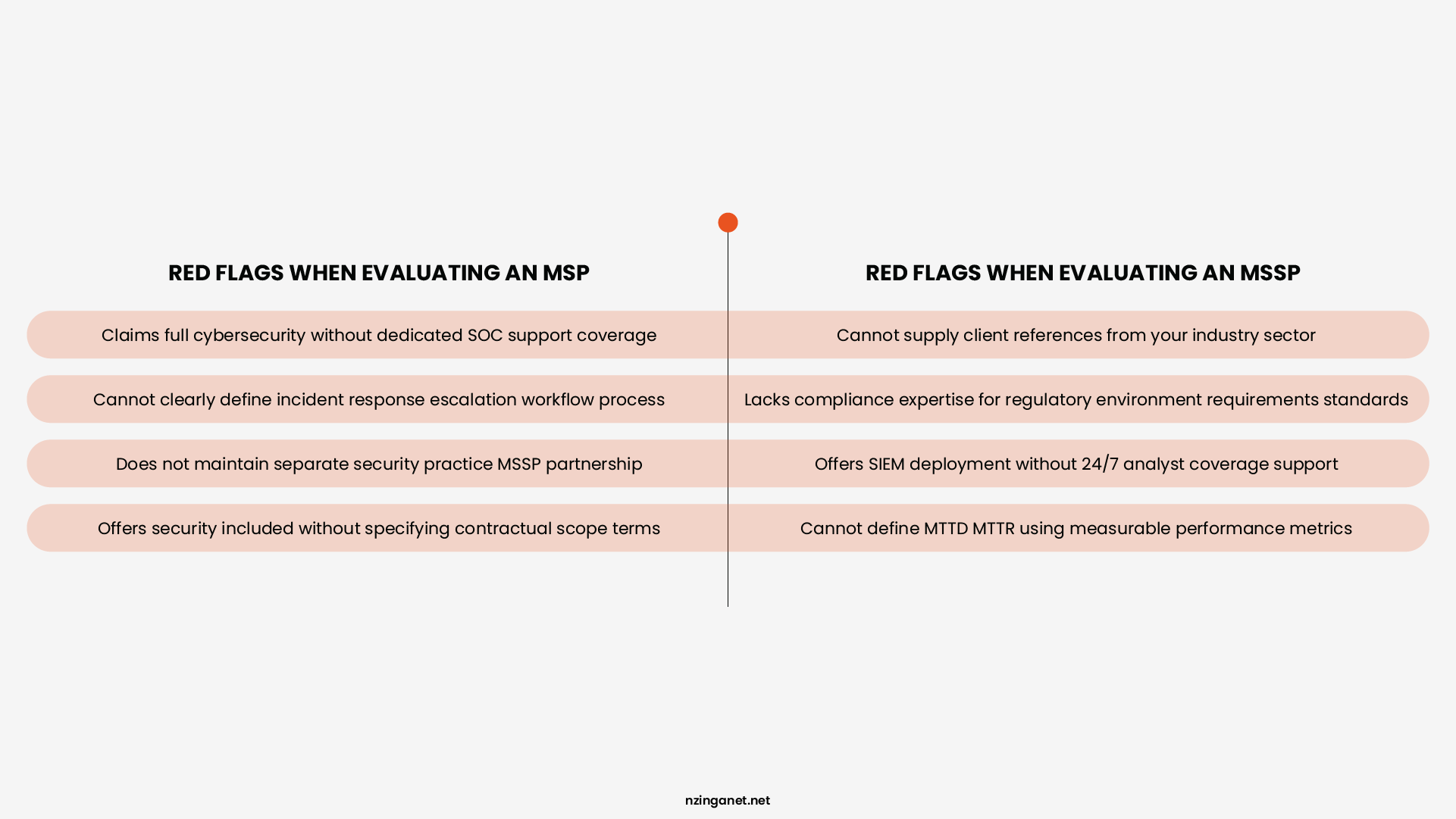
One of the most telling questions to ask an MSSP: "Walk me through the last ransomware incident you responded to." Their answer will reveal more about their capabilities than any sales presentation.
Red Flags for an MSP
- Claims to provide full cybersecurity without a dedicated SOC: An MSP that says it handles all your security but does not have its own security operations center (SOC) is likely just running basic antivirus and calling it protection. A real SOC runs 24 hours a day, seven days a week, with analysts who watch for threats. Without one, you have no one actively looking for a breach until after damage is done.
- Cannot clearly define their incident response procedure: If you ask what happens when a breach occurs and they give you a vague answer like "we will handle it," that is a problem. A legitimate provider should tell you step by step: who gets called, how systems are isolated, how you are notified, and how long each step takes. No clear procedure means chaos during a real attack.
- Does not have a separate security practice or MSSP partnership: Security is not something you add as an afterthought. If an MSP treats security as just another checkbox on the same monthly invoice, they likely lack deep expertise. Look for a dedicated security team or a formal partnership with a real MSSP. Otherwise, your security is being handled by people whose main job is keeping your email running.
- Offers "security included" without specifying what that means contractually: "Security included" is meaningless unless the contract spells out exactly what is covered. Does it include 24/7 monitoring? Threat hunting? Ransomware response? Log analysis? If the agreement just says "security" with no details, you will find out what is missing only when something goes wrong.
Red Flags for an MSSP
- Cannot provide references from clients in your industry: Security needs vary by industry. A provider that works mainly with retail may not understand the compliance rules for healthcare or finance. If they cannot give you a reference from a business similar to yours, they may not have the specific experience you need. Ask to talk to that reference. If they make excuses, walk away.
- Lacks specific compliance expertise relevant to your regulatory environment: Knowing general security is not enough. If you are subject to HIPAA, PCI DSS, SOC 2, or any other framework, your MSSP must understand the specific requirements. Ask them to explain how they handle audit evidence, retention policies, and reporting for your particular regulation. Vague answers mean they will not pass an audit.
- Offers SIEM deployment without 24/7 analyst coverage: A security information and event management system (SIEM) collects logs and generates alerts. But alerts mean nothing if no human looks at them. Some MSSPs sell the software without the people. If they deploy a SIEM but do not have analysts watching it around the clock, you will drown in false alarms or miss real threats entirely.
- Cannot define their mean time to detect and mean time to respond with data: Every serious MSSP tracks how long it takes to spot a threat (mean time to detect, MTTD) and how long it takes to stop it (mean time to respond, MTTR). Ask for their actual numbers. If they cannot give you a clear answer backed by data, they either do not measure performance or their numbers are too embarrassing to share.
Need Help Deciding Between an MSP and MSSP?
Choosing the right support model is not always straightforward, especially when business operations, compliance requirements, and cybersecurity risks overlap. In many cases, the best solution is not choosing one over the other, but building a strategy where IT management and security work together seamlessly.
NzingaNet helps businesses evaluate their current environment, identify operational and security gaps, and recommend practical solutions that fit their size, industry, and long-term goals. Whether you need fully managed IT support, advanced cybersecurity services, or guidance on strengthening your existing setup, the focus should always be on building a resilient and scalable foundation.
If you are unsure where your business stands today, scheduling a consultation can help clarify the next steps before small issues become larger risks.
COMMON QUESTIONS
Frequently Asked Questions
1. What is the difference between an MSP and an MSSP?
An MSP (Managed Service Provider) manages IT infrastructure, including networks, devices, and help desk support, focusing on operational efficiency and uptime. An MSSP (Managed Security Service Provider) focuses exclusively on cybersecurity, providing 24/7 threat monitoring, detection, incident response, and compliance management. The core difference is that MSPs keep technology running while MSSPs keep businesses protected from attackers.
2. Can an MSP replace an MSSP?
No. An MSP cannot replace an MSSP unless the MSP operates a fully staffed 24/7 SOC with dedicated security analysts, SIEM infrastructure, and documented incident response capabilities. Most MSPs do not meet this standard. Businesses that rely on their MSP for security coverage without verifying these capabilities are exposed to significant breach risk.
3. Do small businesses need an MSSP?
Yes, if they store sensitive data, operate in a regulated industry, or process financial transactions. Attackers do not target businesses based on size. They target businesses based on the value and accessibility of their data. A small healthcare practice with 10 employees is a high-value target. A small law firm handling M&A transactions is a high-value target. Size does not equal low risk.
4. Is an MSSP more expensive than an MSP?
Yes, typically by 50% to 100% on a per-user basis. MSPs generally charge $100 to $250 per user per month. MSSPs typically charge $150 to $500 or more per user per month depending on the scope of services. However, the cost comparison must be made against the cost of a breach, not against the cost of the MSP alone.
5. What is co-managed security, and is it a viable option?
Co-managed security is a model where an MSSP augments an internal IT or security team rather than replacing it. The MSSP provides SOC monitoring, threat detection, and specialized security tools while the internal team handles day-to-day IT operations. It is a viable and cost-effective option for mid-sized businesses that have some internal security capability but lack 24/7 coverage.
6. How do I know if my current MSP is providing real security?
Ask them directly: Do you operate a 24/7 SOC? Do you deploy and manage a SIEM? What is your documented incident response procedure? What is your average time to detect a security incident? If they cannot answer these questions with specifics and evidence, they are not providing real security coverage, regardless of what their contract says.
PENNSYLVANIA & BEYOND
Ready for IT Support That Actually Works for Your Business?
NzingaNet provides managed IT and cybersecurity consulting services to small and mid-sized businesses across Pennsylvania and the surrounding region. From day-to-day IT support to strategic technology planning, we give your business the IT expertise it needs without the overhead of full-time staff.