April 13, 2026
A managed service provider, or MSP, is a company that takes ongoing responsibility for your IT infrastructure under a fixed monthly agreement. Instead of waiting for something to break, they monitor your systems continuously, apply security patches, support your staff, and manage your cloud environments day to day. The model exists because most small and mid-sized businesses cannot realistically staff a full IT team.
Hiring a single experienced IT professional in the United States costs well over $100,000 per year in salary alone, typically $105,000 to $145,000 for mid-level roles like systems analysts or network engineers, before benefits or training. An MSP gives those same businesses access to a team of specialists across networking, security, cloud, and support for a fraction of that cost.
This guide explains exactly how MSPs work, what they cover, what the benefits look like in practice, how pricing is structured, and what to ask before signing a contract.
TABLE OF CONTENTS
AT A GLANCE
Key Takeaways
- MSPs offer specialized expertise that enables businesses to benefit from high-level IT skills without the expense and effort of recruiting, training, and managing an in-house team, delivering advanced IT capabilities in a cost-effective manner.
- The managed services model is inherently scalable and flexible, adapting effortlessly to a company's changing needs, whether scaling up rapidly or refining operations, MSPs adjust their services to support evolving objectives.
- Through continuous monitoring and proactive maintenance, MSPs identify and address issues before they escalate, reducing downtime and strengthening system reliability for long-term business continuity.
INDUSTRY OVERVIEW
Managed Service Provider Industry: Market Size and Growth
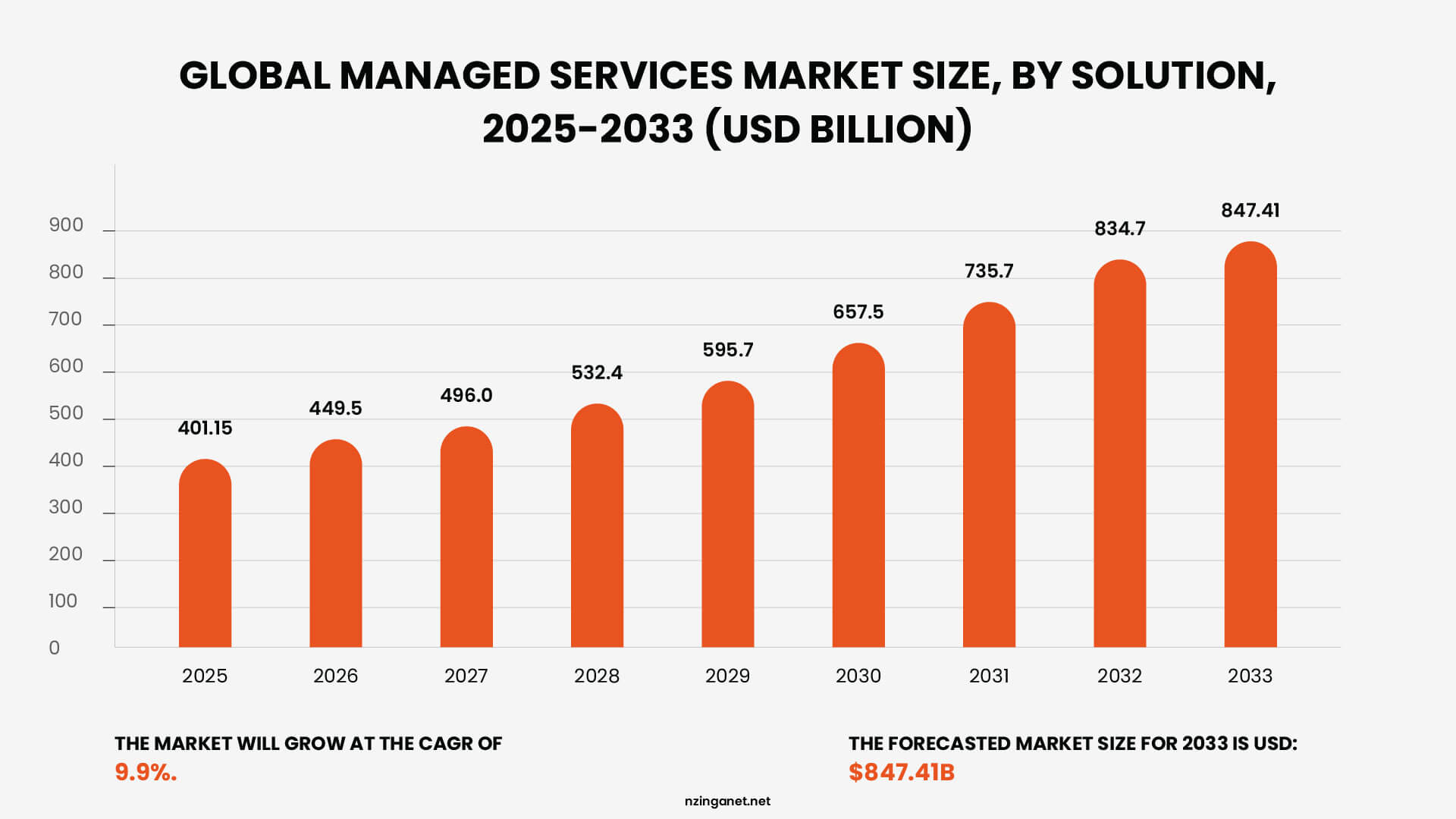
The scale of managed service provider adoption gives useful context for why so many businesses are making this shift. The global managed services market reached $401.15 billion in 2025 and is projected to hit $847.41 billion by 2033, growing at a compound annual growth rate of 9.9%.
In the United States, the market was valued between $69-128 billion in 2025 and is forecast to reach $116-162 billion by 2030 at CAGRs of 4.9-10.8%. North America holds a leading regional share, accounting for around 33% of global managed services revenue, driven by the concentration of small and mid-sized businesses outsourcing IT operations and tightening cybersecurity requirements.
The managed security segment is the fastest-growing category within the industry, which reflects a broader reality: the cost and complexity of staying secure has outpaced what most internal teams can manage on their own.
KEY DISTINCTION
What Is the Difference Between an MSP and an MSSP?
Both terms get used interchangeably online, but they describe two fundamentally different services. Getting this wrong before you sign a contract is an expensive mistake.
The main difference between a Managed Service Provider (MSP) and a Managed Security Service Provider (MSSP) lies in their core focus: an MSP is your partner for overall IT operations and keeping your technology running, while an MSSP is a specialized partner focused exclusively on protecting you from cyber threats.
For a quick overview, here are the key differences:
| Feature | Managed Service Provider (MSP) | Managed Security Service Provider (MSSP) |
|---|---|---|
| Primary Focus | IT infrastructure health, operational efficiency, and system uptime. | Cybersecurity protection, threat detection, and risk mitigation. |
| Core Goal | Ensure technology systems are functional, reliable, and support business productivity. | Protect digital assets, defend against cyberattacks, and ensure data confidentiality. |
| Key Services | Help desk, network management, data backup, software updates, hardware maintenance. | 24/7 security monitoring, threat hunting, incident response, vulnerability management, SIEM. |
| Operational Center | Network Operations Center (NOC) for monitoring network health and performance. | Security Operations Center (SOC) with analysts dedicated to threat monitoring and response. |
| Expertise | Broad IT generalists skilled in various systems and user support. | Deeply specialized cybersecurity experts with certifications like CISSP, CISM. |
| Pricing Model | Typically predictable, flat-rate or tiered subscription fees. | Often higher cost reflecting specialized expertise, advanced tools, and 24/7 service. |
| Approach | Proactive in maintaining system performance; reactive to user issues. | Aggressively proactive in hunting for, identifying, and neutralizing hidden threats. |
CORE SERVICES
What Services Do Managed Service Providers (MSP) Offer?
The scope of what MSPs offer has expanded considerably over the years. At the most basic level, most managed IT services cover the following areas:
Network Monitoring and Management
Your MSP keeps an eye on your network around the clock, looking for unusual traffic, performance slowdowns, hardware failures, and security threats. When something triggers an alert, they investigate before you ever notice a problem.
Cybersecurity
Most MSPs include firewall management, antivirus and endpoint protection, patch management, email filtering, and monitoring for suspicious activity. Some go deeper with full security operations and compliance support.
Cloud Management
Most MSPs manage environments across Microsoft Azure, Amazon Web Services, and Google Cloud, as well as Microsoft 365 and Google Workspace, including user provisioning, license management, and cost optimization.
Help Desk and End-User Support
When an employee cannot connect to the VPN, gets locked out of an account, or has a hardware issue, they need somewhere to turn. MSPs provide staffed IT support by phone, email, or chat during agreed hours. Many offer 24/7 coverage at higher tiers.
Backup and Disaster Recovery
Data loss can come from ransomware, hardware failure, accidental deletion, or natural disaster. MSPs manage backup systems that automatically copy your data at regular intervals and store it offsite or in the cloud, with tested recovery plans.
Software and Hardware Procurement
Some MSPs act as a single point of contact for buying hardware and software licenses, often at discounted rates through vendor partnerships, ensuring you run approved, licensed, and compatible equipment.
BUSINESS IMPACT
What Are The Benefits of Using a Managed Service Provider (MSP)?
The case for using a managed service provider is not just about outsourcing convenience. There are concrete operational advantages that businesses notice once the relationship is in place.
-
1
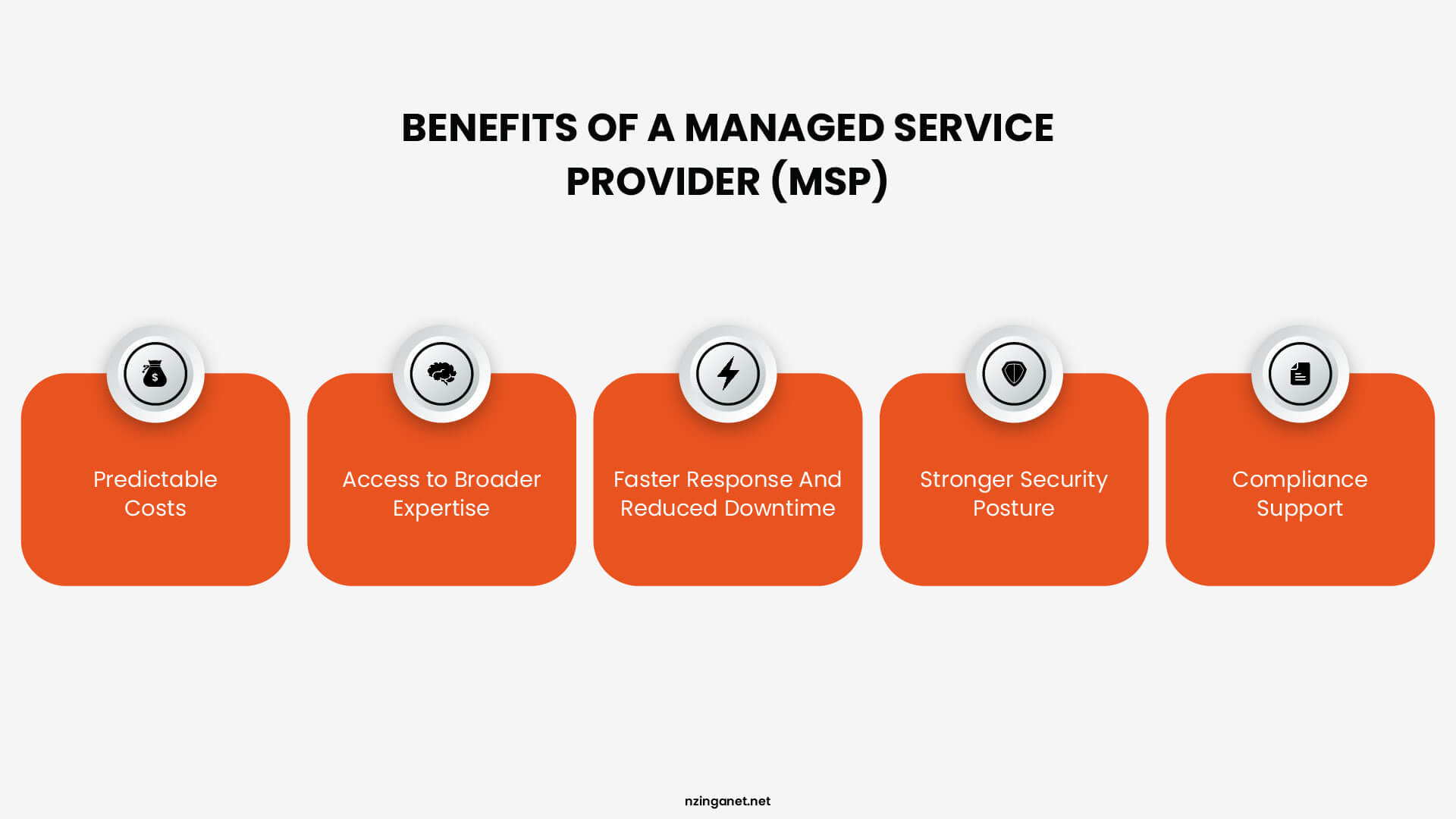
Predictable Costs
Break-fix IT creates budget uncertainty because you cannot predict when a server will fail or how long a fix will take. One of the clearest benefits of managed IT services is that a service agreement converts those unpredictable expenses into a flat monthly line item, which makes planning easier and removes the instinct to delay necessary maintenance to save money.
-
2
Access to Broader Expertise
A single in-house IT hire, however capable, has a finite range of knowledge. A managed service provider (MSP) for small business brings a team where one person specializes in security, another in cloud infrastructure, another in compliance. When a complex problem comes up, the right person is already on staff.
-
3
Faster Response and Reduced Downtime
Continuous monitoring catches issues that might otherwise go unnoticed overnight or over a weekend. According to Datto's report, MSPs achieve significantly faster issue resolution, with surveyed providers reporting up to 40% reduction in unplanned downtime incidents compared to traditional break-fix models.
-
4
Stronger Security Posture
Cybersecurity requires constant attention: patches need to be applied promptly, configurations need to be reviewed, and threats need to be monitored. Most small businesses simply do not have the bandwidth for this. A managed services provider with dedicated security capabilities fills that gap without requiring you to hire a security specialist.
-
5
Compliance Support
Compliance support matters more as regulatory requirements become broader. If your business handles patient records, financial data, or personal information from EU residents, frameworks like HIPAA, PCI-DSS, or GDPR create real obligations. Many MSPs are experienced with these requirements and can help you stay on the right side of them without dedicating internal resources to the task.
TARGET AUDIENCE
Who Typically Uses a Managed Service Provider?
MSPs work with organizations across a wide range of industries and sizes. That said, certain types of businesses tend to get the most value from the model:
🏢 Small and Mid-Sized Businesses (SMBs)
Small and mid-sized businesses are the most common MSP customers. These companies typically do not have the budget or the hiring pipeline to build a full internal IT department, yet they depend on technology just as heavily as larger organizations. An MSP gives them access to a team of specialists at a fraction of the cost.
⚖️ Regulated Industries
Businesses in healthcare, finance, legal, and education are heavy MSP users. Compliance requirements around data security and privacy create obligations that require consistent attention. An MSP familiar with HIPAA, SOC 2, or PCI-DSS can take much of that burden off the business owner.
🚀 High-Growth Companies
Companies going through rapid growth turn to MSPs because their technology needs shift faster than internal hiring can accommodate. Rather than scrambling to expand an IT team every time the business adds a location or doubles headcount, they adjust the scope of their MSP agreement instead.
🏦 Enterprise Use Cases
Even large enterprises use MSPs for specific functions. A multinational company might handle most IT in-house but bring in a managed service provider to cover a regional office, manage a particular cloud environment, or supplement overnight monitoring when internal staff are not available.
DECISION GUIDE
MSP vs. In-House IT: Which Is Better for My Business?
Choosing between a Managed Service Provider (MSP) and an in-house IT team depends on how much control, expertise, and flexibility your business requires. For many small and mid-sized companies, MSPs offer cost-effective access to specialized IT support, while larger organizations often prefer in-house teams to maintain direct control over complex systems.
MSP Advantages
✓ Predictable monthly costs instead of full-time salaries
✓ Access to a wider range of technical expertise
✓ Scalable services as business needs grow
✓ 24/7 monitoring and proactive support
MSP Considerations
· Less direct control over daily IT operations
· Response times depend on the service agreement
· On-site support may be limited or scheduled
In-House Advantages
✓ Full control over infrastructure and policies
✓ Immediate on-site support for technical issues
✓ Deeper understanding of internal workflows and systems
In-House Considerations
· Higher long-term costs due to salaries and training
· Expertise limited to the skills of the internal team
· Scaling requires additional hiring and resources
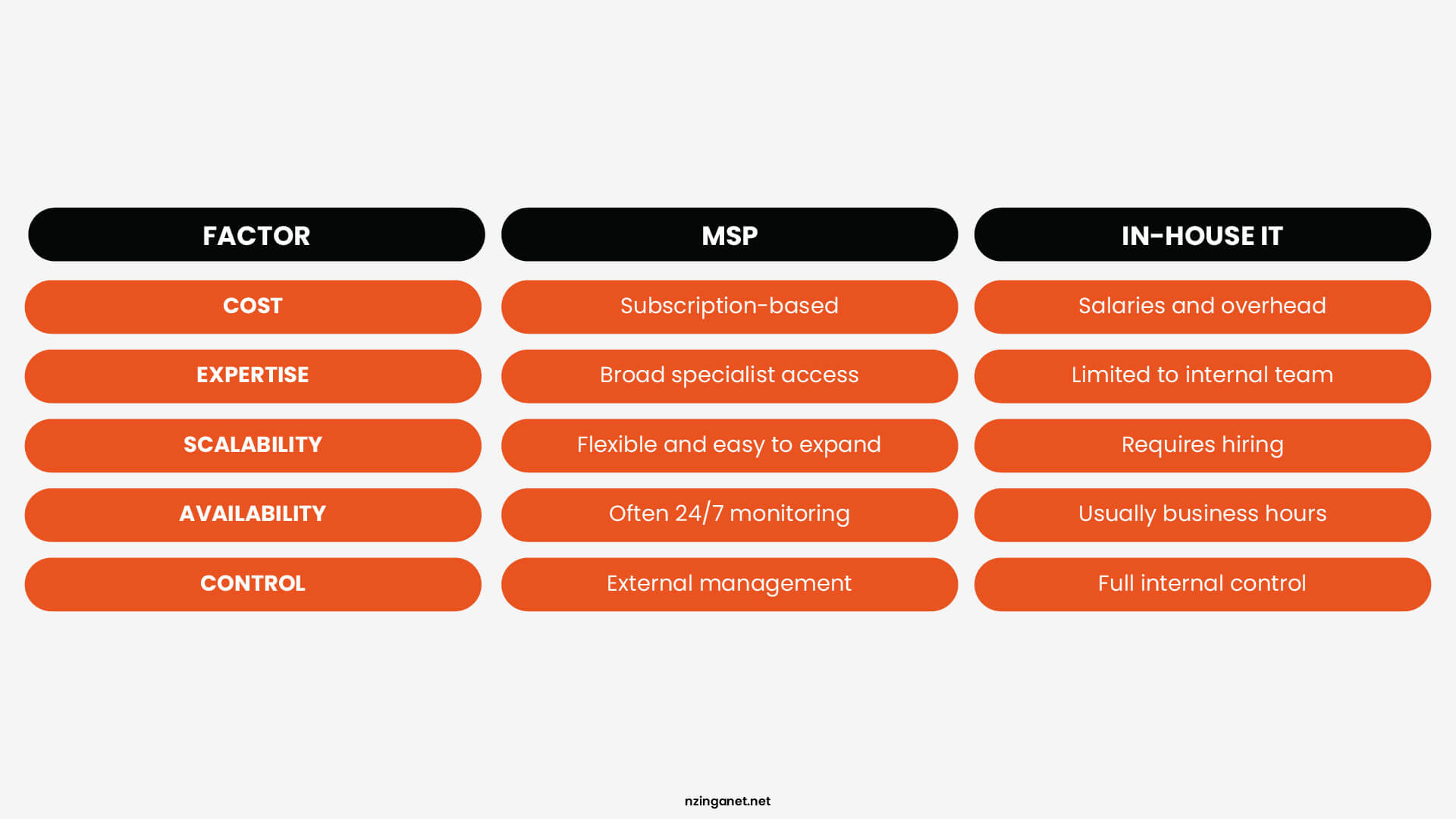
Businesses focused on cost efficiency, scalability, and specialized expertise often benefit from MSP services. Companies that require constant on-site support and full operational control may find an in-house IT team more effective. In many cases, organizations combine both approaches, using internal staff for daily operations while relying on MSPs for specialized services like cybersecurity or infrastructure management.
COST BREAKDOWN
How Much Do Managed IT Services Cost?
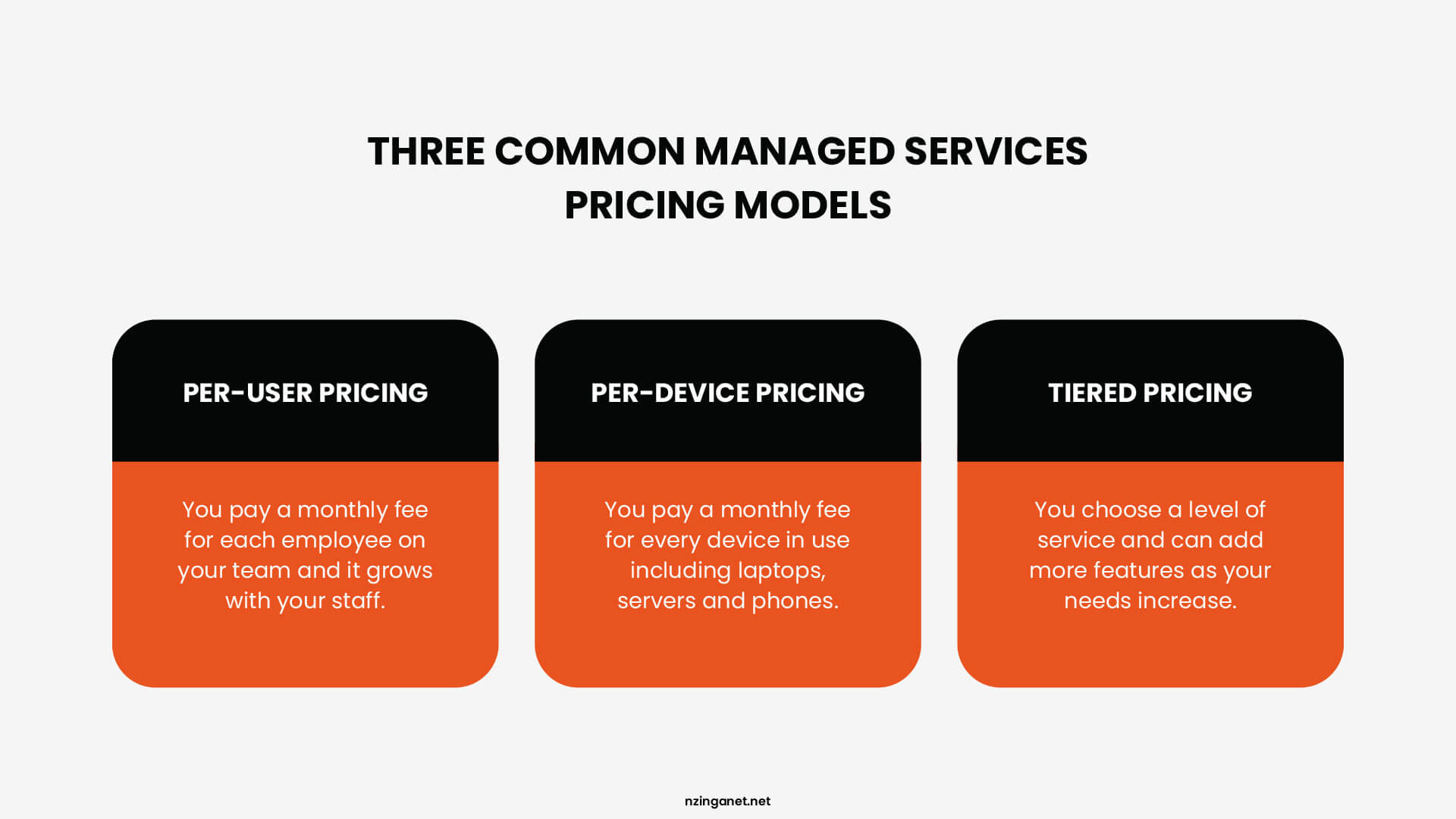
Managed IT pricing is not one-size-fits-all, and that is actually a good thing. Most providers structure their fees around how your business is built, which means you are not paying for coverage you do not need. There are three models you will encounter most often:
Model 1
Per-User Pricing
The most straightforward and common model for SMBs. You pay a flat monthly fee for each employee covered under the agreement, regardless of how many devices that person uses. When you hire someone new, you add them to the plan. The cost scales directly with your headcount and nothing else.
Model 2
Per-Device Pricing
With this model, the fee is tied to each individual device under management rather than each person. Every laptop, server, firewall, and mobile device has its own monthly cost. Works well when your device count is stable but staff changes frequently, for example in industries with high turnover or seasonal hiring.
Model 3
Tiered Pricing
Rather than calculating cost by headcount or device count, tiered pricing bundles a defined set of services at different price points. A base tier covers fundamentals. A premium tier might include 24/7 support, advanced threat detection, compliance management, and a dedicated account manager.
What the Pricing Model Does Not Tell You
When weighing up the cost of managed IT services, the model itself matters less than what is included within it. Two MSPs can both offer per-user pricing and charge significantly different amounts because one bundles on-site visits, after-hours support, and project work into the monthly fee while the other bills each separately. Before comparing quotes, ask every provider: what specifically triggers a bill outside of the monthly fee?
SELECTION CRITERIA
What to Look for When Choosing a Managed Service Provider (MSP)
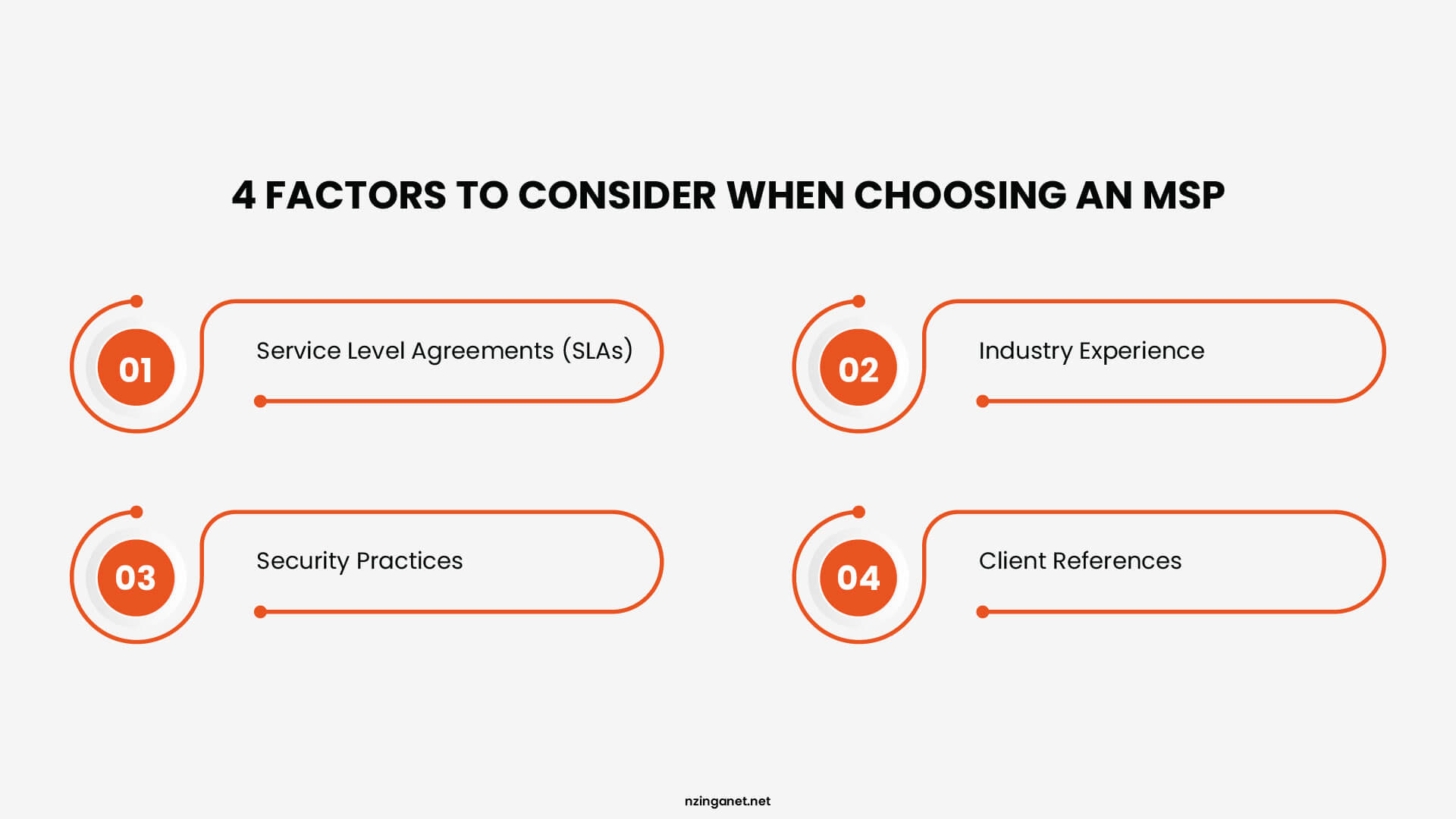
The gap between a good managed service provider and a poor one is not always visible from a website or a sales call. Here are the four things that actually matter before you sign anything:
-
1
Service Level Agreements (SLAs)
An SLA is the document that defines what you are actually buying. Read it with the assumption that something will go wrong eventually, because it will, and the SLA determines what happens next. Response time tiers matter more than the headline number. A well-structured SLA treats a business-wide outage differently from a single offline printer. For critical issues, 30 minutes or less is a reasonable benchmark. A four-hour window is not.
-
2
Industry Experience
The same technical problem carries different stakes depending on your industry. A healthcare practice dealing with an access control failure has far more at risk than a marketing agency facing the same issue. A managed service provider (MSP) with genuine experience in your sector understands that context without requiring you to explain it. Find out which industries make up the bulk of their client base and how long they have been serving businesses like yours. If your operations fall under HIPAA, PCI-DSS, SOC 2, or CMMC, go further and ask how many active clients they currently support under those specific frameworks and what that support involves day to day.
-
3
Security Practices
Bringing on a managed service provider (MSP) means giving a third party privileged access to your systems, your data, and your network. Their internal security posture becomes part of your risk profile, which is why this is the area most businesses underexamine before signing. Before committing, find out how they store and manage credentials for client accounts, whether multi-factor authentication is enforced internally, and how they handle access when one of their own employees leaves the organization. It is also worth knowing whether they carry cyber liability insurance and what their incident response process looks like if a breach originates on their end. A reputable managed service provider (MSP) answers these questions directly. Vague reassurances are worth following up on.
-
4
Client References
A sales presentation shows you what a managed service provider (MSP) wants you to see. A reference conversation gives you something more useful: an honest account of what the relationship actually looks like after the onboarding period ends. Request references from businesses similar to yours in size and industry, ideally clients who have been with the provider for at least a year. When you speak with them, steer the conversation toward how the managed service provider (MSP) handled a difficult situation, not just whether things have generally gone well. How a provider behaves when something goes wrong tells you considerably more about what you can expect than a list of their successes.
LOCAL EXPERTISE
Where Can I Get Managed IT Support in Pennsylvania?
If you are a small or mid-sized business in Pennsylvania or the surrounding areas, the right starting point is a provider who understands your industry before recommending anything. Not every managed service provider is built for every business, and that gap shows up quickly once you are in a contract.
NzingaNet works with businesses like yours every day. We specialize in industries where the stakes are real, including healthcare, construction, insurance, property management, and we build our support around what your environment actually needs.
The easiest way to find out whether we are a good fit is to have a straightforward conversation about where your IT stands today. Schedule a consultation with our team, and we will take an honest look at your current setup and tell you exactly what we see.
COMMON QUESTIONS
Frequently Asked Questions
1. What are the top managed service provider (MSP) trends in 2026?
In 2026, MSPs prioritize AI-driven automation (87% plan increased investments, reducing ticket volume by 40-60%), cybersecurity growth at 18% annually, and SMB expansion with $90B+ new spending. Zero-trust and multi-cloud management also dominate as hybrid environments grow more complex.
2. How does a managed service provider (MSP) handle ransomware protection?
MSPs use layered defenses including the 3-2-1 backup rule (3 copies, 2 media types, 1 offsite), EDR for real-time detection, air-gapped storage, and quarterly restore testing, standard practices across providers. This exceeds basic antivirus by enabling rapid, tested recovery.
3. Can managed service providers (MSPs) integrate with ERP systems like SAP or Oracle?
Yes, MSPs integrate via secure APIs, EDI monitoring, RBAC access controls, and SOC 2 compliance for data flows, managing patch conflicts and performance in hybrid ERP-cloud setups.
4. What red flags should I avoid when hiring a managed service provider (MSP)?
Avoid vague SLAs, lack of cybersecurity insurance, high-pressure sales, weak references, and hidden fees. Client retention below 90% is a warning sign.
5. How do I measure managed service provider (MSP) ROI for my business?
Track downtime reduction, faster ticket resolution, fewer security incidents, and cost savings vs. in-house IT. Most businesses see 2-4x ROI in year one.
6. How much does an MSP typically charge per user each month?
Per-user managed IT pricing commonly falls between $100 and $250 per user per month, depending on the scope of coverage. The exact rate depends heavily on what is bundled into that fee, such as after-hours support, on-site visits, and advanced security tools, so always confirm what is included before comparing quotes across providers.
PENNSYLVANIA & BEYOND
Ready to Find the Right MSP?
NzingaNet works with businesses in healthcare, construction, insurance, and property management across Pennsylvania. Schedule a no-obligation consultation and find out exactly where your IT stands today.