August 11, 2026
Email remains one of the easiest ways for cybercriminals to target businesses. In fact, 94% of malware is delivered through email, making inboxes one of the most frequently exploited entry points for cyberattacks.
For small businesses, the risk is especially significant. Limited security resources, busy employees, and reliance on email for daily operations make them attractive targets for phishing, business email compromise, spoofing, and other email-based threats.
This guide explains what email security is, why it matters for small businesses, the most common email threats to watch for, how to recognize phishing attempts, and ten practical strategies organizations can use to protect their employees, data, and business operations.
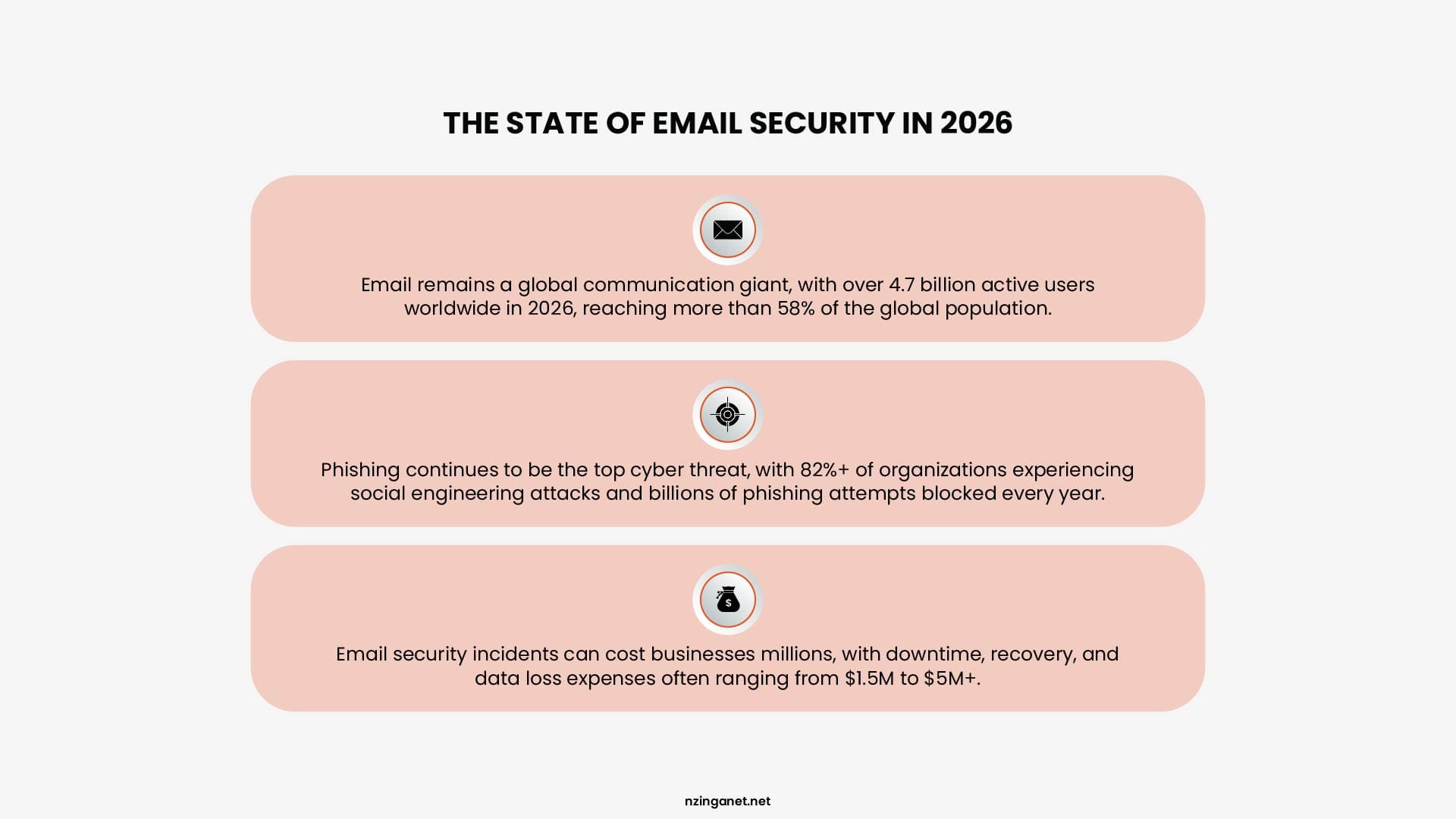
TABLE OF CONTENTS
- What Is Email Security?
- Why Email Security Matters for Small Business
- Types of Email Security Threats
- Business Email Compromise vs Phishing
- Phishing Email Red Flags
- 10 Email Security Best Practices for Small Business
- What to Do If You Open a Phishing Email
- Need Help Securing Your Business Email?
- Frequently Asked Questions
What Is Email Security?
Email security is the combination of tools, policies, and habits that protect your business email accounts and domain from being used to deliver attacks, steal money, or impersonate you.
It covers three separate jobs: stopping malicious emails from reaching your team's inbox, verifying that emails claiming to be from your business are actually from your business, and making sure a compromised account can't be used to cause further damage.
That last point matters because email security isn't only about defending your inbox. It's also about protecting your domain's reputation, so criminals can't send fraudulent messages that appear to come from your company to your customers, vendors, or partners.
Why Email Security Matters for Small Business
Small businesses run almost their entire operation through email. Invoices get approved over email. Vendors get paid based on instructions sent by email. New employees get onboarded through email threads. That level of dependence is exactly what attackers are counting on.
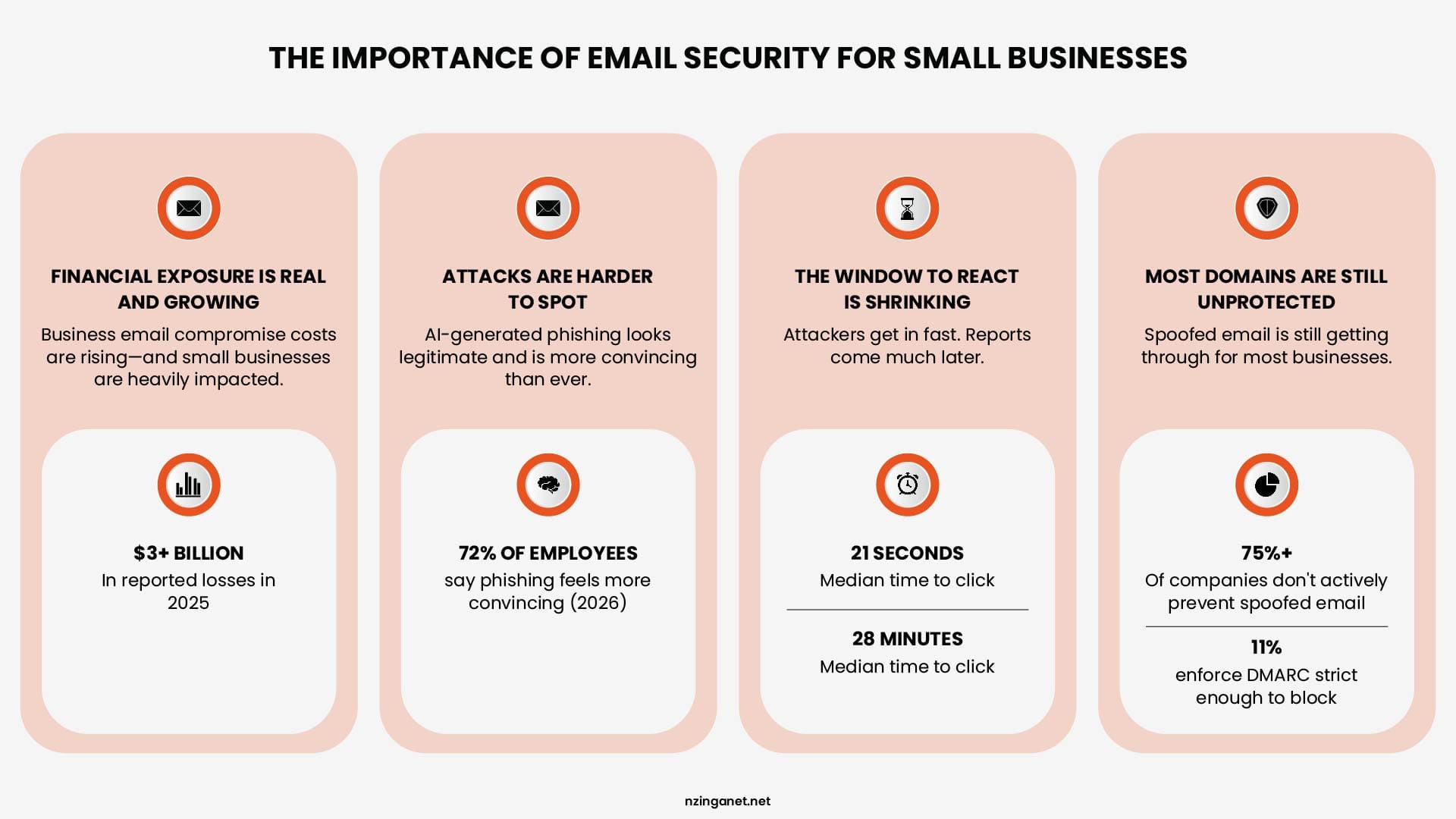
- The financial exposure is real and growing: The FBI's Internet Crime Complaint Center logged 24,768 business email compromise complaints in 2025, totaling more than $3 billion in reported losses, up from roughly $2.77 billion the year before. Small businesses make up a large share of these complaints because they rely so heavily on email to authorize payments without the layered approval processes larger companies use.
- Attacks are getting harder to spot: AI generated phishing has closed the gap that used to make scam emails easy to catch, the bad grammar, the awkward phrasing. By some estimates, 40 percent of business email compromise messages are now AI generated, and in the 2026 Saggis survey, 72 percent of employees said phishing attempts felt more convincing than they did a year earlier because of AI written language.
- The window to react is shrinking: The median time for someone to click a phishing link is around 21 seconds after the email lands, while the median time for that same phishing attempt to actually get reported is roughly 28 minutes. That gap gives an attacker close to half an hour of undetected access before anyone raises a flag.
- Most domains are still unprotected: Even with growing awareness, more than three quarters of companies are not actively preventing spoofed email, and only around 11 percent enforce a DMARC policy strict enough to actually block forged messages. This is one of the biggest gaps between what businesses assume is protecting them and what's actually configured.
Types of Email Security Threats
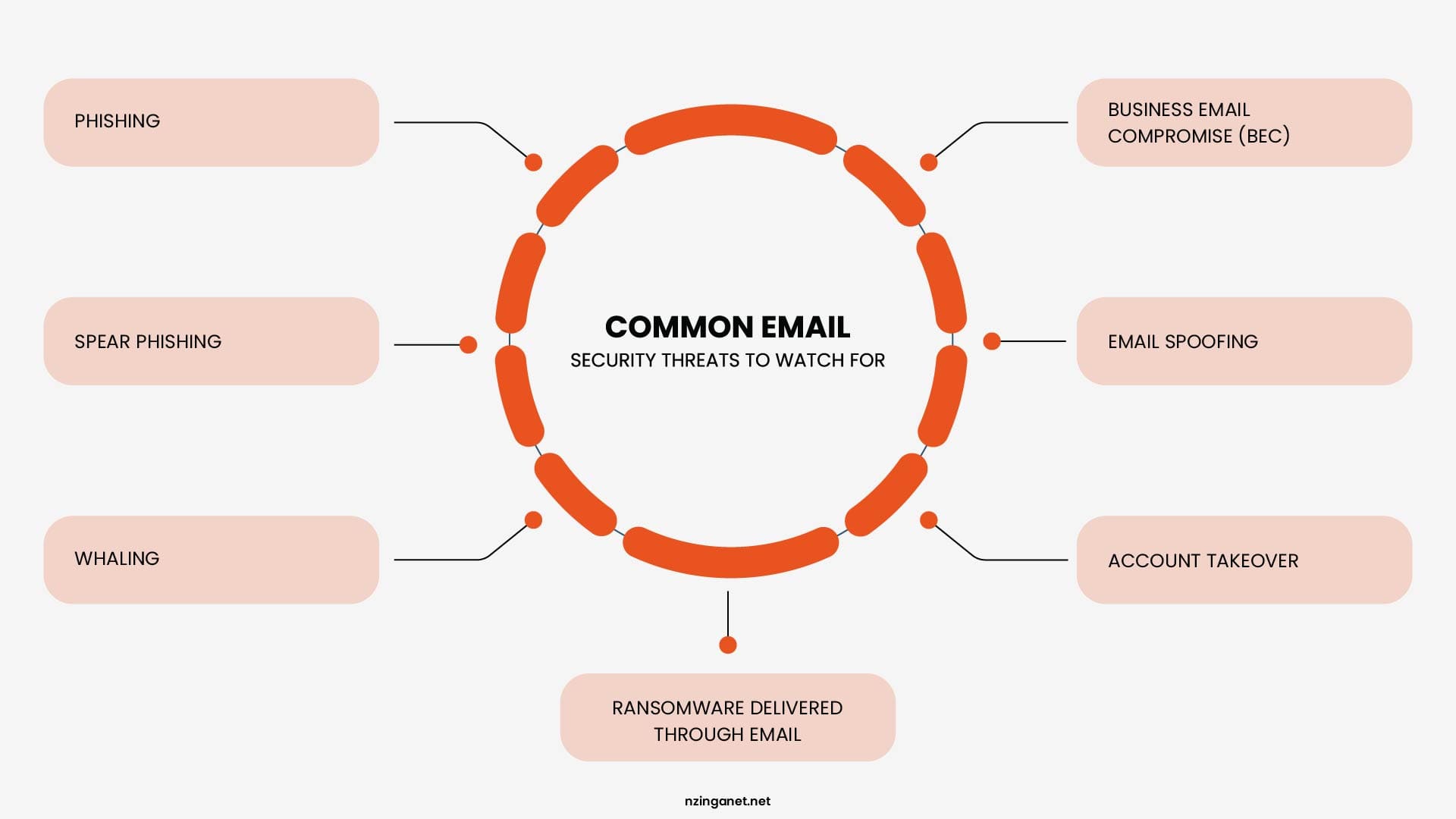
Not all email attacks work the same way. Some rely on tricking employees into taking an action, while others focus on stealing access, impersonating trusted contacts, or delivering malware. Understanding the different types of email threats helps employees recognize suspicious messages and respond appropriately:
Phishing
Phishing is the most common type of email attack. It involves sending fraudulent messages to a large number of recipients with the goal of stealing information, delivering malware, or convincing users to click malicious links. These emails often impersonate trusted organizations and rely on urgency or fear to encourage quick action.
Spear Phishing
Spear phishing is a more targeted form of phishing that focuses on a specific individual, team, or organization. Attackers often research their targets and include personal details, job responsibilities, or company information to make the message appear legitimate. Because these emails are more personalized, they are often more difficult for employees to identify.
Whaling
Whaling targets high-level executives, business owners, and senior employees who have access to sensitive information or financial authority. By compromising or impersonating a senior leader, attackers can make convincing requests for payments, confidential data, or account access.
Business Email Compromise (BEC)
Business email compromise is a financially motivated attack where criminals impersonate trusted individuals, such as executives, vendors, or partners, to manipulate employees into transferring money, changing payment details, or sharing sensitive information. Unlike many cyberattacks, BEC often does not require malware. Instead, attackers rely on social engineering, trust, and urgency to convince victims to take action.
Email Spoofing
Email spoofing involves falsifying the sender information so a message appears to come from a legitimate person or company. Attackers commonly use spoofing to make phishing emails and BEC attempts look more trustworthy. Email authentication technologies such as SPF, DKIM, and DMARC help organizations detect and prevent many spoofing attempts.
Account Takeover
Account takeover occurs when attackers gain access to a legitimate email account, usually through stolen passwords, phishing, or weak authentication practices. Instead of pretending to be someone else, attackers send messages directly from a compromised account, making the attack much harder to detect.
Because the emails come from a real account, employees may be more likely to trust them. Recent research has shown that a significant portion of phishing campaigns originate from previously compromised accounts.
Ransomware Delivered Through Email
Email is also one of the most common ways ransomware enters a business. Attackers may send malicious attachments or links that install ransomware when opened, allowing them to encrypt files, disrupt operations, and demand payment. This is why email security is not only about protecting communication, it is also a critical first line of defense against larger cyberattacks.
Business Email Compromise vs Phishing
Phishing and business email compromise (BEC) are closely related but are not the same type of attack. While both use email to deceive recipients, they rely on different tactics and require different defensive strategies.
| Feature | Phishing | Business Email Compromise (BEC) |
|---|---|---|
| Main goal | Steal credentials, deliver malware, or collect sensitive information | Trick employees into making payments or sharing valuable information |
| Attack style | Often broad and sent to many recipients | Highly targeted and personalized |
| Common tactics | Malicious links, attachments, fake login pages | Executive impersonation, fake vendor requests, payment fraud |
| Use of malware | Common | Often not required |
| Main target | Employees across an organization | Executives, finance teams, and employees with payment authority |
| Primary defense | Email filtering, link scanning, malware detection, MFA | Verification procedures, payment controls, and employee awareness |
- Phishing is the broader category of email attacks. It is typically sent to large numbers of recipients and often includes malicious links, attachments, or fake login pages designed to steal credentials, install malware, or collect sensitive information. Because these attacks usually contain detectable malicious content, email security technologies such as spam filtering, link scanning, malware detection, and multi factor authentication play a critical role in reducing risk.
- Business email compromise is narrower and more deliberate. It typically involves little to no malware at all. Instead, it relies entirely on convincing impersonation, often of a CEO, CFO, or known vendor, paired with urgency, to get someone to transfer money or change payment instructions. According to VIPRE's Email Threat Report, CEOs and other executives were the most frequently impersonated individuals, accounting for 89% of all person-impersonation BEC emails.
The key takeaway is that phishing often relies on malicious content that technical email security tools can detect, while BEC frequently contains no malicious links or attachments. As a result, preventing BEC depends just as much on verification procedures, payment controls, and employee awareness as it does on technical defenses.
Phishing Email Red Flags
Most phishing emails share a number of common warning signs, even well-written, AI-generated messages. Training your team to recognize these red flags can help prevent costly mistakes:
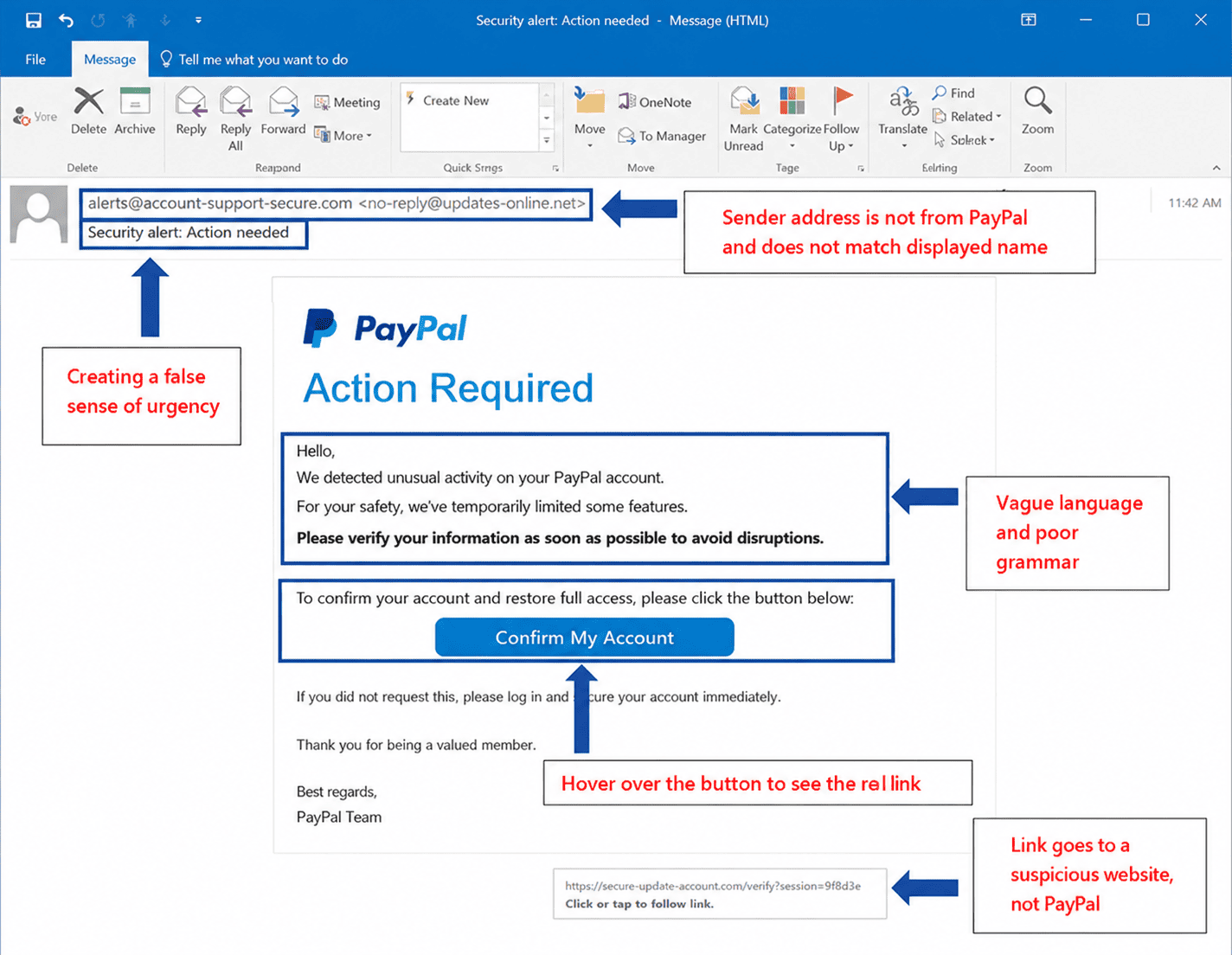
- A sense of urgency or pressure: Phishing emails often demand immediate action, threaten account suspension, or claim that a deadline is about to expire. This urgency is intended to discourage careful thinking and prompt a quick response.
- Requests that bypass normal procedures: Be cautious of requests that ignore established processes, such as an email instructing you to make an urgent wire transfer without the usual approvals or a vendor asking to change payment details unexpectedly. Always verify these requests through a trusted, separate communication channel.
- A mismatched sender address: The display name may appear legitimate, for example, "John Smith, CEO" but the actual email address may reveal subtle differences, such as a misspelled domain, an extra letter, a different domain extension, or a completely unrelated email address.
- Links that don't match their destination: Before clicking a link, hover your mouse over it to view the actual destination URL. If the destination doesn't match the displayed link or the organization's legitimate domain, treat it as suspicious.
- Unexpected attachments: Be wary of attachments you weren't expecting, even if they appear to come from someone you know. Unexpected file types or documents from unfamiliar senders should be treated with caution.
- Generic greetings: Messages that claim to be personal or urgent but begin with generic greetings such as "Dear Customer" or "Valued User" can be a warning sign. However, this indicator is becoming less reliable as AI-generated phishing emails increasingly use personalized information.
- Requests for passwords or sensitive information: Legitimate organizations rarely ask you to provide passwords, multi-factor authentication (MFA) codes, or other sensitive account information through email. If an email requests credentials or directs you to log in through a provided link, verify the request through the organization's official website or another trusted communication method.
10 Email Security Best Practices for Small Business
Email remains one of the most common ways cybercriminals gain access to business systems. Implementing these best practices can significantly reduce your organization's risk of phishing, business email compromise (BEC), and account takeover.
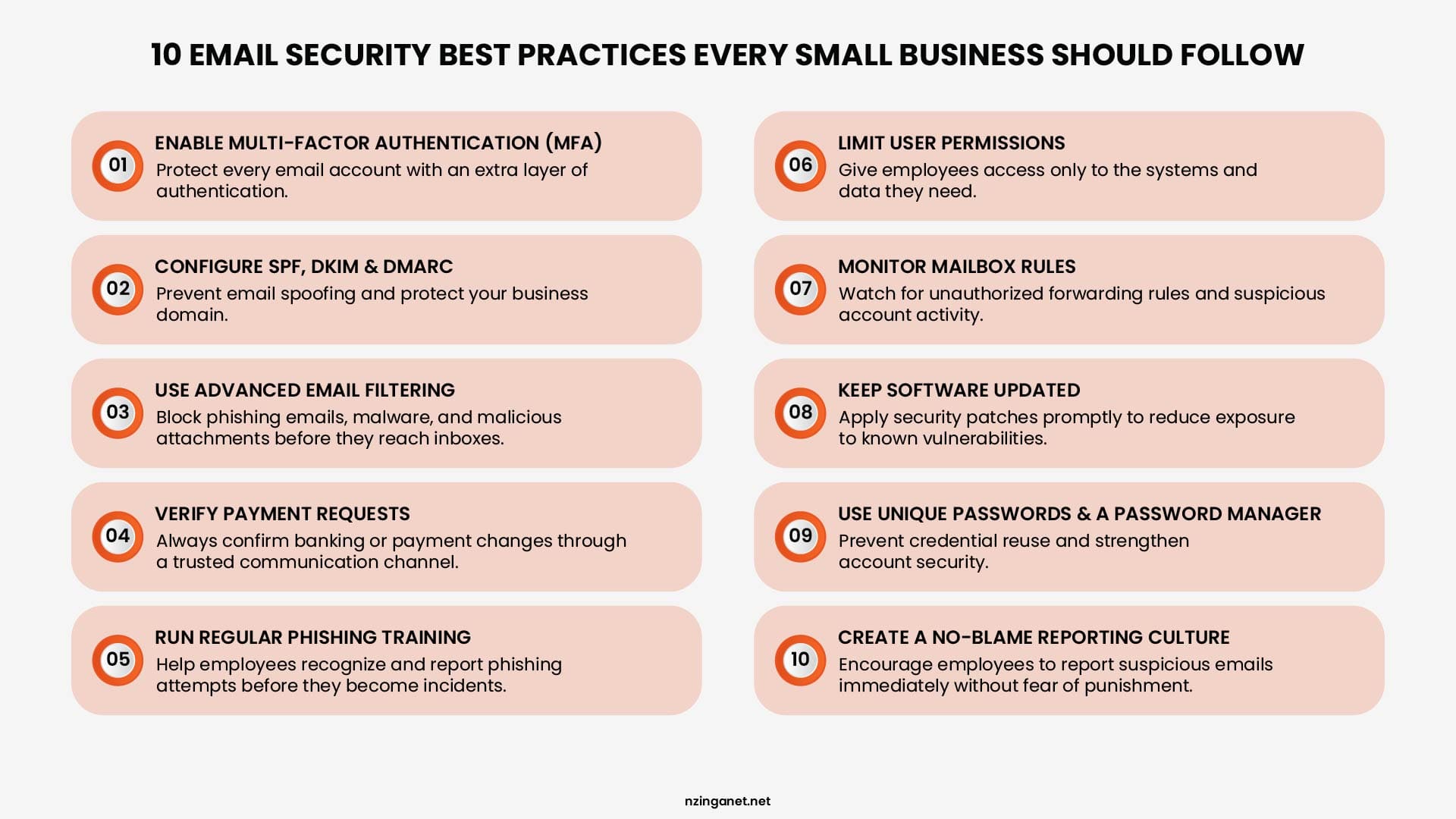
1. Turn On MFA for Every Email Account
MFA is the single highest impact step you can take. If a password is stolen through phishing, MFA can still stop the attacker from actually logging in. Enable it on every account, not just admin accounts, since attackers often go after regular employee accounts specifically because they're less protected.
2. Set up SPF, DKIM, and DMARC Properly
These three records work together to verify that emails claiming to come from your domain actually did, and to tell receiving mail servers what to do with messages that fail that check. SPF and DKIM are widely adopted at this point, but DMARC enforcement lags far behind.
In 2026, Global DMARC adoption has reached around 52 percent of major domains, but more than half of those domains are still set to a monitoring only policy that provides no actual protection against spoofing. Publishing a DMARC record isn't enough. It needs to be set to quarantine or reject to actually stop forged mail.
3. Use a Dedicated Email Filtering & Gateway Solution
A modern email security gateway scans incoming messages for malicious links, suspicious attachments, and known phishing patterns before they ever reach an inbox. Look for one that also analyzes language and context, not just known threat signatures, since AI generated phishing is increasingly designed to slip past filters that only check for familiar red flags.
4. Require Verification for Any Payment or Banking Change
Any request to change payment details, wire funds, or redirect an invoice payment should require a phone call or a separate, previously verified contact method before it's actioned, no exceptions. This single policy stops the majority of business email compromise attempts, since BEC depends entirely on the victim trusting the email at face value.
5. Run Regular Phishing Simulations
Sending simulated phishing emails to your own team, then following up with short, focused training for anyone who clicks, builds recognition over time in a way that a single annual training session never will. Organizations that run consistent, behavior based simulations see susceptibility rates drop significantly compared to those that rely on one time compliance training.
6. Limit What a Compromised Account Can Access
Employees should have access only to the email accounts, applications, and data they need to perform their jobs. Limiting permissions reduces the potential impact of a compromised account and helps prevent attackers from moving laterally through your systems. Regularly review user permissions and remove unnecessary access.
7. Monitor for Suspicious Inbox Rules
Attackers who gain access to an account often set up hidden forwarding rules or rules that auto delete security alerts, so they can keep monitoring the mailbox without detection. Monitoring for unexpected inbox rule changes is one of the more reliable ways to catch an account takeover that's already happened, since these changes leave a trace that many businesses never check.
8. Keep Software and Email Clients Updated
Outdated email clients, web browsers, operating systems, and browser extensions may contain known security vulnerabilities that attackers can exploit. Enable automatic updates whenever possible and apply security patches promptly to reduce the risk of compromise.
9. Use a Password Manager and Enforce Unique Passwords
Every employee should use a strong, unique password for each account. Reusing passwords means that a breach affecting one service can expose your business email accounts. A password manager makes it easy to generate, store, and securely manage complex passwords without relying on memory.
10. Build a Clear, No Blame Reporting Process
Employees should be encouraged to report suspicious emails immediately, even if they accidentally clicked a link or entered information. Early reporting gives your IT or security team the best chance to contain an incident before it spreads.
Avoid creating a culture where employees fear punishment for honest mistakes. Delayed reporting often causes far more damage than the initial click. A supportive reporting process helps identify threats faster and strengthens your organization's overall security.
What to Do If You Open a Phishing Email
If you or someone on your team opens a phishing email, it's important to act quickly. A fast response can significantly reduce the risk of a successful attack.
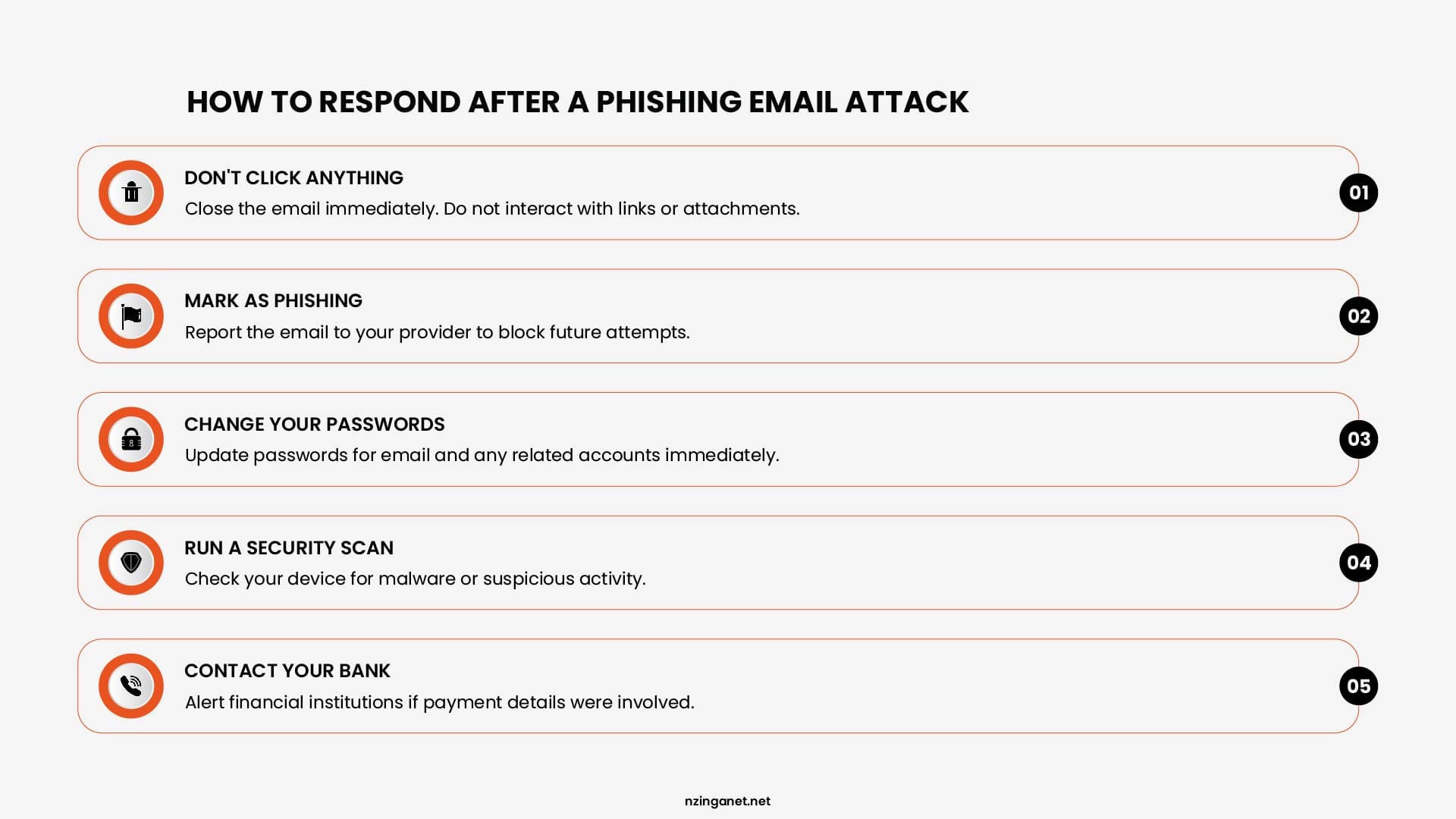
- If you only opened the email: If you opened the email but did not click any links, download attachments, or reply to the sender, the risk is generally low. Simply opening an email is unlikely to compromise your device. However, you should still report the message to your IT team or managed service provider (MSP), then delete it from your inbox and trash folder. Reporting it helps protect others by allowing the threat to be identified and blocked.
- If you clicked a link or opened an attachment: If you clicked a suspicious link or opened an unexpected attachment, disconnect your device from the network immediately by turning off Wi-Fi or unplugging the network cable. Then contact your IT team or managed security services provider (MSSP) as soon as possible. Avoid trying to investigate or fix the issue yourself, as doing so could make the situation worse or destroy valuable evidence.
- If you entered your password or other credentials: If you entered your username, password, or other sensitive information into a phishing website, change your password immediately using a different, trusted device. If you have reused that password on other accounts, change it there as well. Enable or verify multi-factor authentication (MFA) on the affected account, and notify your IT team so they can monitor for unauthorized access.
- If money or payment information was involved: If you authorized a payment, shared banking information, or believe a fraudulent wire transfer has occurred, contact your bank or financial institution immediately. In many cases, banks may be able to freeze or reverse a fraudulent transaction if they are notified quickly. Time is critical, so don't delay reporting the incident.
- Report the incident internally: No matter what happened, report the incident to your organization's IT or security team as soon as possible. Early reporting allows them to investigate the attack, protect other users, and monitor for additional phishing attempts. Cybercriminals often target the same individual or organization again after an initial attack because they know the target has already engaged with a phishing email.
Remember: Reporting a phishing incident quickly is always better than trying to handle it alone. The sooner your IT or security team is informed, the greater the chance of preventing further damage.
Need Help Securing Your Business Email?
NzingaNet helps small and medium-sized businesses improve their email security with Microsoft 365 protection, advanced email filtering, email authentication (SPF, DKIM, and DMARC), phishing protection, and employee security awareness training.
If you'd like to evaluate your current email security or identify opportunities to strengthen your defenses, schedule a consultation with our team. We'll assess your environment, recommend practical improvements, and help you better protect your business from today's evolving email threats.
Need Help Securing Your Business Email?
NzingaNet helps small and medium-sized businesses improve their email security with Microsoft 365 protection, advanced email filtering, email authentication (SPF, DKIM, and DMARC), phishing protection, and employee security awareness training.
COMMON QUESTIONS
Frequently Asked Questions
1. What is the best email security solution for a small business?
The best email security solution combines multiple layers of protection rather than relying on a single tool. A strong setup typically includes spam and phishing filtering, malware scanning, multi-factor authentication (MFA), email authentication (SPF, DKIM, and DMARC), endpoint protection, and ongoing security awareness training. Small businesses should choose a solution that integrates with their email platform and is easy to manage as their organization grows.
2. How often should employees receive phishing awareness training?
Cybersecurity experts recommend providing phishing awareness training throughout the year instead of relying on a single annual session. Regular training, combined with simulated phishing exercises, helps employees recognize new attack techniques and reinforces safe email habits as threats continue to evolve.
3. Can Microsoft 365 or Google Workspace stop all phishing emails?
No. While Microsoft 365 and Google Workspace include built-in email security features, no email platform can block every phishing attempt. Sophisticated attacks (particularly AI-generated phishing emails and business email compromise (BEC) scams) can sometimes bypass standard filters. Many businesses strengthen their protection with advanced email security solutions, proper email authentication, and employee awareness training.
4. How do I know if my domain is protected against email spoofing?
The best way to determine whether your domain is protected is to verify that SPF, DKIM, and DMARC are correctly configured and actively enforced. A DMARC policy set to quarantine or reject provides significantly stronger protection against spoofed emails than a monitoring-only policy. Regularly reviewing authentication reports can also help identify unauthorized use of your domain.
5. Should a small business use managed email security services?
Managed email security can be a cost-effective option for small businesses that don't have a dedicated IT or cybersecurity team. A managed provider can monitor email threats, maintain security configurations, respond to suspicious activity, and help keep protections up to date. This allows business owners to focus on running their business while reducing the risk of phishing, malware, and account compromise.
PENNSYLVANIA & BEYOND
Ready to Secure Your Business Email?
NzingaNet provides email security and managed IT services to small and mid-sized businesses across Pennsylvania and the surrounding region. From phishing protection to email authentication and employee training, we give your business the protection it needs.